
JavaScript functions are fundamental building blocks of the JavaScript language. In this tutorial, we will learn what is a JavaScript function, how to create a function in JavaScript, and how to invoke it and return values from it.
A JavaScript function is a block of JavaScript code that performs a specific task or calculates the value. We may pass values to the function and it may return a value. We define the function only once in our program, but execute or invoke it many times i.e. we reuse it in other parts of the program. Functions also make code readable & maintainable.
We can create a function in JavaScript in four ways
The simple way to declare a function is to use the function declaration or function statement
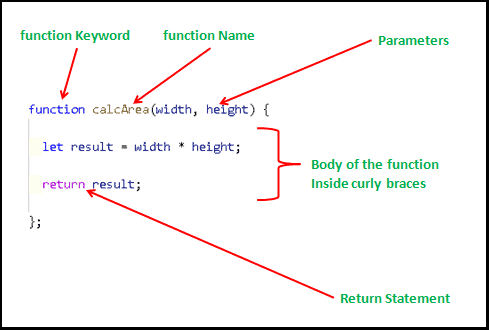
A function declaration starts with a function keyword. It is followed by a list of parameters and then followed by JavaScript statements inside curly braces {…}
The Syntax for creating a function is as follows
function name(param1, param2,param3) {
   [statements]
}
Name: The function name. It uniquely identifies the function and is required. We use the name to refer to the function elsewhere in the application. The JavaScript behind the scene creates a variable and assigns the function to it. A function name must follow all the rules of variable naming. Hence we can use only letters, digits, underscores, and dollar signs.
param contains the list of parameters (comma-separated) inside parentheses. They are optional. Functions can have multiple parameters or no parameters at all.
statements comprise the body of the function. It will contain zero or more JavaScript statements inside curly braces {…}. These statements are executed when the function is invoked. The function body must be always enclosed in curly braces even if it consists of a single statement or no statement at all.
The following is an example of a Javascript function.
Here we name the function as calcArea. It takes two parameters width & height.
Inside the function body, we declare the result variable and assign the multiplication of width & height to it.
The return statement specifies the value that the function returns. In the example, we return the result, which contains the multiplication of width & height.
function calcArea(width, height) {
   let result= width * height;
   return result;
};
You can also return the result of an expression directly.
function calcArea(width, height) {
   return width * height;
};
The function declaration is not the only way to create functions in JavaScript. There are other ways to create them.They are as follows.
Functions are useful only if it executes the statements present in their body. Defining a function does not execute it. We need to invoke or call or execute it.
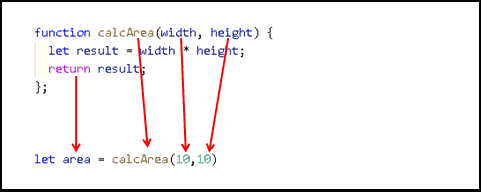
We invoke the function, by using the function name followed by the value for each parameter inside the parentheses i.e. (). Note that the () Invokes the function.
In the following example, we invoke the calcArea function. We pass values to the width & height parameters inside the parenthesis. We store the return value in a variable area and print it in the console.
function calcArea(width, height) {
  let result = width * height;
  return result;
};


let area=calcArea(10,5)     //Invoking the function
console.log(area)
//50


area=calcArea(50,50)
console.log(area)
//2500
The Functions can accept values from the calling program. To do that functions must declare what values it needs in their definition. We call them parameters.
The calling program can pass value to those parameters when invoking the function. We call them arguments.
In the following code, addNum declares two parameters, i.e. a & b. When we call the function addNum with 1 & 2 as value to it. 1& 2 are arguments to the function addNum
function addNum(a, b){
   return a+b;
}

addNum(1,2)
JavaScript functions can accept more (or fewer) arguments than those declared in the function declaration. If you pass fewer arguments, then the parameter that does not receive value is initialized as undefined.
If you send more arguments, we cannot access them using the parameters. We either use the arguments object or make use of the rest parameters.
You can refer to learn more about them
A function may or may not produce a value. When it does, we use the return statement to return the value to the calling program.
A return statement consists of a return keyword followed by the value that we want the function to return. The return statement also terminates the function and control is returned to the calling program.
We use the assignment operator to capture the returned value and assign it to a variable.
The following example calculates the power of a number. We capture the returned value in a variable result and print it to the console.
function  power(base, exponent) {
    let result = 1;
    for (let count = 0; count < exponent; count++) {
      result *= base;
    }
    return result;     //returning the result
 };

//Use assignment operator to capture the returned value
let result = power(10,2)
console.log(result)
//100
A function without a return statement returns undefined.
function sayHello() {
    console.log("Hello")
}

let result=sayHello()
console.log(result)  //undefined
Function with a return statement, but without an expression after it will also returnundefined.
function sayHello() {
  console.log("Hello")
  return
}

let result=sayHello()
console.log(result)  //undefined
You can include any complex expressions in the return statement.
                            function addNum(a,b) {
   return a+b
}

let result=addNum(1,2)
console.log(result) //3
Everything in Javascript is an Object. So are the functions. Functions are a special type of object in Javascript that also has a code. We can execute that code whenever we want. To execute all we need to use the () Operator after the function name. Inside the () we can pass a value for each parameter.
The function name without the () refers to the function object.
For example, the following sayHello (without ()) refers to the function object. To Execute the function we need to use the parentheses sayHello().
function sayHello() {
    console.log("Hello")
}


alert(message);   //Uncaught ReferenceError: message is not defined
While we can access the variable defined outside the function.
let message = "Hello";  //This variable is defined outside and can be accessed by the function

function sayHello() {
    alert(message);   //Hello
    message="Hello Again"
}

sayHello();

alert(message);   //Hello Again
In this example, we create the variable message inside the function. It will override the variable present outside the function.
let message = "Hello";

 function sayHello() {
     //declare a message inside the function.
     let message="Hello from function"
     alert(message);   //"Hello from function"
 }

 sayHello();

 alert(message);   //Hello    No change here
You can read more about Variable scope in JavaScript
Everything in Javascript is an Object. So are the functions. Functions are a special type of object in Javascript that also has a code. We can execute that code whenever we want. To execute all we need to use the () Operator after the function name. Inside the () we can pass a value for each parameter.
The function name without the () refers to the function object.
For example, the following sayHello (without ()) refers to the function object. To Execute the function we need to use the parentheses sayHello().
function sayHello() {
    console.log("Hello")
}
We can store functions in a variable, object, and array. The following example creates an addNum function and stores it in test variable. Now we can invoke the function using test() also.
function addNum(a,b) {
    return a+b
 }

 let test = addNum

 let result = test(1,2)
 console.log(result)   //3
We can read the function just like any other variable. The following code uses the alert function to display the contents of the addNum. You will see the code of the function displayed on your screen.
function addNum(a, b) {
    return a + b
}

alert(addNum)
Since alert is also a function, just check to see if you can see its code.
alert(alert)
You will see the message native code. That is because the alert is part of the JavaScript code and is included as binary. Since there is no point in showing the binary code, it will display the message native code.
We can store functions in a variable, object, and array. The following example creates an addNum function and stores it in test variable. Now we can invoke the function using test() also.
function addNum(a,b) {
    return a+b
 }

 let test = addNum

 let result = test(1,2)
 console.log(result)   //3
We can read the function just like any other variable. The following code uses the alert function to display the contents of the addNum. You will see the code of the function displayed on your screen.
function addNum(a, b) {
    return a + b
}

alert(addNum)
Since alert is also a function, just check to see if you can see its code.
alert(alert)
You will see the message native code. That is because the alert is part of the JavaScript code and is included as binary. Since there is no point in showing the binary code, it will display the message native code.
Since functions are variables, we can pass them as an argument to another function. You can also return a function from a function.
In the following example, we create two functions addNum & multiplyNum. The third function operate takes func as the first argument, where it expects us to pass a function.
function addNum(a, b) {
    return a + b
}

function multiplyNum(a, b) {
    return a * b
}


function operate(func, a, b) {
    return func(a, b)
}

let result = operate(addNum, 10, 10)
console.log(result);  //20

let result = operate(multiplyNum, 10, 10)
console.log(result); //100
Passing a function to another function is known as a callback function.
A function is a free-floating object that exists independently. For example, the following code declares the Person object. It contains a addNum method. We expect that the addNum belongs to the person object. But in reality, you can take it out and assign it some other variables outside the Person object
let person = {
    name : "Alex",

    addNum : function(a,b) {
      console.log(a+b)
    }
}

let addNum1=person.addNum;

person=null;
addNum1(1,10)   //11
In the example, we assign the addNum to addNum1 variable. Since the functions are objects, they are copied by reference. Hence both addNum & addNum1 points to the same function.
We free up the Person object by assigning null to it. Here we usually expect addNum also released from Memory. But it stays and you can invoke it using its reference addNum1()
But JavaScript goes one step further. It not only keeps the function irrespective object that it is attached to no longer exists, But it also keeps its enclosing scope. This behavior is called Closure.
Now, look at the following code. We have invoked the calcArea function before its declaration. But this code works without any errors. This is because of Hoisting.
Hoisting is JavaScript behavior where it moves all the declaration statements to the top. Hence even if we declare the calcArea at the end of the file, JavaScript moves it to the top.
//Invoke the function
let result = calcArea(10,10)
console.log(result)


//Declare the function
function calcArea (width, height) {
    let result = width * height;
    return result;
};
Read More
