
The Javascript uses the Prototypes to implement the inheritance. In this tutorial, we will learn how to use Prototype to create Inheritance. Inheritance makes code reusable, readable & maintainable by sharing the instance of existing properties & methods across objects
Inheritance is a mechanism by which one object acquires the property and behavior of another object. In classical languages like C# & Java, this is done with classes.
But in Javascript, we do not have the concept of classes. JavasScript has only Objects. To implement inheritance JavaScript makes use of Prototype. The Inheritance is known as Prototype Inheritance.
A Prototype is just another JavaScript Object. The JavaScript assigns it to the [[Prototype]] property of the object when it creates it. The [[Prototype]] is the internal property and is hidden from us. This Property points to the Prototype Object or NULL.
We cannot access the [[Prototype]] directly. But we can access it either by using the __proto__ property or using the getPrototypeOf method of the Object
Prototype objects are just like any other Javascript object. Hence Even they also have prototype objects. We can traverse using an object’s prototype until we find null. This is referred to as prototype chain
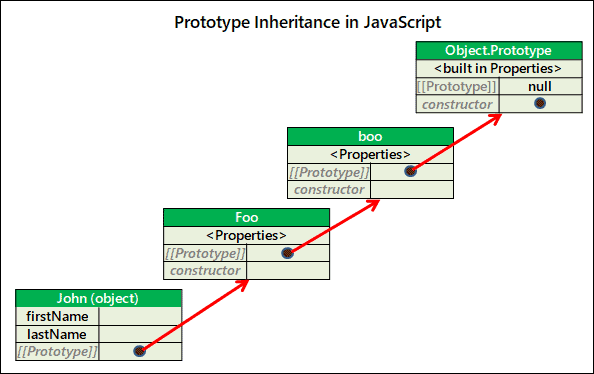
The image below shows a Prototype chain in JavaScript.
At the bottom, we have John object, which has a [[Prototype]] property. It points to Foo object. The Foo object is the prototype of the John object.
The Prototype object can also have a Prototype Object. Boo is a Prototype of Foo. The Prototype chain usually ends with Object.prototype. The Prototype of Object.prototype is NULL.
First, let us understand why we need Inheritance in the first place.
Take a look at the following snippet. The constructor function Person defines two properties and one method sayHi.
var Person = function(firstName, lastName) {
  this.firstName=firstName
  this.lastName=lastName

  this.sayHi=function() {
    console.log(" Hello "+this.firstName+' '+this.lastName)
  }
}
We create two new objects (john & bill) from the Person function.
var john = new Person("John","Dyer")
john.sayHi();       //Hello John Dyer


var bill= new Person("Bill","Gates")
bill.sayHi();       //Hello Bill Gates
The code above works perfectly well. But we can make it better
The issue is with the sayHi method. Every time we create a new Person it also creates an instance of sayHi method in the Memory.
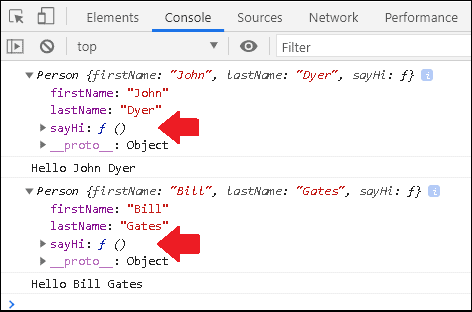
If you happen to create many such Person objects, then it will also mean that you have many instances of sayHi occupying the memory.
The solution is to create a single instance of sayHi method and share it among all the objects created from the Person function.
This is where we make use of Prototype Inheritance.
console.log(person.__proto__=== Person.prototype);
//true

console.log(Person.prototype.__proto__=== Object.prototype);
//true

console.log(Object.prototype.__proto__);
//null
The prototype chain looks something like this.
person => Person.prototype => Object.prototype => null
Whenever we create a function, JavaScript adds an extra property prototype to the function. The prototype property is an object. We can refer to it using the <functionName>.prototype. In the case of Person function, it becomes Person.prototype.
Whenever we create a new object using a new operator from the Person Function, the Person.prototype becomes the Prototype of the newly created object.
In the code from the previous example, we make a small change. We remove the sayHi function from the Person function. We add it to the Person.prototype object.
Run the code, and you will see the same result as the previous one.
var Person = function (firstName, lastName) {
  this.firstName = firstName;
  this.lastName = lastName;
};

Person.prototype.sayHi = function () {
  console.log(" Hello " + this.firstName + " " + this.lastName);
};

var john = new Person("John","Dyer")
console.log(john)
john.sayHi();

var bill= new Person("Bill","Gates")
console.log(bill)
bill.sayHi();
The sayHi method no longer belongs to the john or bill objects.
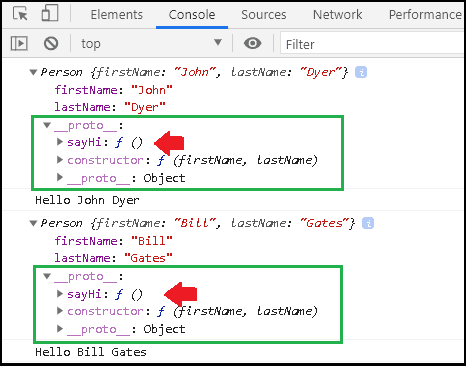
But you will find them in the __proto__ property of both john & bill objects. Both these methods actually point to the Person.prototype object. You can use the === to check if they are equal.
console.log(john.__proto__ === Person.prototype)
//true

console.log(bill.__proto__ === Person.prototype)
//true
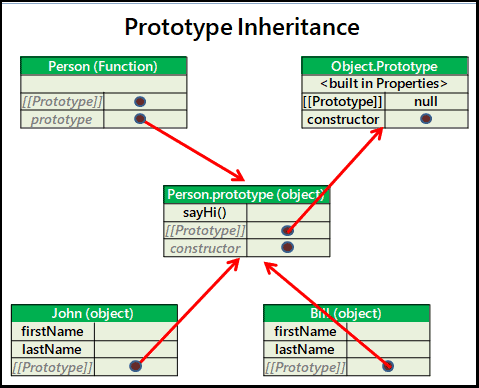
We have only one instance of Person.prototype object in the memory. The prototype Property of the function point to it. The [[Prototype]] property of the john & bill objects also point to it.
But how did john.sayHi() & bill.sayHi() work if they did not contain the sayHi method.
An object can have only one Prototype. But it can become a Prototype of many other objects.
When we ask for a property or method from an object, JavaScript tries to read the property from the object itself. If the object lacks the property, then JavaScript looks for the property in the prototype object. And if that prototype object also does not contain the property, then JavaScript looks in its prototype. This process continues until it reaches the Object.prototype. The prototype of Object.prototype is NULL. Hence the search stops there and returns the undefined value.
When we call john.sayHi(), The javascript searches for sayHi method in the john object. It does not find it there. So it looks for it in the __proto__ of john. The __proto__ of john points to Person.prototype. It finds the method there, hence executes it, and returns the result.
JavaScript has several built-in or native Objects. The following tables show the list of built-in objects, with their corresponding prototypes.
| Built in Object | Corresponding Prototype |
|---|---|
| Object | Object.prototype |
| Array | Array.prototype |
| Function | Function.prototype |
| String | String.prototype |
| Number | Number.prototype |
| Date | Date.prototype |
| Boolean | Boolean.prototype |
| BigInt | BigInt.prototype |
| Symbol | Symbol.prototype |
The Object() is a built-in constructor function. We can create new objects using it. All the objects that we create from it get the Object.prototype as their prototype
console.log(Object.prototype)
As you can see from the image, the Object.prototype defines few methods. The constructor property points to Object() Constructor function. Because Object.prototype is created from it.
There are properties like hasOwnProperty, IsPrototypeOf, propertyIsEnumerable, toLocalString, toString, valueOf, etc. Every object that inherits from the Object.prototype have access to these properties.
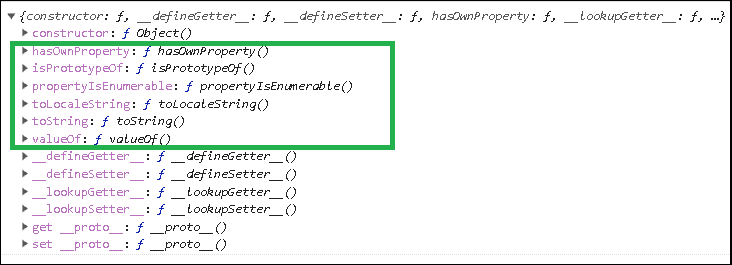
The following example creates obj object using the Object constructor. It can access the hasOwnProperty because Object.prototype is its prototype
obj = new Object();
obj.name="Roger Mayer"

console.log(obj.hasOwnProperty("name"))
//true
You can verify it by creating the new object with null as its prototype as shown in the example below. Accessing the hasOwnProperty results in TypeError, becuase it is not present in its prototype chain.
obj2 = Object.create(null);
obj2.name="Roger Mayer"

console.log(obj2.hasOwnProperty("name"))

//Uncaught TypeError: obj2.hasOwnProperty is not a function
Similarly, when you create a new String object, the newly created objects will get String.prototype as their prototypes.
As you can see from the image, the String.prototype has many methods. Due to Prototype Inheritance, the newly created objects will have access to all these methods.
The prototype of String.prototype is Object.prototype. Hence the newly created object can also access the methods of Object.prototype
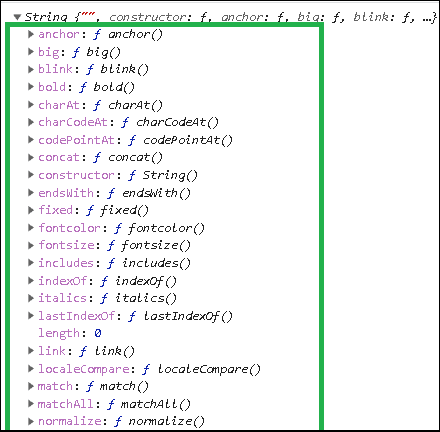
var str = new String( "This is string" );


//str.__proto__            == String.prototype
//str.__proto__.__proto__  == Object.prototype

//str => String.prototype --> Object.prototype --> Null
Note that JavaScript has seven simple primitive types. They are string, boolean, number, BigInt, Symbol, null, and undefined. They are not objects.
But JavaScript creates an object wrapper around the primitive types. This enables us to use prototype methods of the String object on the primitive string.
let primString="hi"
let objString=new String("Hi")

console.log(primString)
console.log(objString)
A console.log of both will make the difference clear.
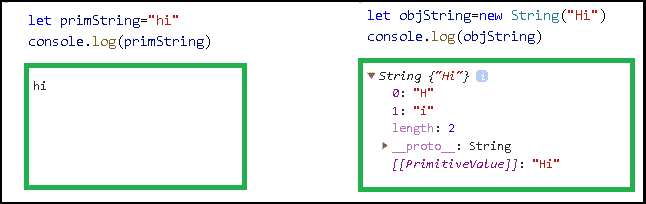
But comparing the __proto__ of both results in true. You can also access all the methods of the String.prototype. When we call a property or method on a string primitive, JavaScript automatically coerces it to a String object. Hence it works.
console.log(primString.__proto__==objString.__proto__)
//true

//All methods of String.prototype still work on primitive strings.
primString.slice(0,1)
//
Similarly, Arrays inherit from Array.prototype
var arr = ['Ford', 'Chevrolet', 'Buick', 'Tesla'];


//arr.__proto__            == Array.prototype
//arr.__proto__.__proto__  == Object.prototype

//arr => Array.prototype --> Object.prototype --> Null
Apart from the Object constructor function, there are other ways in which you can create an Object.
The following example creates person object using the object literal syntax. The objects created using the literal syntax gets the Object.prototype as its [[Prototype]]
var person = { name: "Bill Gates"};

//prototype chain
//person --> Object.prototype --> null
We looked at this in the above examples.
var Circle = function(radius) {
  this.radius=radius
}

Circle .prototype = {
   area: function () {
      return Math.PI * this.radius * this.radius;
   },
   circumference : function() {
      return 2 * Math.PI * this.radius
   },
}

var cir = new Circle (10)

//cir.__proto__            == Circle .prototype
//cir.__proto__.__proto__  == Object.prototype

//cir => Circle.prototype --> Object.prototype --> Null
Using Object.create method allows us to specify the prototype of the newly created object.
For Example, let us create an object obj1 using the literal syntax
var obj1 = {a: 1};
//
// obj1 ---> Object.prototype ---> null
In the following example, we use Object.create to create obj2 using the obj1 as prototype.
var obj2 = Object.create(obj1);

// obj2 ---> obj1 ---> Object.prototype ---> null
You can access the property of the obj1 from obj2 because it is its prototype.
console.log(obj2.a);

// 1  inheritated from obj1
You can create an object without a prototype by Passing the Null as the argument.
Object.create(null).
We can add or alter the Property or method of a Prototype object. These changes will immediately become visible in all of the objects that are based on that prototype
In the example below, we change the sayHi method midway through the program.
var Person = function (firstName, lastName) {
  this.firstName = firstName;
  this.lastName = lastName;
};

Person.prototype.sayHi = function () {
  console.log(" Hello " + this.firstName + " " + this.lastName);
};

var john = new Person("John","Dyer")
john.sayHi();       //Hello John Dyer

var bill= new Person("Bill","Gates")
bill.sayHi();       //Hello Bill Gates

console.log("Change the method sayHi")

//We change the sayHI method here
//Return lastName+FirstName

Person.prototype.sayHi = function () {
  console.log(" Hello " + this.lastName + " " + this.firstName);
};

//Now both prints lastName+FirstName

john.sayHi();     //Hello Dyer John
bill.sayHi();     //Hello Gates Bill
The Prototype inheritance works only for reading the Properties. Write/delete operations work directly with the object.
var Person = function (firstName, lastName) {
  this.firstName = firstName;
  this.lastName = lastName;
};

Person.prototype.sayBye="Bye";

var john = new Person("John","Dyer")
var bill= new Person("Bill","Gates")

console.log(john.sayBye);   //Bye

console.log(bill.sayBye);   //Bye

//Writing Property
//This will create a new Property in the john object
//does not change the Person.prototype.sayBye

john.sayBye="Goodbye"

console.log(john.sayBye);   //Goodbye
console.log(bill.sayBye);   //Bye
Similarly, the delete operator deletes the property from the object. But it will not traverse the prototype chain to delete the objects from the prototype
In the example, we delete the sayBye from john. A similar property exists in Person.prototype. It will not affect it.
var Person = function (firstName, lastName) {
  this.firstName = firstName;
  this.lastName = lastName;
};

Person.prototype.sayBye="Bye";

var john = new Person("John","Dyer")
var bill= new Person("Bill","Gates")

console.log(john.sayBye);   //Bye

console.log(bill.sayBye);   //Bye

john.sayBye="Goodbye"

console.log(john.sayBye);   //Goodbye
console.log(bill.sayBye);   //Bye

//Deletes sayBye from john
delete john.sayBye

console.log(john.sayBye);   //Bye
console.log(bill.sayBye);   //Bye

//sayBye already deleted. Hence does nothing
delete john.sayBye


console.log(john.sayBye);   //Bye
console.log(bill.sayBye);   //Bye
The prototype property of the function has a special purpose.
Whenever we create a new object from the function, the prototype property becomes the prototype of the newly created object. The prototype property is empty initially. but you can add properties and methods or even other objects.
Consider the following example of the Person constructor function. it will automatically come with the Person.prototype property.
Every object, that we create with the Person function will have the Person.prototype as their prototype. For Example both employee & customer object will get Person.prototype as their prototype.
var Person= function(name) {
  this.name=name
}

var employee = new Person("Aida Bugg");
var customer = new Person("Roger Mayer");
You can verify it by comparing their prototypes.
console.log(employee.__proto__=== Person.prototype);

console.log(customer.__proto__=== Person.prototype);
