
In this tutorial let us learn the difference between Pass by Value and Pass by Reference in JavaScript. The primitive data types are passed by value, while objects are passed by reference.
There are seven primitive types in JavaScript. They are string, number, bigint, boolean, undefined, symbol, and null.
Everything else is Object in Javascript. Arrays, Objects, functions & classes etc are all Objects.
Primitive types are value types. While objects are Reference types.
The primary difference between value types & Reference types is how they are stored in memory.
The variables of Value types or primitive types store the values in the variable itself.
But the reference type variables do not store the value. But they store the reference to the memory location where the value is stored.
For Example
let num1 = 10;

let obj1 = {
  firstName: 'Allie',
  lastName: 'Grater'
};
Both variables num1 & obj1 gets a memory location reserved for them.
num1 is a value type. Its value 10 is directly stored in that location
But in the case of obj1, the value is not stored in that location. It stores elsewhere in the memory and stores the address of that location in obj1’s memory location. The obj1 does not store the value.
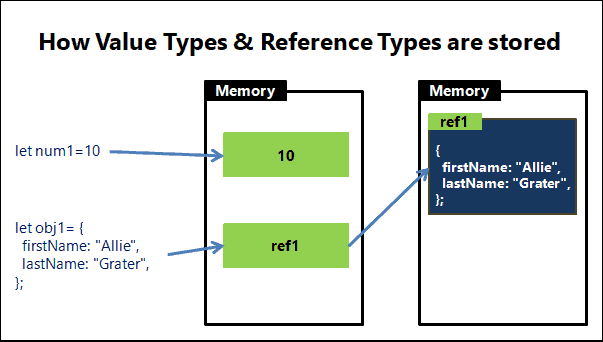
This is the only difference between the value type & Reference types in Javascript. But this makes a crucial difference when we copy variables.
There are two memory locations. One is stack (on the left) & the other one he heap(on the right). Javascript stores the primitive value in a stack because its size is small and does not change. But the size of an object is dynamic and can change. Hence it stores it in a separate heap memory location
Now, let us see what happens when we copy one value type variable to another variable.
Consider this example
let num1 = 10;
let num2 = num1;

num2 = 20;

console.log(num1);
console.log(num2);
The following process takes place when we assign num1 to num2
let num2 = num1;
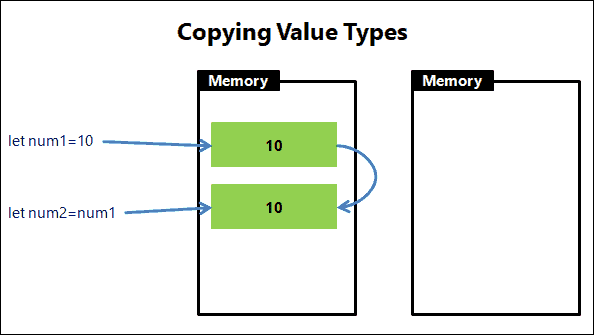
Now we have two variables num1 & num2 in the memory, both containing the value 10, but both are independent of each other.
If we change the value of num2 to 20, It will not affect num1.
num2 = 20;
Now, let us see what happens when we copy a Reference type
let obj1 = {
  firstName: 'Allie',
  lastName: 'Grater'
};

let obj2 = obj1;

obj2.firstName = 'John';

console.log(obj1.firstName);
console.log(obj2.firstName);
The following process takes place when we assign obj1 to obj2
Note that the process is the same as that of value types.
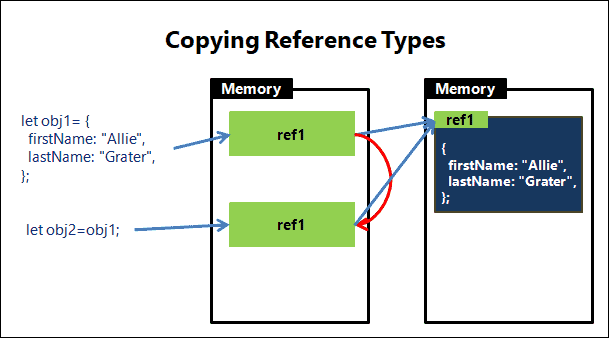
The obj1 and obj2 are two different variables, but point to same memory location
obj2.firstName = 'John';

console.log(obj1.firstName);
console.log(obj2.firstName);
When we change firstName property of the obj2, you will see that obj1.firstName also change, because both refer to the same object.
When we use the == or === to check equality on objects, it returns true if both variables point to the same object.
In the example below both obj1 & obj2 contains the same reference. Hence they return equal
let obj1 = {
  firstName: 'Allie',
  lastName: 'Grater'
};

let obj2 = obj1;

console.log(obj1 ==  obj2);     //True
console.log(obj1 === obj2);     //True
In the example below, we initialize the obj1 & obj3 separately. JavaScript creates two objects and stores their reference in obj1 and obj2. Since the references are not equal they return false. even though the objects they represent are similar.
let obj1 = {
  firstName: 'Allie',
  lastName: 'Grater'
};

let obj3 = {
  firstName: 'Allie',
  lastName: 'Grater'
};

console.log(obj1 ==  obj3);      //False
console.log(obj1 === obj3);      //False
The JavaScript evaluates the default values when we call the function.
In the following example, the a is 1 and b becomes 3 when we call addNum for the first time. We change the value of x & y and when we call the addNum again it will evaluate default values again. Hence a is 5 and b becomes 10.
function addNum(a=x, b=x+y) {
    return a + b ;
}

x=1
y=2
console.log(addNum());              //4  (a=1 & b=3)

x=5
y=5
console.log(addNum());              //15   (a=5 & b=10)
Consider the following code. We create a variable a and pass it to someFunc. Behind the screen, JavaScript creates a new variable b and copies the value from a and gives it to the function.
Inside the function, we change the value of b to 50. Since a and b are separate variables, this will not affect the value of a.
a=10

 function someFunc(b) {
     b=50
     console.log(b)  //50
 }

 someFunc(a)
 console.log(a)   //10
Now, consider the following example. We pass the person object to the doSomething function.
The javascript as usual creates a new variable obj and copies the person variable to it (using obj=person ). The person variable contains the reference to the object, it is copied to the obj variable. Now obj also points to the same object that person points to
Since both of these variables points to the same object, whatever changes you make to obj in doSomething function will always change the original object.
let person = {
  firstName: 'Allie',
  lastName: 'Grater'
};

function doSomething(obj) {
  obj.firstName = 'John';
}

doSomething(person);

console.log(person.firstName);  //John
