
JavaScript constants are variables, whose values cannot be modified after initialization. We declare them using the keyword const. They are block-scoped just like the let keyword. Their value cannot be changed neither they can be redeclared. Const keyword is part of the es2015 (es6) specification of the javascript.
We declare constants using the keyword const keyword
Example:
const MaxAllowed=100 ;
The initial value of the const must be specified along with the declaration.
const maxValue=100;     //Ok

const maxValue1;        //Uncaught SyntaxError: Missing initializer in const declaration
The const is similar to the let keyword. They are local to the code block in which we declare them.
const Rate = 10;       //global scope

if (true) {
  const Rate = 8;     //its scope is limited to the if block
  console.log(Rate);  //Prints 8
}

console.log(Rate);    //Prints 10
We can assign a value to the const variable at the time of declaration. Once initialized, we cannot modify its value. So if you try to assign a new value to a constant it results in an error.
const MaxTry=10 ;
MaxTry=5;            //Uncaught TypeError: Assignment to constant variable.
Similarly, if the const is an object.
const emp = { id:1, name:"Rahul"}
emp = {id:2, name:"Sachin"}      //code1.js:2 Uncaught TypeError: Assignment to constant variable.
You cannot assign new content to a const variable. But if the content is an object, then we can modify the object itself.
The following example throws the error Assignment to constant variable when we try to assign a new object to obj variable.
const obj= {
    firstName: "Allie",
    lastName: "Grater"
};

obj = { firstName: "Jack",
        lastName: "Ferguson"
      }

//Uncaught TypeError: Assignment to constant variable.
However, you can change the properties of the object itself.
const obj = {
    firstName: "Allie",
    lastName: "Grater"
};


obj.firstName= "Jack",
obj.lastName= "Ferguson"
To understand why you need to understand the difference between value types & reference types
There are two types of data types in JavaScript. One is value types (primitive values) & the other one is reference types. The types string, number, Bigint, boolean, undefined, symbol, and null are value types. Everything else is reference types. The primary difference between value types & Reference types is how JavaScript stores them in memory.
const num=10

const obj= {
    firstName: "Allie",
    lastName: "Grater"
};
JavaScript stores the value types in the variable itself. But in the case of reference type variables, they do not store the value. But they store the reference to the memory location where JavaScript stores the actual values.
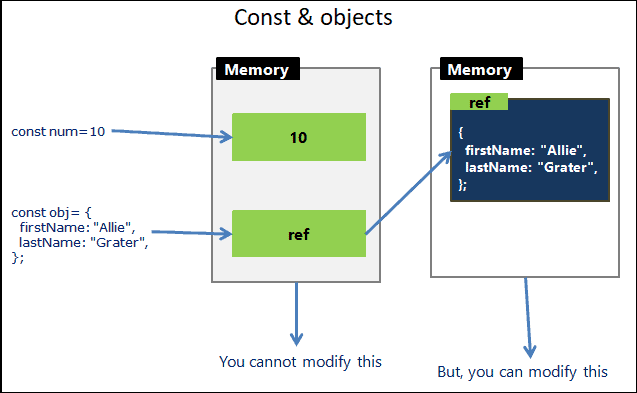
Both the code below throws Uncaught TypeError: Assignment to constant variable error as we are assigning a new value.
num  = 20;
const obj  = {    firstName: "Jack",     lastName: "Ferguson" };
But you can change the object itself.
obj.firstName= "Jack",
obj.lastName= "Ferguson"
The following is an example using arrays.
const cities =['Delhi','Mumbai','Chennai']

//not allowed. You cannot assign a new array
cities= ['New york','London','Sydney']       //Error here


//But you can change the items of the array.
cities.splice(0,3);                        //allowed
cities.push('New york','London','Sydney')  //allowed
console.log(cities);
Accessing the const before the initialization results in a ReferenceError. The variable in a “temporal dead zone” from the start of the block until the initialization. You can read more about it from Hoisting in JavaScript.
console.log(City);     //Uncaught ReferenceError: Cannot access 'City' before initialization
const City  = "DELHI";
Trying to redeclare constant throws the following error. Uncaught SyntaxError: Identifier ‘MaxTry’ has already been declared”.
const MaxTry=10;
console.log(MaxTry);

const MaxTry=100;   //Uncaught SyntaxError: Identifier 'MaxTry' has already been declared

console.log(MaxTry);
You can use const to declare values that do not change. Use let for everything else. But always remember the fact that if const points to an object, then you can change its properties.
Read More
