
Javascript Tutorial
Javascript Tutorial Introduction to Javascript JavaScript Code Editors & IDE JavaScript Hello World Example Javascript Syntax and Rules syntax_rules javascript_identifiers JavaScript Keywords & Reserved Words javascript_variables JavaScript Const JavaScript let vs var vs const Data Types in JavaScript JavaScript String Template Literals & String interpolation in JavaScript Tagged Templates in JavaScript String to Number in JavaScript Number Data Type in JavaScript NaN in JavaScript JavaScript Number Min & Max & Safe Values JavaScript EPSILON & Floating point precision Infinity in JavaScript JavaScript Bigint BigInt Vs Number in JavaScript Boolean Data Type in JavaScript Undefined in JavaScript Null in JavaScript Null vs Undefined in JavaScript JavaScript Operators Arithmetic Operators in JavaScript Unary plus & minus operators in JavaScript Increment & Decrement Operators in JavaScript Comparison or Relational operators in JavaScript Strict Equality (==) Loose Equality (===) in JavaScript Ternary Conditional Operator in JavaScript Logical Operators in JavaScript Bitwise Operators in JavaScript Assignment Operators in JavaScript Nullish Coalescing Operator in JavaScript Comma Operator in JavaScript Typeof JavaScript Operator Precedence in JavaScript JavaScript if, else & nested if statement Switch Statement in JavaScript While & Do While Loops in JavaScript For Loop in JavaScript Break statement in JavaScript Continue Statement in JavaScript Arrays in JavaScript Array Constructor in Javascript Sparse Array Vs Dense Array in JavaScript How to merge Arrays in JavaScript Array Methods in JavaScript Functions in JavaScript Function Parameters & Arguments in JavaScript JavaScript Default Parameters Pass by Value and Pass by Reference in Javascript Function Expression in Javascript Nested Functions in JavaScript Immediately-invoked Function Expressions (IIFE) JavaScript Callback Functions Arrow Functions in JavaScript Arguments Object In JavaScript Rest Parameters in JavaScript Objects in Javascript Create Objects in JavaScript JavaScript Object Properties Computed Property Names in JavaScript Object Literal in JavaScript Constructor Function & New Operator in JavaScript Delete Operator in JavaScript hasOwnProperty in JavaScript Using Getters and Setters in Javascript DefineProperty in JavaScript JavaScript Property Descriptors Enumerable, Writable & Configurable Object Destructuring in JavaScript Variable Scope in JavaScript Hoisting in JavaScript Lexical Scope & Closures in JavaScript This in JavaScript Global Object, Window & Globalthis in JavaScript Call function in Javascript Prototype In Javascript Prototype Inheritance in JavaScript Instanceof Operator in JavaScript Spread Operator in JavaScript

How to merge Arrays in Java Script

There are several ways in which you can merge arrays in Javascript. You can use the spread operator, concat method, or use the well tested for loop and push technique. In this post, let us explore them in detail.

Merging Arrays in JavaScript

The Array in Javascript is a data structure that can store ordered collection items of various data types.

There are situations where you want to merge two are more arrays into a single array. For Example, you may get arrays from different data sources and need to join them before doing something useful with them.

There are five distinct ways to merge arrays in JavaScript

  1. Spread Operator
  2. The concat() method
  3. push method
  4. for each

Merging Arrays using the spread operator

The spread operator is the most preferred and efficient way to mergetwo arrays in JavaScript. spread operator takes an iterable object like an array, object, string, etc., and spreads its contents.

The spread syntax consists of three dots followed by the name of the array or object (iterable).

Example

                             
[...numbers]


For example, let’s say you have an array of numbers called numbers. To spread it, we will use the statement ...numbers. Javascript will replace …numbers with the content of the array.
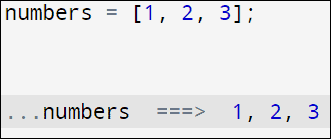
Example

                             
const numbers = [1, 2, 3];
 
console.log(numbers)    //[ 1, 2, 3 ] This is array
 
console.log(...numbers) //1 2 3     This is just a sequence of numbers


Interactive Tools

FWe can merge two or more arrays by using the array literal and spreading out the existing array inside the array literal. The syntax is as shown below.

const mergedArray = […array1, …array2, …array3, …arrayN];

Where array1, array2, array3, etc., are arrays. You can merge any number of arrays.

The code below joins the two arrays into a single array of numbers.

Example

                             
const num1Arr=[1,2,3]
const num2Arr=[4,5,6]
 
const numbers = [...num1Arr, ...num2Arr];
 
console.log(numbers)   //[ 1, 2, 3, 4, 5, 6 ]


The spread operator always returns the new array. It will not alter the existing arrays.

Merging Arrays with the Concat Method

The Concat method takes two or more arrays as arguments and returns a new merged array that contains the elements of all the arrays.

Concat method does not modify the original arrays i.e. it does not mutate the original array. It will always return a new array.

The following example shows how to merge two arrays.

Example

                             
const num1Arr=[1,2,3]
const num2Arr=[4,5,6]
 
const mergedArray = num1Arr.concat(num2Arr);
 
console.log(mergedArray)        //[ 1, 2, 3, 4, 5, 6 ]


You can merge any number of arrays. The code below merges three arrays.

Example

                             
const num1Arr=[1,2,3]
const num2Arr=[4,5,6]
const num3Arr=[7,8,9]
 
const mergedArray = num1Arr.concat(num2Arr,num3Arr);
 
console.log(mergedArray)        //[ 1, 2, 3, 4, 5, 6, 7, 8, 9 ]


Calling Array.prototype.concat directly.

Example

                             
const num1Arr=[1,2,3]
const num2Arr=[4,5,6]
const num3Arr=[7,8,9]
 
const mergedArray = Array.prototype.concat(num1Arr,num2Arr,num3Arr);
 
console.log(mergedArray)        //[ 1, 2, 3, 4, 5, 6, 7, 8, 9 ]


Like the spread operator, the contact always returns the new array. It will not alter the existing arrays.

Merging Arrays with the Push Method

The push method is another way to merge two arrays in JavaScript.

The array push method inserts a new elements to the end of an existing array. It takes the element to be added as an argument and returns the array’s new length.

We can insert one or more arrays into another array using push method along with the spread operator.

In the following example, we merge OrigArray with numArr1.

Example

                             
let OrigArray = [1,2,3];
let numArr1 = [4,5,6];
 
//Merging numArr1 with OrigArray using combination of push & spread
OrigArray.push(...numArr1);
 
console.log(OrigArray)             


The code below merges two arrays with the OrigArray.

Example

      
let OrigArray = [1,2,3];
let numArr1 = [4,5,6];
let numArr2 = [7,8,9];
 
//Merging two arrays with with OrigArray
OrigArray.push(...numArr1, ...numArr2);
 
console.log(OrigArray)    // [ 1, 2, 3, 4, 5,  6, 7, 8, 9]            


Note that the push method mutates the original array, i.e., it modifies the original array.

Unshift method

Unshift method is very similar to the push method except that it inserts a new value at the start of the array.

But remember unshift method needs to shift all existing elements to a higher index to make room for the new element at the start of the array. This makes it slower compared to all other methods. This is more noticeable as the array gets larger. Push method is faster as it inserts the element to end of the array, hence no need to shift elements.

Example

                             
let OrigArray = [1,2,3];
let numArr1 = [4,5,6];
let numArr2 = [7,8,9];
 
//Merging two arrays with with OrigArray
OrigArray.unshift(...numArr1, ...numArr2);
 
console.log(OrigArray)    // [ 4, 5,  6, 7, 8, 9, 1, 2, 3,]         


For Loop

Using For Loop, we can iterate through an array and insert its values into another array or a new array. We can also run some custom checks on the inserted elements. It will help us filter and transform the elements before merging the arrays.

For Loop is very flexible and gives complete control to you. And its performance is as good as the push and spread operator.

Example

                             
let numArr1 = [1,2,3];
let numArr2 = [4,5,6];
 
let numArr = mergeArray(numArr1,numArr2)
 
console.log(numArr)     //[ 1, 2, 3, 4, 5, 6 ]
 
function mergeArray(first, second) {
  for(let i=0; i < second.length; i++) {
     // You can run custom logic here // 
     // We are pushing into the existing array. You can also create a new array
     first.push(second[i]);
  }
   return numArr1; 
}            


ForEach loop

ForEach method is similar and is as flexible as for loop. We can loop through one of the arrays and push its values into an array. Just like For Loop, forEach is also is very flexible and gives complete control to you.

We can set the length property of an array to a value that is higher than the highest index

Example

                             
let numArr = [1,2,3];
let numArr1 = [4,5,6];
 
numArr1.forEach((element) => {
    numArr.push(element)
});
 
console.log(numArr)     //[ 1, 2, 3, 4, 5, 6 ]           


Merging two arrays into a new array.

Example

                             
let numArr1 = [1,2,3];
let numArr2 = [4,5,6];
 
let mergedArray=[]
 
numArr1.forEach((element) => {
    mergedArray.push(element)
});
numArr2.forEach((element) => {
    mergedArray.push(element)
});
 
console.log(mergedArray)     //[ 1, 2, 3, 4, 5, 6 ]


Transform and Merge Arrays

There are several use cases where we would like to transform the array before we merge them. For Example, we would like to modify the values of the existing array, filter some of the elements, etc.

JavaScript arrays offer several methods like map, filter, reduce, or sort to transform the array. You can then merge it with another array using the concat method or the spread operator (…).

Array Map method

The Array map method is another alternative to merge arrays when you wish to transform the array before joining. The map method returns a new array after changing the given array with new values based on specific conditions. You can then use the conact method to create a new merged array.

The code below multiplies each array element with two and merges them using the concat.

Example

                              
const numArr1 = [1, 2, 3];
const numArr2 = [4, 5, 6];
const mergedArray = numArr1.map(element => element * 2)
                        .concat(
                            numArr2.map(element => element * 2)
                        );
 
console.log(mergedArray);
// Output: [2, 4, 6, 8, 10, 12]        


Array Filter method

The array filter can be used to filter out unwanted values before merging them

Example

                             
const numbers = [1, 2, 3, 4, 5, 6, 7, 8, 9, 10];
 
const evenNumbers = numbers.filter(number => number % 2 === 0);
 
mergedArray = [ ...numbers.filter(number => number % 2 === 0),
                ...numbers.filter(number => number % 2 != 0 )    ]
 
console.log(mergedArray)  //[ 2, 4, 6, 8, 10, 1, 3, 5, 7,  9 ]     


You can also use the sort & reduce methods to transform the array

Summary

  1. In JavaScript, merging arrays involves combining two or more arrays into a single array.
  2. The spread operator (…), push() method, and concat() method is commonly used to merge arrays.
  3. You can also use the for loop or for each loop to merge arrays, which offers maximum flexibility.
  4. avaScript treats the sparse array as an object. Hence uses the object property look to locate the value and array index lookup. This makes the sparse array slower.
  5. You can combine Map, filter, sort, and reduce methods to transform the array before merging.