
A JavaScript variable is a storage for the data, where programs can store value or information. We must give a name to the variable. We can then refer to the variable in another part of the program. In this article, we learn how to declare a variable. Also, learn about the rules for naming the variable
JavaScript variables are storage for data, where programs can store value. Basically, It’s an area of memory where JavaScript stores the data.
We usually assign a name to the memory. The programs can then use the variable name to identify the memory location. It makes the coding easier.
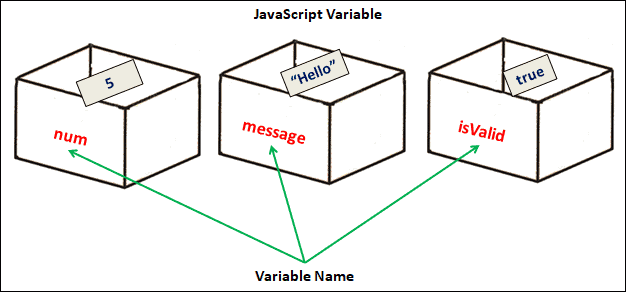
let num;
let messsage;
let isValid;

num=5
message="Hello"
isValid=true;
In JavaScript, a variable can store just about anything like numbers, strings, objects, arrays, etc. There are no restrictions on that. This is different from other languages like C# & Java, where a variable that stores numbers can only store numbers and nothing else.
We need to create the variables before using them. In JavaScript, we call it declaring the variable. There are three keywords using which we can declare a variable.
They are
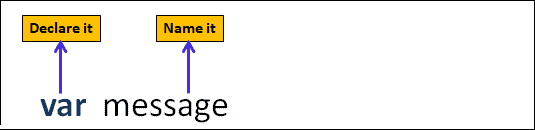
To declare a variable we use the keyword followed by name of the variable that we want to declare.
The following example declares the variable using the keyword var .
var messsage
The message is the name we have assigned to the variable. It uniquely identifies this variable. Hence, It is also called an Identifier.
You can as well use let here.
let messsage
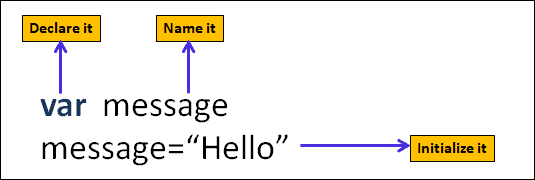
Initializing a variable means storing an initial value in it before using the variable. To store data, we need to make use of the assignment operator. The assignment operator represented by the symbol equals sign (=) is one of the several JavaScript Operators. We use it to assign a new value to a variable.
We assign a value to a variable by typing its name, followed by an equals sign (assignment operator), followed by the value you want to give it.
The following example stores the literal“Hello” in the variable message immediately after its creation.
var messsage        //Creating the Variable
message = "Hello" //Initializing the variable by assigning a value to it.
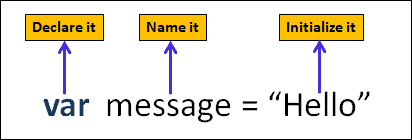
We can combine declaration with initialization in a single line
var messsage ="Hello"
There are certain rules that you must follow when you choose a name for the variable. The following are the rules for naming the variable
valid names
var $$$ = "Hello World";
var $ = 2;
var $myMoney = 5;

var _lastName = "Johnson";
var _x = 2;
var _100 = 5;

let userName;
let test123;
Invalid Names
var  123=30;
var *aa=320;
You can use non-Latin characters in variable names. The following example does not throw any error and is a perfectly valid JavaScript Code. But it makes the code difficult to read for a user who does not know the language.
let имя = '...';    //Russian
let 我 = '...';     //chines
You can modify the value of the variable at any time using an assignment. The following example assigns a new value to the message variable.
let messsage ="Hello"   //Creating the variable with the initial value of Hello
console.log(message)    //Hello


message="Hello World"   //Updating it with the new value of Hello world
console.log(message)    //Hello World
You can declare multiple variables in a single line each separated by a comma.
let person = "John Doe", carName = "Volvo", price = 200;
You can also span them over multiple lines.
var person = "John Doe",
carName = "Volvo",
price = 200;
JavaScript assigns a default value of undefined when you declare a variable without an initial value.
var message;           //declaring a variable without inital value
console.log(message)   //undefined
Example using let
let message;
console.log(message)   //undefined
JavaScript allows us to Re declare a variable only if we declare it with var.
In the following example, we use var to declare the variable message. We later redeclare it. Since the variable message already exists, JavaScript simply ignores the redeclaration. The value of the message variable does not change on redeclaration.
var message;       //Declaring message variable
message="Hello"

var message        //Re declaring message. This line is ignored.

console.log(message)  //Hello
But when we use let either to declare the variable or to redeclare it, then JavaScript throws the Identifier [variable-name] has already been declared error.
let message;
message="Hello"

let message   //Uncaught SyntaxError: Identifier 'message' has already been declared
let message;
message="Hello"

var message   //Uncaught SyntaxError: Identifier 'message' has already been declared
var  message;
message="Hello"

let message   //Uncaught SyntaxError: Identifier 'message' has already been declared
JavaScript is a loosely typed and dynamic language. The variables are not tied to any particular data type. We can assign and reassign values of all types to any variable
In the following example, we have declared the variable with a string value. But later we reassign a number and an object to it.
let a="Hello"
a=100
a= { name:"Bill Gates", company:"Microsoft" }
JavaScript variables have a lifetime. Their lifetime depends on the scope in which we defined them. It starts when the program enters the scope in which variable is declared and dies when the program leaves the scope.
JavaScript creates a function scope for every function & block scope (since ES6) for every code block ({}). Anything that is outside the function and code block belongs to the global scope.
JavaScript Variables can only be accessed within the scope in which we declare them. The variables present in the global scope can be accessed everywhere.
In the following example, we have globalVar is outside of any function or code block. Hence it is part of the global scope and can be accessed anywhere.
The funcVar variable is declared inside the function. Hence we can access only within the function and not outside of It. Accessing it outside the function will result in funcVar is not defined error.
let globalVar="Hello"

 //Functions
 function someFunc() {
   let funcVar="Hi"
   console.log(globalVar)  //Hello
   console.log(funcVar)  //Hi
 }
 someFunc();


 console.log(globalVar) //Hello
 console.log(funcVar)   //Uncaught ReferenceError: funcVar is not defined
You can read more about it from the tutorial Scopes in JavaScript
JavaScript throws [variable-name] is not defined error when we try to access a variable that is not yet declared.
console.log(message) //Uncaught ReferenceError: message is not defined
But if we assign a value to an undeclared variable, JavaScript automatically creates a global variable. The message variable in the example is not yet declared. But when we assign a value to it JavaScript creates it in the global scope
 message="Hello"        //JavaScript creates the variable here
 console.log(message)   //Hello
Because of the above behavior, you may accidentally create a variable. To Prevent assigning value to an undeclared variable, JavaScript introduced the strict mode in ES5. You can enable that just by adding “use strict” at the top of the code.
The following code throws an error when we try to accessmessage variable.
"use strict"            //this prevents assigning value to an undeclared variable


message="Hello"        //Uncaught ReferenceError: message is not defined
console.log(message)
The following code throws an error when we try to accessmessage variable.
In the following example, we use the message variable before its declaration. The code works because JavaScript process the variable declaration before it starts to execute the code.
Hence JavaScript reads the line var message first and creates the variable. The actual execution of the code begins when JavaScript finishes the creation of all variables.
message="Hello"
console.log(message)  //Hello

var message        //declaring the message using var
But, if you use let (or const) instead of var, then the JavaScript will throw Cannot access [variable-name] before initialization error.
message="Hello"       //Uncaught ReferenceError: Cannot access 'message' before initialization
console.log(message)

let message           //declaring the message using let
You can learn more about Hoisting in JavaScript
