
In this tutorial learn about the Function Arguments & Parameters in JavaScript. We learned how to create a function in JavaScript. The parameters are the way we pass values to a JavaScript function. We learn the difference between arguments and parameters, set default Parameters & learn about Argument Objects.
The parameter is a named variable that we list in the function’s declaration.
We declare Parameters when we create the function. They are part of the function declaration. The following is the syntax for declaring a function.
function name(param1, param2, param3) {
   [statements]
}
In the above syntax, param1, param2 & param3 are the parameters of the function. We place them inside parentheses each separated by a comma. There is no limitation on the number of parameters that you can add. A Function can have 0 to any number of parameters
In the following addNum function has two parameters a & b.
function addNum(a, b){
   return a+b;
}
The argument is the value that we pass to a function
We provide the argument to the function when we invoke it. In the following example, 10 & 25 are the arguments to the function.
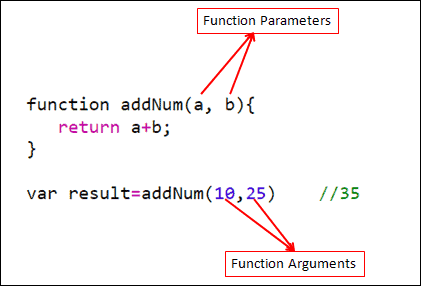
When we invoke the function, JavaScript creates new variables using the name provided in the Parameters. It then initializes its value using the arguments.
For Example when we invoke addNum(10,25)
There are a few rules that one should be aware of.
You can define a JavaScript function with zero to any number of parameters.
In the following example, sayHello has zero parameters, sayHi has one parameter, and addNum has two parameters.
// 0 parameters
function sayHello() {
    return "Hello";
}

// 1 parameter
function sayHi(name) {
    return "Hi " + name;
}

// 2 parameters
function addNum(val1, val2) {
    return val1 + val2;
}


sayHello()      //"Hello"
sayHi("Bill")   //Hi Bill
addNum(10, 5)   //15
The JavaScript function does not throw an error if you send more arguments or fewer arguments than the number of parameters
For Example. the addNum function declares two parameters. But we invoke it using 0 to 3 Arguments. JavaScript does not throw any errors.
Instead, it initializes the parameters with undefined, if the parameter does not receive a value.
It ignores the arguments, If we send more arguments than parameters
function addNum(a, b) {
    return a + b ;
}

//0 Argument.   Both a & b is initialzed as undefined
console.log(addNum());              //Nan

//1 Argument    b is initialzed as undefined
console.log(addNum(1));             //Nan


//2 Argumnets
console.log(addNum(1,2));           //3


//3 Arguments   last argument 3 is ignored
console.log(addNum(1,2,3));         //3
We can also configure parameters with default values while declaring the function using an assignment operator
In the example below, we assign 0 to both the a & b parameters. Now if we do not send any argument to them, they are initialized with a 0
function addNumbers(a=0, b=0) {
    return a + b ;
}

//0 Argument.   Both a & b is initialized with 0
console.log(addNumbers());              //0


//1 Argument.   b is initialized with 0
console.log(addNumbers(1));             //1


//2 Arguments
console.log(addNumbers(1,2));           //3


//3 Arguments Last argument 3 is ignored
console.log(addNumbers(1,2,3));         //3
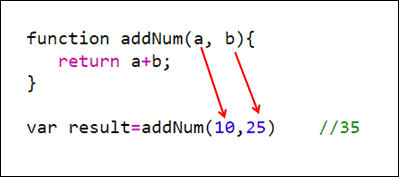
The JavaScript Parameters are evaluated from left to right
In the following example, when JavaScript assigns the arguments to parameters it starts from left to right. First, it assigns the value 10 to a and then 25 to b.
The fun1 & fun2 functions in the following example return values 3 & 4. We use the return values directly in the addNum function.
When we execute the addNum function, the JavaScript will evaluate the fun1 first and then fun2.
function addNum(a,b) {
    console.log(a+b)
}

function fun1() {
    console.log("fun1")
    return 3
}

function fun2() {
    console.log("fun2")
    return 5
}

addNum(fun1(), fun2())


***** Results
fun1
fun2
8
We use the parameters to access the arguments inside the function. But there is another way to do this. Using the Arguments Object. It is a pretty useful feature if the function receives a random no of arguments
The Arguments object contains the values of the arguments in an Array-like object. Note that it is not an Array but an Array-like object.
For Example, take a look at the following example. The addNumbers declares three parameters. We can access all of them using arguments array
function addNumbers(a, b, c) {

 console.log(arguments[0]);      //10
 console.log(arguments[1]);      //20
 console.log(arguments[2]);      //30

 console.log(arguments[3]);      //undefined
 console.log(arguments[4]);      //undefined

 return a+b+c;

}

addNumbers(10, 20, 30);
You can also refer to arguments as addNumbers.arguments[0]. But this feature is deprecated. So it is no longer recommended. Though some browsers still support it for compatibility purposes
The following example shows how we can make use of the arguments object. The following function addNumbers can add any number of numbers.
The arguments.length property returns the number of arguments.
function addNumbers() {

    let sum = 0;
    for (let i = 0; i < arguments.length; i++) {
        sum += arguments[i];
    }

    console.log(sum)
    //150
    return sum;
}

addNumbers(10, 20, 30, 40, 50);
The JavaScript types are either value types or reference types. The value types are string, number, bigint, boolean, undefined, symbol, and null. All other types are reference types.
The value types are passed by value. In the following example, a is a value type. We pass it to someFunc. When we invoke someFunc(a), the JavaScript creates a new variable b (parameter of someFunc) copies the values of a to it. Whatever changes you make to b will not affect the original variable a
a=10

function someFunc(b) {
    b=50
    console.log(b)  //50
}

someFunc(a)
console.log(a)   //10
In the following example the person is an object, hence a reference type. The person variable does not contain the object but it contains the reference to the object.
When we invoke doSomething(person), the JavaScript creates a new variable obj and copies the content from person variable. Since the person object contains the reference to the object, both obj and person points to the same object. Hence if you make any changes to the obj in the function it will also affect the person as both of them refers to the same object.
For a more detailed explanation read Pass by Value & Pass by Reference
let person = {
  firstName: 'Allie',
  lastName: 'Grater'
};

function doSomething(obj) {
  obj.firstName = 'John';
}

doSomething(person);

console.log(person.firstName);  //John
You can also refer to arguments as addNumbers.arguments[0]. But this feature is deprecated. So it is no longer recommended. Though some browsers still support it for compatibility purposes
The following example shows how we can make use of the arguments object. The following function addNumbers can add any number of numbers.
The arguments.length property returns the number of arguments.
function addNumbers() {

    let sum = 0;
    for (let i = 0; i < arguments.length; i++) {
        sum += arguments[i];
    }

    console.log(sum)
    //150
    return sum;
}

addNumbers(10, 20, 30, 40, 50);
