
The JavaScript Tagged Templates allow us to tag template strings or template literals using a function. Once tagged, we can parse the Templates strings using the tagged function. It allows us more control over how the templates are converted to a string.
We can create a Template String in JavaScript (or Template Literals) by enclosing the string inside a back-tick. What makes the Template strings powerful is that we can include a expression inside them. The expression must be specified inside dollar sign and curly braces (${expression}). JavaScript evaluates the expression and coerces the result into a string. This allows us to create a dynamic string.
In the following example, we have included the expression ${playerName} inside the string. When we run the code ${playerName} is evaluated and its value Sachin Tendulkar is inserted in the final string.
let playerName = "Sachin Tendulkar";
console.log(`${playerName} is the greatest cricketer of all time`)


//**** Output ****
//Sachin Tendulkar is the greatest cricketer of all time
But what if want to run some business logic and have more control over the transformation of the given string. This is where we use the Tagged Templates.
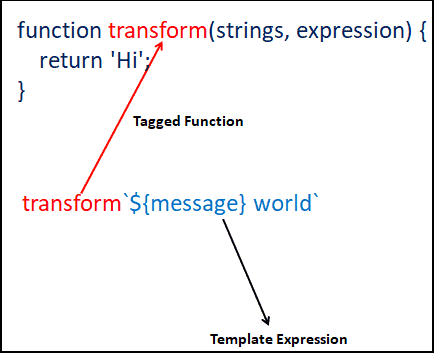
The Tagged Template is a template string, to which we tag a function (attach a function). It consists of two parts. One is Template String and the other one is a function (which we call Tagged function). The Tagged function is where we write our custom logic to parse the template string.
To create a tagged template, First, we need to create a function. Then use it to tag the Template string by placing before it.
In the following example we create a function transform. The function just returns the message hi
We tag the Template string with the function. That is done by placing the function name before it without the customary (). Now this Template string is a tagged template.
When we run the code, you will see Hi in the output, which is what our tagged function returns.
let message="Hello";

 //This is our tag function
 function transform() {
   return 'Hi';
 }

 //use the function to tag the template string
 console.log(transform`${message} world`);


 //**** output ****
 //Hi
But what if want to run some business logic and have more control over the transformation of the given string. This is where we use the Tagged Templates.
The tagged function receives following arguments.
Consider the following template string
`Hello, ${firstName} ${lastName}. Welcome to ${topic} Tutorial`
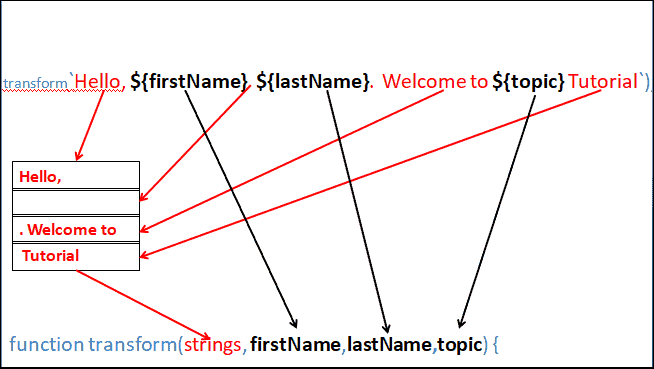
The first argument to the tag function is an array of strings (Strings).
The first element in the array is the string up to the first expression $(firstName), which is “Hello,”. The second element is the string between the first expression $(firstName) and the second expression $(lastName) i.e.a blank string. The third element is between the second expression $(lastName)and the third expression(${topic}) (${topic}). i.e. “. Welcome to”. And the last element is from the last expression ${topic} to the end of the string i.e. “Tutorial”
Hence our first argument is [ 'Hello, ', ' ', '. Welcome to ', ' Tutorial' ]
The expressions are evaluated and passed as the subsequent arguments in the order of occurrence.
let firstName  = "Sachin"
let lastName = "Tendulkar"
let topic = "JavaScript"

console.log(transform`Hello, ${firstName} ${lastName}. Welcome to ${topic} tutorial`);


function transform(strings, firstName,lastName,topic) {
  let str = strings[0]+ firstName+strings[1]+lastName+strings[2]+topic+strings[3];
  return str;
}

//Hello, Sachin Tendulkar. Welcome to JavaScript tutorial
In the above example, we knew the number of arguments beforehand. But, if there are a variable number of expressions, then it would be better to make use of the rest operator as shown below
let firstName = "Sachin"
let lastName = "Tendulkar"
let topic = "JavaScript"

function transform(strings, ... expr) {
  console.log(strings);
  console.log(expr);
  return "";
}

console.log(transform`Hello, ${firstName} ${lastName}. Welcome to ${topic} Tutorial`);


//['Hello, ', ' ', '. Welcome to ', ' Tutorial']
//['Sachin', 'Tendulkar', 'JavaScript']
Now once we have the required arguments, we can use them in the function to fine-tune the output
let firstName = "Sachin"
let lastName = "Tendulkar"
let topic = "JavaScript"

function transform(strings, ... expr) {
  let str = '';
  strings.forEach((string, i) => {
      str += string + (expr[i] || '');
  });
  return str;
}

console.log(transform`Welcome, ${firstName} ${lastName}. Learn ${topic} here`);


//Welcome, Sachin Tendulkar. Learn JavaScript here
Note that the strings array is always be going to be one more than the expr array. Hence when we come to the last string in the loop, the expr would be undefined
The ES6 also has a useful method String.raw, which prevents escape characters from being interpreted. The backslash is a special character ( escape ) in JavaScript. When JavaScript encounters a backslash, it tries to escape the following character.
Take a look at the following example. The variable filePath contains several \. When we use this expression in Template string, the backslashes are removed from the output as JavaScript treats them as escape character.
filePath = `C:\Development\profile\aboutme.html`;
console.log(`The file was uploaded from: ${filePath}`);


//OUTPUT
The file was uploaded from: C:Developmentprofileaboutme.html
Here you can make use of String.raw tagged function to return the raw string.
filePath =String.raw`C:\Development\profile\aboutme.html`;
console.log(`The file was uploaded from: ${filePath}`);

//OUTPUT
The file was uploaded from: C:\Development\profile\aboutme.html
The following example shows how to use raw method inside the tagged function. In this case newline character \n is ignored.
firstName="Sachin"
lastName="Tendulkar"
topic="JavaScript"

function transform(strings, ...expr) {
  let str = '';
  strings.raw.forEach((string, i) => {         //using strings.raw
      str += string + (expr[i] || '');
  });
  return str;
}


console.log(transform `Hello ${firstName} ${lastName} \n Welcome to ${topic} Tutorial`);


//OUTPUT
Without raw method, the \n is interpreted correctly and a new line is inserted in the output.
function transform(strings, ...expr) {
  let str = '';
  strings.forEach((string, i) => {              //using strings
      str += string + (expr[i] || '');
  });
  return str;
}


//OUTPUT
//Hello Sachin Tendulkar
//Welcome to JavaScript Tutorial                //newline
Read More
