
The JavaScript number data type has its limitation regarding Max Value, Safe Value & Min Value that you can use. It uses the MAX_SAFE_INTEGER, MIN_SAFE_INTEGER, MAX_VALUE & MIN_VALUE to represent these values.
The JavaScript stores the numbers as a double-precision 64-bit number, which means that it has a total 64-bit memory allocated to it. These numbers are stored using the scientific notation in binary format.
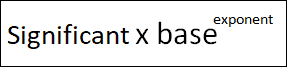
Out of these 64 bits, one bit is used for the sign, 11 for the exponent and remaining 52 bits are used for the mantissa (significand).

You can follow these links to find out how to
The Number.MAX_SAFE_INTEGER constant represents the maximum safe integer that you can use in JavaScript. It is the static property of the Number object. It has the value of 9007199254740991.
It is referred to as safe because any number more than the above number is not guaranteed to be represented exactly and correctly. This is not the limitation of the JavaScript, but a limitation imposed by the double-precision 64-bit number format followed by Javascript
console.log(Number.MAX_SAFE_INTEGER)    //9007199254740991
console.log(Number.MIN_SAFE_INTEGER)    //-9007199254740991


*** output ****
9007199254740991
-9007199254740991
9007199254740991 is represented
0-10 00011 0011-1111 1111 1111 1111 1111 1111 1111 1111 1111 1111 1111 1111 1111
Any number above this number will result in loss of accuracy. For Example, adding 1 & 2 to the MAX_SAFE_INTEGER results in the same value
console.log(Number.MAX_SAFE_INTEGER+1)
console.log(Number.MAX_SAFE_INTEGER+2)

//*** output **
//9007199254740992
//9007199254740992
And that is because of both converts to same in 64-bit binary
9007199254740992
0-100 0011 0100-0000 0000 0000 0000 0000 0000 0000 0000 0000 0000 0000 0000 0000

9007199254740993
0-100 0011 0100-0000 0000 0000 0000 0000 0000 0000 0000 0000 0000 0000 0000 0000

9007199254740994
0-100 0011 0100-0000 0000 0000 0000 0000 0000 0000 0000 0000 0000 0000 000 00001
You can use the Number.isSafeInteger method to check whether the number is safe.
console.log(Number.isSafeInteger(Number.MAX_SAFE_INTEGER));
console.log(Number.isSafeInteger(Number.MAX_SAFE_INTEGER+1));

//*** output **
//true
//false
The largest number possible to represent using the number data type is 1.7976931348623157e+308 and it is represented by Number.MAX_VALUE. The lowest number is Number.MIN_VALUE.
console.log(Number.MAX_VALUE)
console.log(Number.MIN_VALUE)

****** Output *****
1.7976931348623157e+308
5e-324
Numbers beyond Number.MAX_VALUE cannot be represented using the double-precision 64-bit binary system. Hence any value above the MAX_VALUE is truncated to the MAX_VALUE.
 console.log(Number.MAX_VALUE + 100 == Number.MAX_VALUE);

 //**output
 //true
While the very large value results in infinity
console.log(Number.MAX_VALUE + Number.MAX_VALUE);

 **output
 //Infinity
The bitwise operators and shift operators operate on 32-bit integers only, so in that case, the max safe integer is 2147483647.
The JavaScript Number object has static properties MAX_SAFE_INTEGER, MIN_SAFE_INTEGER, MAX_VALUE & MIN_VALUE. These represent the Maximum/Minimum values that are supported by the number data type. The MAX_SAFE_INTEGER & MIN_SAFE_INTEGER are extremely important, as any number above these numbers are not guaranteed to be represented exactly and correctly.
Read More
