
JavaScript if statements run a block of code only if an evaluation of a given condition results in true. If statements can be used with else clause, If else if clause and as nested if to control the flow of the program execution.
The JavaScript if statement executes a block of code if the evaluation of condition results in truthy.
Syntax
The if statement starts with a if followed by condition in parentheses. We place the statements (conditional code) that we want to execute, immediately after the condition and inside curly brackets.
if (condition) {

   //(Conditional code / if block)
   //Statements to execute if Condition is true

}
The following flowchart shows how the if statement work.
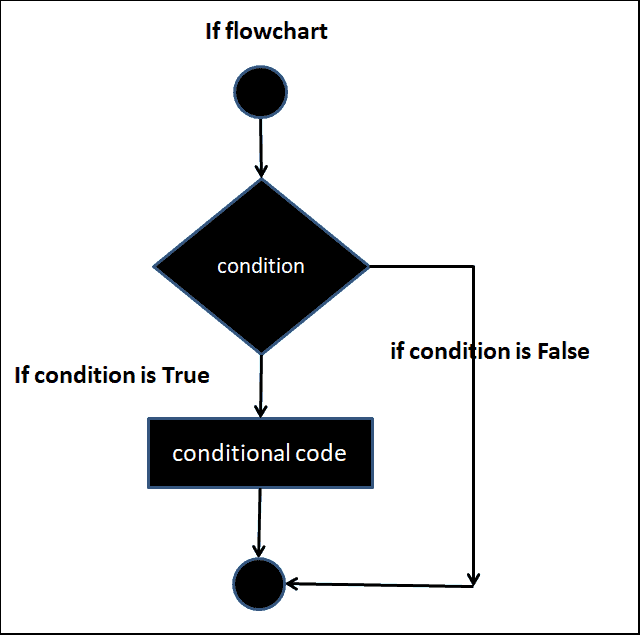
In the following example, (a > 0) is our condition. Since the value of a is 1 this condition evaluates to true. Hence the statements in the Conditional code ( inside the { } ) is executed.
if (a > 0) {
  alert("a is greater than 0");
}
Similarly in the following example, since a < 0 evaluates to false, the if statement does not execute the conditional code.
let a = 1;
if (a < 0) {
  alert('This is never executed. because a < 0 is false ');
}
We can make use of logical operators like AND (&&), OR (||), & NOT (!) to construct complex conditions
let a = 1;
let b = 1;

if (a > 0 && b > 0) {
  alert("Both a & b are greater than 0");
}


a=0
if (a > 0 && b > 0) {
  alert("This is never executed as a is less than 0");
}
If the if block consists of only one statement, then you do not need to include it inside the curly braces
if (a > 0 && b > 0)
 alert("Both a & b are greater than 0");
But, curly braces are a must if the if block has more than one statement.
Consider the following example, where we are not doing any comparison in the if statement.
The If (a) evaluates to true and if (b) evaluates to false.
let a = 1;

 if (a) {

 let a = 1;

 if (a) {
   alert("a is true");
 }

 let b = 0;

 if (b) {
   alert("This is not executed");
 }
This is because the underlying JavaScript coerces everything into either true or false.
Those values, which convert to false are Falsy values. There are eight falsy values in JavaScript. They are
Everything else converts to true, hence we call them Truthy.
You can read more aboutTruthy & falsy
Hence if (a) evaluates to true because the value of a is 1 & if (b) evaluates to false because the value of a is 1
We can follow if block with an optional else block. The else block will execute only if the if condition evaluates to false.
Syntax
if (condition) {

  //if Block
  //Statement to execute if Condition is true

} else {


  //Else Block
  //Statement to execute if Condition is false

}
Example
In this example a > 0 evaluates to false as the value of a is 0. Hence the if block does not execute. Instead, the else block executes
let a = 0;

if (a > 0) {
  console.log('a is greater than 0');
  //This will not
} else {
  console.log('a is less than or equal 0');
  //This will execute
}
A simpler if-else statement can also be written using a Ternary Conditional Operator.
let c = a > 0 ? 'a is greater than 0' : 'a is not greater than 0';
console.log(c);
We can attach another If condition to an Else Block, thus creating a chain of blocks. This is particularly useful when you want to test multiple related conditions.
Note that conditions are tested in the order they appear in the code. It is possible that more than one If condition can evaluate to be true. But the first if block that satisfies the condition is executed.
Syntax
if (condition1) {

 //If Block1
 //Statement to execute if Condition1 is true

} else if (condition2) {

 //If Block2
 //Statement to execute if Condition2 is true

} else if (condition3) {

 //If Block3
 //Statement to execute if Condition3 is true

} else {

 //Else Block
 //Statement to execute if all the above conditions are false

}
Example
let a = 10;

 if (a > 10) {
   alert("a is greater than 10");
 } else if (a > 0 && a <= 10) {
   alert("a is greater than 0 & less than 10");
 } else if (a == 0) {
   alert("a is equal 0");
 } else {
   alert("a is less than 0");
 }
In the following example both first and second if conditions evaluate to true. But only the first If block is executed and the second If block is never executed.
let a = 25;

if (a > 10) {
  alert("a is greater than 10");
}
else if (a > 20) {
  //this will never execute even if it is true
  alert("a is greater than 20");


}
 else {
  alert("a s less than or equal to 10");
A nested if is an if statement, which is present inside the body of another if or else statement.
Syntax
if (condition1)
{
   //Executes when condition1 is true
   if (condition2)
   {
      //Executes when both condition1 & condition2 is true

     if (condition3)
     {

      //Executes when both condition1 & condition3 is true

     }
   }
   else if (condition4)
   {
      //Executes when both condition1 & condition4 is true
   }
}
Example
let val1 = 20;
let val2 = 10;
let operation = "<";

if (operation == ">") {
  console.log("greater than");

  if (val1 > val2) {
    console.log("Val1 > val2");
  } else {
    console.log("Val1 <= val1");
  }
} else if (operation == "<") {
  console.log("Less than");
  if (val1 < val2) {
    console.log("Val1 < val2");
  } else {
    console.log("Val1 >= val2");
  }
} else if (operation == "=") {
  console.log("Equal");

  if (val1 == val2) {
    console.log("Val1 = val2");
  } else {
    console.log("Val1 != val2");
  }
}
