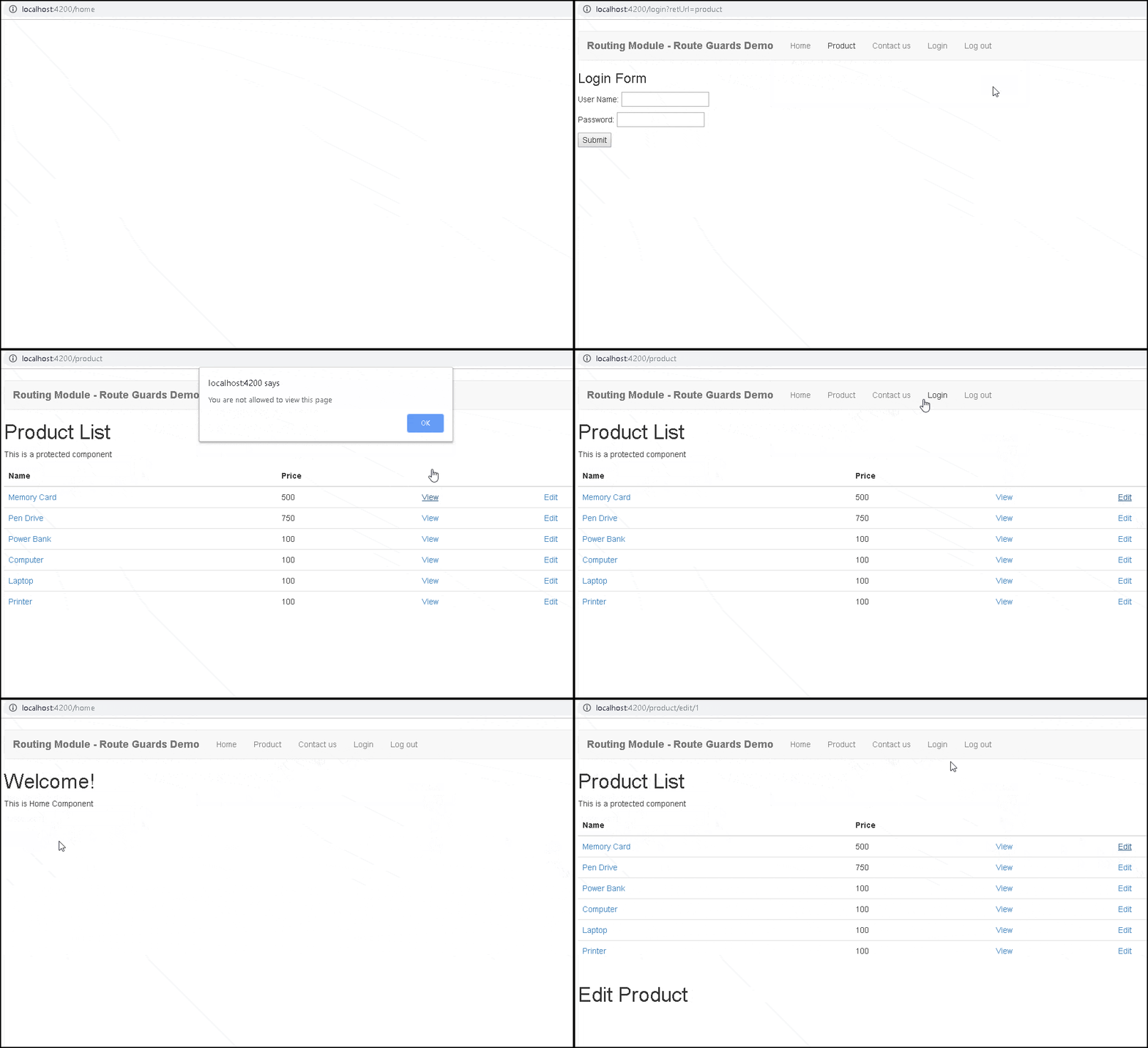
The Angular CanActivateChild guard runs before we navigate to a child route. In this tutorial, we will learn what is CanActivateChild guard is and how to use it to protect the child routes. We will build a simple Angular CanActivateChild example app to show you how to use it in the real application.
The CanActivatechild guard is very similar to CanActivateGuard. We apply this guard to the parent route. The Angular invokes this guard whenever the user tries to navigate to any of its child routes. This allows us to check some conditions and decide whether to proceed with the navigation or cancel it.
Consider the following routes.
The ProductComponent displays the list of products. We have attached the canActivate guard to the product route. The canActivate guard blocks access to the route, if the user is not logged in. This guard protects both the product route and all its children.
{ path: 'product', component: ProductComponent, canActivate : [AuthGuardService],
      children: [
      {  path: 'view/:id', component: ProductViewComponent  },
      {  path: 'edit/:id', component: ProductEditComponent  },
      {  path: 'add', component: ProductAddComponent }
      ]
  },
Now, consider the case where we want all users to view the ProductComponent, but only the Admin user can view any of its child routes
We can create another guard ProductGuardService that implements the canActivate guard and attach it to each of those child routes as shown below.
{ path: 'product', component: ProductComponent, canActivate : [AuthGuardService],
      children: [
      {  path: 'view/:id', component: ProductViewComponent, canActivate : [ProductGuardService]  },
      {  path: 'edit/:id', component: ProductEditComponent, canActivate : [ProductGuardService]  },
      {  path: 'add', component: ProductAddComponent, canActivate : [ProductGuardService] }
      ]
  },
Another way is to use the CanActivateChild guard and attach it to the product route as shown below. When Angular sees a canActivateChild guard attached to the parent route, it invokes it every time the user tries to navigate to the child route. Hence instead of attaching Guard service to every child, you can attach it to the parent route.
{ path: 'product', component: ProductComponent, canActivate : [AuthGuardService],
canActivateChild : [AdminGuardService],
      children: [
      {  path: 'view/:id', component: ProductViewComponent  },
      {  path: 'edit/:id', component: ProductEditComponent  },
      {  path: 'add', component: ProductAddComponent }
      ]
  },
Just like all other Angular Guards, we need to create an Angular Service. The service must import & implement the CanActivateChild Interface. The Interface is defined in the @angular/router module. The Interface has one method i.e. canActivateChild. The details of the CanActivateChild interface are as shown below.
interface CanActivateChild {
  canActivate(route: ActivatedRouteSnapshot, state: RouterStateSnapshot): Observable<boolean | UrlTree> | Promise<boolean | UrlTree> | boolean | UrlTree
}
The method gets the instance of the ActivatedRouteSnapshot &
RouterStateSnapshot. We can use this to get access to the route parameter, query
parameter, etc.
The guard must return true/false or a UrlTree . It can return these values either as an observable or a promise or as a simple Boolean value.
If all guards return true, navigation will continue.
If any guards return false, navigation will be cancelled.
If any guard returns a UrlTree, current navigation will be cancelled and a new navigation will be kicked off to the UrlTree returned from the guard.
The example canActivateChild guard is as follows
import { Injectable } from '@angular/core';
import { Router, CanActivate, ActivatedRouteSnapshot,RouterStateSnapshot } from '@angular/router';


@Injectable()
export class AuthGuardService implements CanActivateChild {

    constructor(private _router:Router ) {
    }

    canActivate(route: ActivatedRouteSnapshot,
                state: RouterStateSnapshot): boolean {

        //check some condition
        if (someCondition)  {
            alert('You are not allowed to view this page');
            //redirect to login/home page etc
            //return false to cancel the navigation
            return false;
        }
        return true;
    }

}
In our example application, the HomeComponent & ContactComponent are not protected and can be accessed by any user.
The user must log in to the system to access the ProductComponent.
The ProdudctEditComponent, and ProductViewComponets are child components of the ProductComponent
We also need LoginComponent to handle the user login.
login.component.ts
import { Component, OnInit } from '@angular/core';
import { FormControl, FormGroup } from '@angular/forms';
import { Router, ActivatedRoute } from '@angular/router';
import { AuthService } from './auth.service';

@Component({
   templateUrl: './login.component.html',
   styles: [``]
})
export class LoginComponent implements OnInit {

    invalidCredentialMsg: string;
    username:string;
    password:string;
    retUrl:string="home";

    constructor(private authService: AuthService,
                private router: Router,
                private activatedRoute:ActivatedRoute) {
    }

    ngOnInit() {
        this.activatedRoute.queryParamMap
                .subscribe(params => {
            this.retUrl = params.get('retUrl');
            console.log( 'LoginComponent/ngOnInit '+ this.retUrl);
        });
    }

    onFormSubmit(loginForm) {
       this.authService.login(loginForm.value.username, loginForm.value.password).subscribe(data => {
           console.log( 'return to '+ this.retUrl);
           if (this.retUrl!=null) {
                this.router.navigate( [this.retUrl]);
           } else {
                this.router.navigate( ['home']);
           }
       });
    }
}
<h3>Login Form</h3>

<div>
 <form #loginForm="ngForm" (ngSubmit)="onFormSubmit(loginForm)">
   <p>User Name: <input type='text'  name='username' ngModel></p>
   <p>Password: <input type="password"  name="password" ngModel></p>
   <p><button type="submit">Submit</button></p>
 </form>
</div>
import { Injectable } from '@angular/core';
import { Observable } from 'rxjs/Observable';
import 'rxjs/add/observable/of';
import 'rxjs/add/operator/map';
import { of } from 'rxjs';


@Injectable()
export class AuthService {

    private isloggedIn: boolean;
    private userName:string;

    constructor() {
        this.isloggedIn=false;
    }

    login(username: string, password:string) {

        //Assuming users are provided the correct credentials.
        //In real app you will query the database to verify.
        this.isloggedIn=true;
        this.userName=username;
        return of(this.isloggedIn);
    }

    isUserLoggedIn(): boolean {
        return this.isloggedIn;
    }

    isAdminUser():boolean {
        if (this.userName=='Admin') {
            return true;
        }
        return false;
    }

    logoutUser(): void{
        this.isloggedIn = false;
    }

}
The AuthService checks whether the user is allowed to login. It has the method to login & logout the users. Our implementation of the login method does not check for anything. It just marks the user as logged in. isAdminUser() method returns true if the user is logged in with the user name “Admin”.
The ProductComponent is our protected component. Only the logged-in users can access this. This component displays the list of Products, which it gets from the ProductService.
product.component.ts
import { Injectable } from '@angular/core';
import { Observable } from 'rxjs/Observable';
import 'rxjs/add/observable/of';
import 'rxjs/add/operator/map';
import { of } from 'rxjs';


@Injectable()
export class AuthService {

    private isloggedIn: boolean;
    private userName:string;

    constructor() {
        this.isloggedIn=false;
    }

    login(username: string, password:string) {

        //Assuming users are provided the correct credentials.
        //In real app you will query the database to verify.
        this.isloggedIn=true;
        this.userName=username;
        return of(this.isloggedIn);
    }

    isUserLoggedIn(): boolean {
        return this.isloggedIn;
    }

    isAdminUser():boolean {
        if (this.userName=='Admin') {
            return true;
        }
        return false;
    }

    logoutUser(): void{
        this.isloggedIn = false;
    }

}
<h1>Product List</h1>
   <p> This is a protected component </p>

   <div class='table-responsive'>
   <table class='table'>
       <thead>
           <tr>
               <th>Name</th>
               <th>Price</th>
               <th></th>
               <th></th>
           </tr>
       </thead>
       <tbody>
           <tr *ngFor="let product of products;">
               <td><a [routerLink]="['/product/view',product.productID]">{{product.name}}</a></td>
               <td>{{product.price}}</td>
               <td><a [routerLink]="['/product/view',product.productID]">View</a></td>
               <td><a [routerLink]="['/product/edit',product.productID]">Edit</a></td>
           </tr>
       </tbody>
     </table>
  </div>

  <router-outlet></router-outlet>
import {Product} from './Product'
import { of, Observable, throwError} from 'rxjs';
import { delay, map } from 'rxjs/internal/operators';

export class ProductService{

    products: Product[];

    public constructor() {
        this.products=[
            new Product(1,'Memory Card',500),
            new Product(2,'Pen Drive',750),
            new Product(3,'Power Bank',100),
            new Product(4,'Computer',100),
            new Product(5,'Laptop',100),
            new Product(6,'Printer',100),
        ]
    }

    public getProducts(): Observable<Product[]> {
        return of(this.products) ;
    }

    public getProduct(id): Observable<Product> {
        var Product= this.products.find(i => i.productID==id)
        return of(Product);
    }

}
export class Product {

    constructor(productID:number,    name: string ,   price:number) {
        this.productID=productID;
        this.name=name;
        this.price=price;
    }

    productID:number ;
    name: string ;
    price:number;

}
We have Product add, edit & view components.
product-add.component.ts
import { Component, OnInit } from '@angular/core';
import { Product } from './Product';
import { ProductService } from './product.service';
import { ActivatedRoute } from '@angular/router';


@Component({
  template: `<h1>Add Product</h1>`,
})
export class ProductAddComponent
{

  product:Product;

  constructor(private productService: ProductService,
              private route:ActivatedRoute ){
  }


  ngOnInit() {
  }

}
import { Component, OnInit } from '@angular/core';
import { Product } from './Product';
import { ProductService } from './product.service';
import { ActivatedRoute } from '@angular/router';


@Component({
  template: `<h1>Edit Product</h1>`,
})
export class ProductEditComponent
{

    product:Product

    constructor(private productService: ProductService,
                private route:ActivatedRoute ){
    }


    ngOnInit() {

    let id=this.route.snapshot.params['id'];

    this.productService.getProduct(id)
        .subscribe(data => {
            this.product=data;
        })
    }
}
import { Component, OnInit } from '@angular/core';
import { Product } from './Product';
import { ProductService } from './product.service';
import { ActivatedRoute } from '@angular/router';


@Component({
  template: `<h1>Edit Product</h1>`,
})
export class ProductEditComponent
{

    product:Product

    constructor(private productService: ProductService,
                private route:ActivatedRoute ){
    }


    ngOnInit() {

    let id=this.route.snapshot.params['id'];

    this.productService.getProduct(id)
        .subscribe(data => {
            this.product=data;
        })
    }
}
import { Component, OnInit } from '@angular/core';
import { Product } from './Product';
import { ProductService } from './product.service';
import { ActivatedRoute } from '@angular/router';


@Component({
  template: `<h1>View Product</h1>`,
})
export class ProductViewComponent
{

    product:Product

    constructor(private productService: ProductService,
                private route:ActivatedRoute ){
    }


    ngOnInit() {


        let id=this.route.snapshot.params['id'];

        this.productService.getProduct(id)
            .subscribe(data => {
                this.product=data;
            })
    }

}
import { Component } from '@angular/core';
import { AuthService } from './auth.service';
import { Router } from '@angular/router';

@Component({
  selector: 'app-root',
  templateUrl: './app.component.html'
})
export class AppComponent {
  title = 'Routing Module - Route Guards Demo';

  constructor (private authService:AuthService,
               private router:Router) {
  }

  logout() {
    this.authService.logoutUser();
    this.router.navigate(['home']);
  }

}
<div class="container">

<nav class="navbar navbar-default">
  <div class="container-fluid">
    <div class="navbar-header">
      <a class="navbar-brand" [routerLink]="['/']"><strong> {{title}} </strong></a>
    </div>
    <ul class="nav navbar-nav">

        <li><a [routerLink]="['home']">Home</a></li>
        <li><a [routerLink]="['product']">Product</a></li>
        <li><a [routerLink]="['contact']">Contact us</a></li>
        <li><a [routerLink]="['login']">Login</a></li>
        <li><a [routerLink]="" (click)="logout()">Log out</a></li>

    </ul>
  </div>
</nav>

 <router-outlet></router-outlet>

</div>
import {Component} from '@angular/core';

@Component({
    template: `<h1>Welcome!</h1>
              <p>This is Home Component </p>
             `
})

export class HomeComponent {
}
import {Component} from '@angular/core';

@Component({
     template: `<h1>Contact Us</h1>
                <p>TekTutorialsHub </p>
                `
})
export class ContactComponent {
}
Next, we will build CanActivate guard, which will check whether the users are logged in or not. The users are redirected to the login page if they are not logged in.
Also, CanActivateChild guard, which checks whether the user is Admin User. Only the Admin Users are allowed to navigate to the ProductEditComponent & ProductViewComponent.
auth-guard.service.ts
import { Injectable } from '@angular/core';
import { Router, CanActivate, ActivatedRouteSnapshot,RouterStateSnapshot, UrlTree, CanActivateChild } from '@angular/router';
import { AuthService } from './auth.service';


@Injectable()
export class AuthGuardService implements CanActivate , CanActivateChild {

    constructor(private router:Router, private authService: AuthService ) {

    }

    canActivate(route: ActivatedRouteSnapshot,
                state: RouterStateSnapshot): boolean|UrlTree {

        console.log('canActivate on '+route.url);

        if (!this.authService.isUserLoggedIn()) {
            alert('You are not allowed to view this page. You are redirected to login Page');
            this.router.navigate(["login"],{ queryParams: { retUrl: route.url } });
            return false;

            //var urlTree = this.router.createUrlTree(['login']);
            //return urlTree;
        }

        return true;
    }

    canActivateChild(route: ActivatedRouteSnapshot,
                    state: RouterStateSnapshot): boolean|UrlTree {


        if (!this.authService.isAdminUser()) {
            alert('You are not allowed to view this page');
            return false;
        }


        return true;
}

}
First, we import the CanActivate and CanActivateChild from the @angular/router module.
The AuthGuardService implements both CanActivate & CanActivateChild interface
Inject the AuthServce in the constructor of the Guard
In the CanActivate method, we will redirect the user to the login page, if the user is not logged in. To cancel the navigation,we must either return false or urlTree as shown in the example above.
While in CanActivateChild method, we just check if the user is Admin, then we will return true else return false
Next, we will update the route definition and use the guard in all the routes, which we want to protect
app.routes.ts
import { Routes } from '@angular/router';

import { HomeComponent} from './home.component'
import { ContactComponent} from './contact.component'
import { ProductComponent } from './product.component'

import { AuthGuardService } from './auth-guard.service';
import { LoginComponent } from './login.component';
import { ProductViewComponent } from './product-view.component';
import { ProductAddComponent } from './product-add.component';
import { ProductEditComponent } from './product-edit.component';


export const appRoutes: Routes = [
  { path: 'home', component: HomeComponent },
  { path: 'login', component:LoginComponent},
  { path: 'contact', component: ContactComponent },
  { path: 'product', component: ProductComponent, canActivate : [AuthGuardService] ,
      canActivateChild : [AuthGuardService],
      children: [
      {  path: 'view/:id', component: ProductViewComponent  },
      {  path: 'edit/:id', component: ProductEditComponent  },
      {  path: 'add', component: ProductAddComponent }
      ]
  },

  { path: '', redirectTo: 'home', pathMatch: 'full' },
];
import { BrowserModule } from '@angular/platform-browser';
import { NgModule } from '@angular/core';
import { HttpModule } from '@angular/http';
import { FormsModule }    from '@angular/forms';

import { RouterModule } from '@angular/router';

import { AppComponent } from './app.component';
import { HomeComponent} from './home.component'
import { ContactComponent} from './contact.component'
import { ProductComponent} from './product.component'

import { AuthGuardService } from './auth-guard.service';

import { appRoutes } from './app.routes';
import { AuthService } from './auth.service';
import { LoginComponent } from './login.component';
import { ProductAddComponent } from './product-add.component';
import { ProductViewComponent } from './product-view.component';
import { ProductEditComponent } from './product-edit.component';
import { ProductService } from './product.service';

@NgModule({
  declarations: [
    AppComponent,HomeComponent,ContactComponent,ProductComponent,LoginComponent, ProductAddComponent, ProductViewComponent, ProductEditComponent
  ],
  imports: [
    BrowserModule,
    FormsModule,
    HttpModule,
    RouterModule.forRoot(appRoutes)
  ],
  providers: [AuthGuardService,AuthService,ProductService],
  bootstrap: [AppComponent]
})
export class AppModule { }
We apply both guards on the product route. The canActivate guards protect the product route and canActivateChild protects all its child routes.
Run the app. You can access the Product page only if you log in as shown in the image below.