
In this tutorial. let us learn RxJs Subject in Angular. The Subjects are special observable which acts as both observer & observable. They allow us to emit new values to the observable stream using the next method. All the subscribers, who subscribe to the subject will receive the same instance of the subject & hence the same values. We will also show the difference between observable & subject. If you are new to observable then refer to our tutorial on what is observable in angular.
A Subject is a special type of Observable that allows values to be multicasted to many Observers. The subjects are also observers because they can subscribe to another observable and get value from it, which it will multicast to all of its subscribers.
Basically, a subject can act as both observable & an observer.
Subjects implement both subscribe method and next , error & complete methods. It also maintains a collection of observers[]
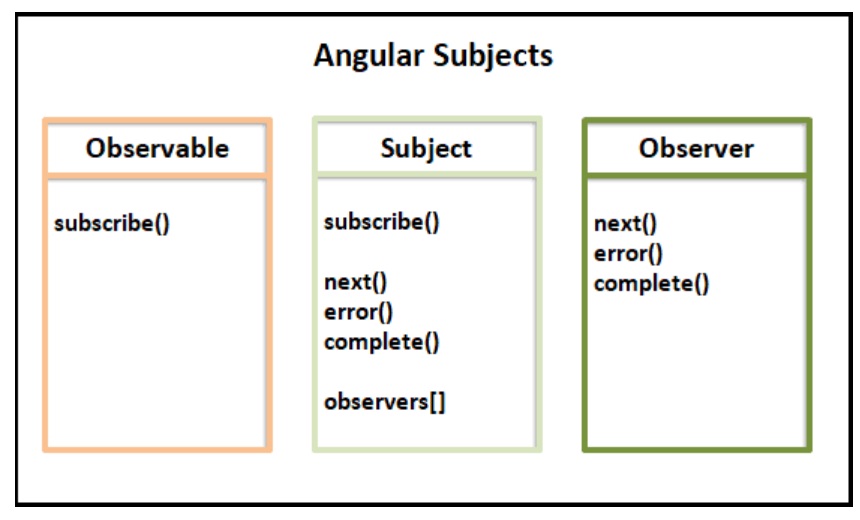
An Observer can subscribe to the Subject and receive value from it. Subject adds them to its collection observers. Whenever there is a value in the stream it notifies all of its Observers.
The Subject also implements the next, error & complete methods. Hence it can subscribe to another observable and receive values from it.
The following code shows how to create a subject in Angular.
app.component.ts
import { Component, VERSION } from "@angular/core";
import { Subject } from "rxjs";

@Component({
  selector: "my-app",
  templateUrl: "./app.component.html",
  styleUrls: ["./app.component.css"]
})
export class AppComponent {

  subject$ = new Subject();

  ngOnInit() {

    this.subject$.subscribe(val => {
      console.log(val);
    });

    this.subject$.next("1");
    this.subject$.next("2");
    this.subject$.complete();
  }
}
The code that creates a subject.
subject$ = new Subject();
We subscribe to it just like any other observable.
this.subject$.subscribe(val => {
  console.log(val);
});
The subjects can emit values. You can use the next method to emit the value to its subscribers. Call the complete & error method to raise complete & error notifications.
this.subject$.next("1");
this.subject$.next("2");
this.subject$.complete();
//this.subject$.error("error")
That’s it.
The subject is observable. It must have the ability to emit a stream of values
The previous example shows, we can use the next method to emit values into the stream.
this.subject$.next("1");
this.subject$.next("2");
Observables are classified into two groups. Cold & Hot
The cold observable does not activate the producer until there is a subscriber. This is usually the case when the observable itself produces the data.
import { Component, VERSION } from "@angular/core";
import { Subject, of } from "rxjs";

import { Component, VERSION } from "@angular/core";
import { Observable, of } from "rxjs";

@Component({
  selector: "my-app",
  templateUrl: "./app.component.html",
  styleUrls: ["./app.component.css"]
})
export class AppComponent {
  obs1$ = of(1, 2, 3, 4);

  obs$ = new Observable(observer => {
    console.log("Observable starts");
    observer.next("1");
    observer.next("2");
    observer.next("3");
    observer.next("4");
    observer.next("5");
  });

  ngOnInit() {
    this.obs$.subscribe(val => {
      console.log(val);
    });
  }
}
The Producer is one that produces the data. In the above example above it is part of the observable itself. We cannot use that to emit data ourselves.
Even in the following code, the producer is part of the observable.
obs1$ = of(1, 2, 3, 4);
The producer produces the value only when a subscriber subscribes to it.
The hot observable does not wait for a subscriber to emit the data. It can start emitting the values right away. The happens when the producer is outside the observable.
Consider the following example. We have created an observable using subject. In the ngOnInit, we emit the values & close the Subject. That is without any subscribers.
Since there were no subscribers, no one receives the data. But that did not stop our subject from emitting data.
import { Component, VERSION } from "@angular/core";
import { Subject } from "rxjs";

@Component({
  selector: "my-app",
  templateUrl: "./app.component.html",
  styleUrls: ["./app.component.css"]
})
export class AppComponent {

  subject$ = new Subject();

  ngOnInit() {
    this.subject$.next("1");
    this.subject$.next("2");
    this.subject$.complete();
  }
}
Now, consider the following example. Here the subjects the values 1 & 2 are lost because the subscription happens after they emit values.
import { Component, VERSION } from "@angular/core";
import { Subject } from "rxjs";

@Component({
  selector: "my-app",
  templateUrl: "./app.component.html",
  styleUrls: ["./app.component.css"]
})
export class AppComponent {
  subject$ = new Subject();

  ngOnInit() {
    this.subject$.next("1");
    this.subject$.next("2");

    this.subject$.subscribe(val => {
      console.log(val);
    });

    this.subject$.next("3");
    this.subject$.complete();
  }
}
The observer needs to implement the next, error & Complete callbacks (all optional) to become an Observer
import { Component, VERSION } from "@angular/core";
import { Observable, Subject } from "rxjs";

@Component({
  selector: "my-app",
  templateUrl: "./app.component.html",
  styleUrls: ["./app.component.css"]
})
export class AppComponent {
  subject$ = new Subject();

  observable = new Observable(observer => {
    observer.next("first");
    observer.next("second");
    observer.error("error");
  });

  ngOnInit() {
    this.subject$.subscribe(val => {
      console.log(val);
    });

    this.observable.subscribe(this.subject$);
  }
}
The following example creates a Subject & and an Observable
We subscribe to the Subject in the ngOnInit method.
We also subscribe to the observable, passing the subject. Since the subject implements the next method, it receives the values from the observable and emits them to the subscribers.
The Subject here acts as a proxy between the observable & subscriber.
this.observable.subscribe(this.subject$);
Another important distinction between observable & subject is that subjects are multicast.
More than one subscriber can subscribe to a subject. They will share the same instance of the observable. This means that all of them receive the same event when the subject emits it.
Multiple observers of an observable, on the other hand, will receive a separate instance of the observable.
The Subjects are multicast.
Consider the following example, where we have an observable and subject defined. The observable generates a random number and emits it.
import { Component, VERSION } from "@angular/core";
import { from, Observable, of, Subject } from "rxjs";

@Component({
  selector: "my-app",
  templateUrl: "./app.component.html",
  styleUrls: ["./app.component.css"]
})
export class AppComponent {
  observable$ = new Observable<number>(subscriber => {
    subscriber.next(Math.floor(Math.random() * 200) + 1);
  });

  subject$ = new Subject();

  ngOnInit() {
    this.observable$.subscribe(val => {
      console.log("Obs1 :" + val);
    });

    this.observable$.subscribe(val => {
      console.log("Obs2 :" + val);
    });

    this.subject$.subscribe(val => {
      console.log("Sub1 " + val);
    });
    this.subject$.subscribe(val => {
      console.log("Sub2 " + val);
    });

    this.subject$.next(Math.floor(Math.random() * 200) + 1);
  }
}
We have two subscribers of the observable. Both these subscribers will get different values. This is because observable on subscription creates a separate instance of the producer. Hence each one will get a different random number
    this.observable$.subscribe(val => {
      console.log("Obs1 :" + val);
    });

    this.observable$.subscribe(val => {
      console.log("Obs2 :" + val);
    });
Next, we create two subscribers to the subject. The subject emits the value using the random number. Here both subscribets gets the same value.
    this.subject$.subscribe(val => {
      console.log("Sub1 " + val);
    });
    this.subject$.subscribe(val => {
      console.log("Sub2 " + val);
    });

    this.subject$.next(Math.floor(Math.random() * 200) + 1);
Whenever a subscriber subscribes to a subject, it will add it to an array of subscribers. This way Subject keeps track of its subscribers and emits the event to all of them.
What we have explained to you is a simple subject. But there are few other types of subjects. They are
We will talk about them in the next tutorial.
