
The Angular Team release a new version of the Angular at regular intervals. To keep up with the latest version, we need to update or upgrade our Angular Application. Starting from Angular 6, the process of upgrading or updating the Angular apps to the latest version has become very easy.
The Angular CLI Command ng update. makes it easier to update the application and its dependencies
ng update [options]
| OPTION | Alias | Default | DESCRIPTION |
|---|---|---|---|
| --all=true|false | false | selecting true will update all packages in package.json. | |
| --force=true|false | false | If true, forces the update even if the installed packages are incompatible with the update. if false, packages are not updated and the error message is shown | |
| --from=from | Version from which to migrate from. Only available with a single package being updated, and only on migration only. | ||
| --help=true|false| json| JSON | false | Shows a help message for this command in the console. | |
| --migrateOnly=true|false | false | Only perform a migration, does not update the installed version. | |
| --next=true|false | false | Use the largest version, including beta and RCs. | |
| --packageManager=npm|yarn | npm | The preferred package manager configuration files to use for registry settings | |
| --packages | The names of package(s) to update | ||
| --registry=registry | The NPM registry to use. | ||
| --to=to | Version up to which to apply migrations. Only available with a single package being updated, and only on migrations only. Requires from to be specified. Default to the installed version detected. |
Before upgrading, you need to know the features that are changed, new features that are added and more importantly the breaking changes that were introduced and API’s deprecated and or planned to be deprecated
To find out the list of changes/bug fixes in the new version of Angular, you can read it from the changelog.
Once you know the list of changes, the next step is to find out what needs to be changed in your app so that you can safely upgrade to the next version. This you can find out from the Angular Update Guide.
Once you open the above site, you need to follow these steps and the guide will list you the changes required
The Application tells you the steps needed to upgrade.
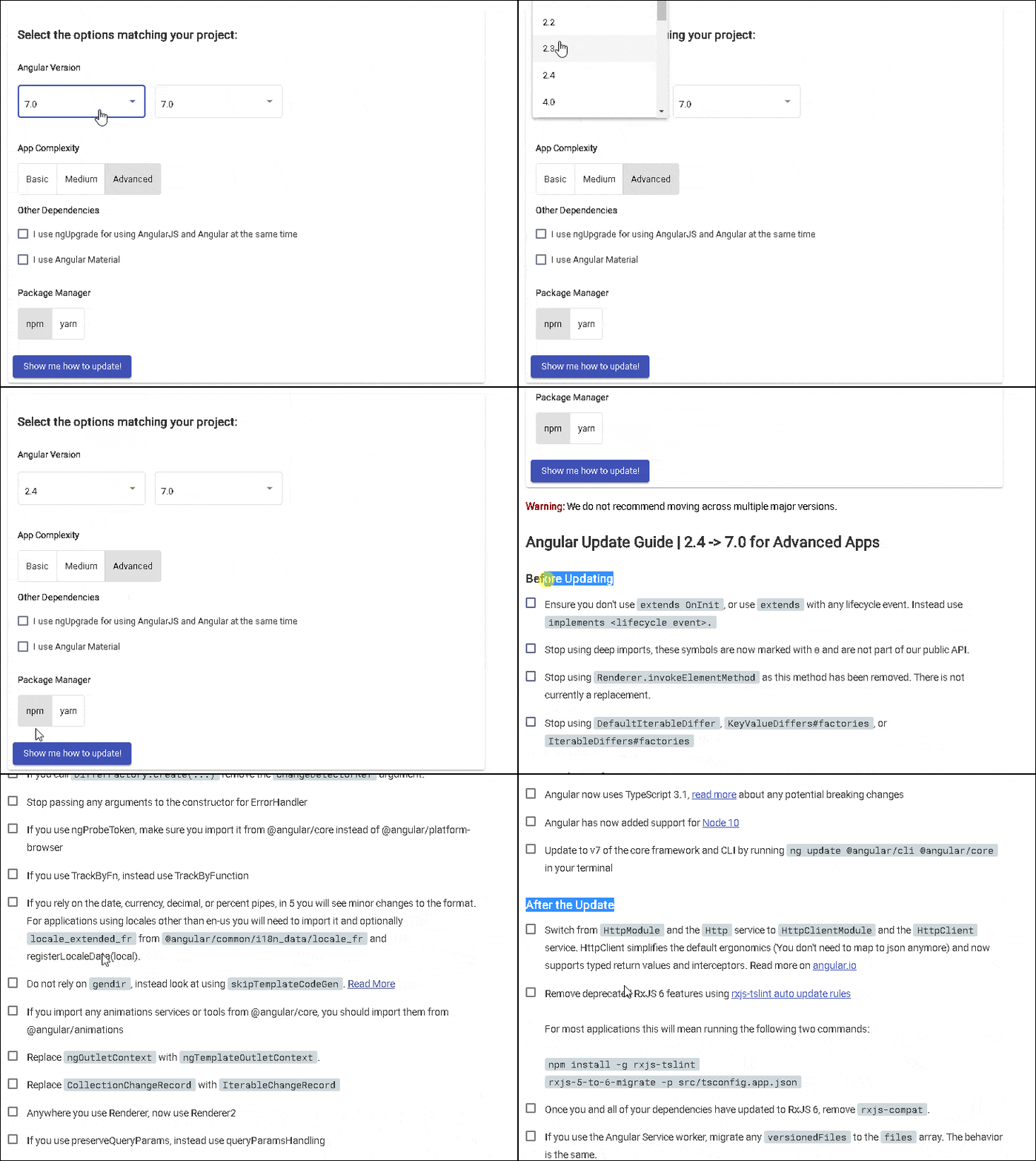
The above gives the detailed steps needed to update the Angular to the latest version. The list contains three sections. Before Update, During the update, After update . All you needed to is to follow those steps.
The steps mentioned in the previous section should be sufficient to upgrade the application. The above section contains the ng update commands needed to upgrade the app.
This section explains the steps involved in upgrading the Angular app using ng update
You can run the following command to update the Node.js or visit the Node.js website and download the latest version and install it
npm update -g //Updates Node
The following command installs the latest version of Angular CLI. The current version as of today is 7.1.0. Click to find out the Angular CLI Versions
npm install -g @angular/cli@latest   //Global installation
npm install @angular/cli@latest --save-dev   //local installation
Verify that Angular CLI Installed correctly by inspecting
thepackage.json file. The "@angular/cli": "^7.1.0" must be listed under the
"devDependencies"node. If it appears under the "dependencies", or
older version still exists then remove it. If the version is not the latest
version, then you can change it and then run npm install to update
it.
You can also install the older version of Angular CLI by appending the version no as shown below
npm install -g @angular/cli@latest   //Global installation
npm install @angular/cli@latest --save-dev   //local installation
If you are upgrading to an older version of Angular, for example, version 6, then it is
better to install the corresponding Angular CLI Version
Since, the Angular Version 6, the Angular CLI follows the same Version No as the Angular.
Hence for Angular 7, the corresponding version of the Angular CLI is 7.
The Angular CLI version 1.7 was for Angular 5 and Angular CLI 1.4 was for Angular 4
The next step is to update the various configuration files like angular.json, karma.conf.js etc. This is done by running the following command
ng update @angular/cli
The next step is to update the Angular Core packages & Dependencies. The following command updates the Angular core packages & rxjs.
ng update @angular/core
ng update rxjs
The Following gives you the list of packages (not all) that needs to be updated along with the command.
ng update
You can force Angular to update all the dependencies by using --all & --force flag
ng update --all --force
And if you encounter an error after running the above steps, then you can remove the
node_modules folder & package-lock.json file and run npm install
The Angular releases a Major version every six months. The minor updates & bug fixes are released much more frequently. Updating to the latest version once in a month or two makes it easier to upgrade. This keeps the changes to minimum & manageable.
The Major version of Angular may introduce a breaking change. It also may deprecate some of the API. All of these are available at Changelog. The deprecated changes are usually supported at least for two major versions as per the policy. This gives you at least one year to make the necessary changes. Plan and work on those changes
