
In this tutorial, we learn how to pass route params (Route Parameters)
to the Route in Angular. First, let us look at
how to define the route, which accepts the parameter. We then learn how to pass the angular route
params to the route using the routerLink
directive. Finally, we learn how to retrieve the parameters using the ActivatedRoute Service. The
parameters
can be retrieved by either reading the snapshot property or by subscribing to the
paramMap or params observation.
There are many scenarios, where you need to pass parameters to the route. For example, to navigate to the product detail view, we need to pass the id of the Product, so that component can retrieve it and display it to the user. This is where we use the Route Parameters (or Angular Route Params)
The Route Parameters are a dynamic part of the Route and essential in determining the route.
For example, consider the following route
{ path: 'product', component: ProductComponent }
The above route match only if the URL is /product
To retrieve the product details, our URL should look something like
/product/1 /product/2
Where the second URL segment ( 1 and 2 ) is the id of the product. The id is dynamic and changes as per the selected Product. To handle such a scenario angular router allows us to include route parameters , where we can send any dynamic value for a URL segment
Let us build on the Application we built in the Angular Routing tutorial.
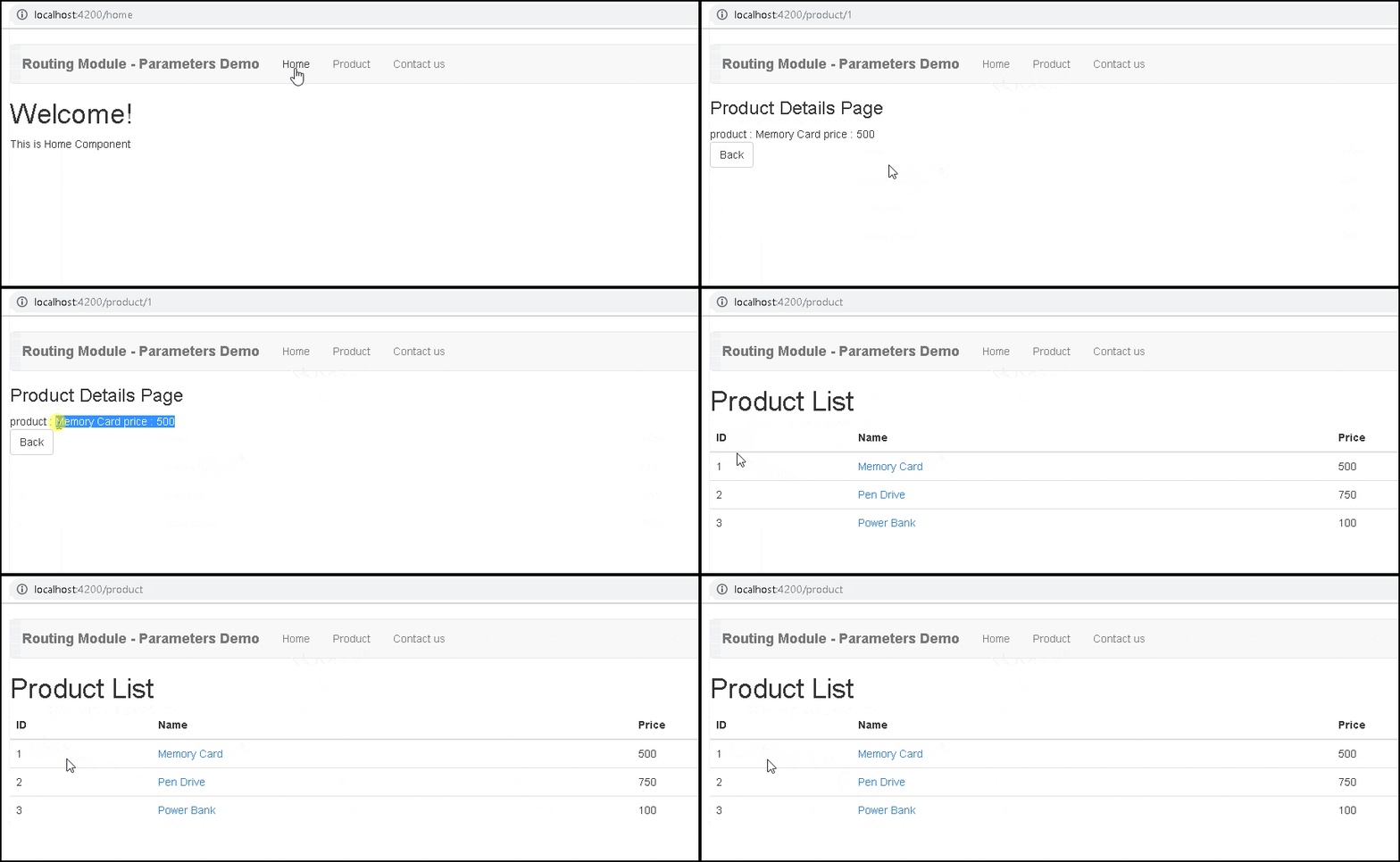
The application contains the Product and Product Details page. The Product detail page displays the product detail based on the Product Id passed in the URL. Since the Product Id is dynamic, we will pass it as a Route Parameter.
You can view the code from the stackblitz
Our first task is to create a Route with a dynamic Parameter. We know how to define Route from the Routing & Navigation tutorial
We can define parameters by adding a forward slash followed colon and a placeholder (id) as shown below
app.module.ts
{ path: 'product/:id', component: ProductDetailComponent }
Where id is the dynamic part of the Route.
Now above path matches the URLs /product/1,/product/2, etc.
If you have more than one parameter, then you can extend it by adding one more forward slash followed colon and a placeholder
{ path: 'product/:id/:id1/:id2', component: ProductDetailComponent }
The name id, id1 & id2 are placeholders for parameters. We will use them while retrieving the values of the parameters.
We, now need to provide both path and the route parameter routerLink directive.
This is done by adding the id of the product as the second element to the routerLink parameters array as shown below
<a [routerLink]="['/Product', ‘2’]">{{product.name}} </a>
Which translates to the URL /product/2
OR
product.component.ts
<a [routerLink]="['/Product', product.productID]">{{product.name}} </a>
Which, dynamically takes the value of the id from the product object.
You can also use the navigate method of the router object
goProduct() {
    this.router.navigate(
        ['/products'. product.productID] }
    );
}
Finally, our component needs to extract the route parameter from the URL
This is done via the ActivatedRoute service from the angular router module to get the parameter value
The ActivatedRoute is a service, which keeps track of the currently activated route associated with the loaded Component.
To use ActivatedRoute, we need to import it into our component
product-detail.component.ts
import { ActivatedRoute } from '@angular/router';
Then inject it into the component using dependency injection
product-detail.component.ts
product-detail.component.ts

constructor(private _Activatedroute:ActivatedRoute)
There are two properties that ActviatedRoute routes provide, which contain the Route Parameter.
The Angular adds the map of all the route parameters in the ParamMap object, which can be accessed from the ActivatedRoute service
The ParamMap has three methods, which makes it easier to work with the route parameters.
get method retrieves the value of the given parameter.
getAll method retrieves all parameters
has method returns true if the ParamMap contains a given parameter else false
The Angular ActviatedRoute also maintains the Route Parameters in the Params array. The Params array is a list of parameter values, indexed by name.
Angular announced that it will deprecate the Params but it has not done so.Params and QueryParams are not deprecated
There are two ways in which you can use the ActivatedRoute to get the parameter value from the ParamMap object.
The snapshot property returns the current value of the route.
It does not
contain any observable. Hence if the value changes after you retrieve the values, you will not
be notified of it. The snapshot contains both paramMap &
params array. You can use any of them
to read the value of id.
The following code reads the value from the paramMap object.
this.id=this._Activatedroute.snapshot.paramMap.get("id");
Code to read the router parameter from the params array.
this.id=this._Activatedroute.snapshot.params["id"];
The ActivatedRoute also contains the paramMap & params observable. We can subscribe to it and listen for changes. The paramMap observable emits the paramMap object, while the params observable emits the params array.
The following code subscribes to the paramMap observable. We use the get method to read the value of id.
this.id=this._Activatedroute.snapshot.params["id"];
The code to subscribe to the params observable
this._Activatedroute.params.subscribe(params => {
    this.id = params['id'];
});
We usually retrieve the value of the parameter in the ngOnInit life cycle hook, when the component is initialized.
When the user navigates to the component again, and if the component is already loaded then, Angular does not create the new component but reuses the existing instance. In such circumstances, the ngOnInit method of the component is not called again. Hence you need a way to get the value of the parameter.
By subscribing to the paramMap observable (or to the params observable), you will get a notification when the value changes. Hence you can retrieve the latest value of the parameter and update the component accordingly.
The above difference is explained in our next tutorial Angular child routes tutorial.
Here is the complete list of codes.
app.component.ts
import { Component } from '@angular/core';

@Component,({
  selector: 'app-root',
  template: `
    <div class="container">
    <nav class="navbar navbar-default">
      <div class="container-fluid">
        <div class="navbar-header">
          <a class="navbar-brand" [routerLink]="['/']"
            ><strong> {{ title }} </strong></a
          >
        </div>
        <ul class="nav navbar-nav">
          <li><a [routerLink]="['home']">Home</a></li>
          <li><a [routerLink]="['product']">Product</a></li>
          <li><a [routerLink]="['contact']">Contact us</a></li>
        </ul>
      </div>
    </nav>

    <router-outlet></router-outlet>
  </div>

  `,
})
export class AppComponent {
  title = 'Route Parameters Demo';
}
The routerlink directive code creates the HTML link and binds the click event of the link to a route. Clicking on the Product link will direct us to the product route. The routes are defined in the app.module.
<li><a [routerLink]="['home']">Home</a></li>
<li><a [routerLink]="['product']">Product</a></li>
<li><a [routerLink]="['contact']">Contact us</a></li>
export class Product {

  constructor(productID:number,    name: string ,   price:number) {
      this.productID=productID;
      this.name=name;
      this.price=price;
  }

  productID:number ;
  name: string ;
  price:number;

}
import { Observable } from 'rxjs';
import { Product } from './product';

export class ProductService {
  public getProducts() {
    let products: Product[];

    products = [
      new Product(1, 'Memory Card', 500),
      new Product(2, 'Pen Drive', 750),
      new Product(3, 'Power Bank', 100),
    ];

    return products;
  }

  public getProduct(id) {
    let products: Product[] = this.getProducts();
    return products.find((p) => p.productID == id);
  }
}
import { Component, OnInit } from '@angular/core';

import { ProductService } from './product.service';
import { Product } from './product';

@Component,({
  template: `

  <h1>Product List</h1>
  <div class='table-responsive'>
      <table class='table'>
          <thead>
              <tr>
                  <th>ID</th>
                  <th>Name</th>
                  <th>Price</th>
              </tr>
          </thead>
          <tbody>
              <tr *ngFor="let product of products;">
                  <td>{{product.productID}}</td>
                  <td><a [routerLink]="['/product',product.productID]">{{product.name}} </a> </td>
                  <td>{{product.price}}</td>
              </tr>
          </tbody>
      </table>
  </div>

  `,
})
export class ProductComponent {
  products: Product[];

  constructor(private productService: ProductService) {}

  ngOnInit() {
    this.products = this.productService.getProducts();
  }
}
In the Product Component, we have added product.productID as the second argument to the routerLink parameters array.
<a [routerLink]="['/product',product.productID]">{{product.name}} </a>
import { Component, OnInit, OnDestroy } from '@angular/core';
import { Router, ActivatedRoute } from '@angular/router';

import { ProductService } from './product.service';
import { Product } from './product';

@Component,({
  template: `

  <h3>Product Details Page</h3>


product : {{product.name}}
price : {{ product.price}}
<p>
    <a class='btn btn-default' (click)="onBack()">Back </a>
</p>
  `,
})
export class ProductDetailComponent implements OnInit {
  product: Product;
  id;

  constructor(
    private _Activatedroute: ActivatedRoute,
    private _router: Router,
    private _productService: ProductService
  ) {}

  /* Using snapshot */
  //ngOnInit() {
  //  this.id = this._Activatedroute.snapshot.paramMap.get('id');
  //
  //  //You can use this also
  //  //this.id=this._Activatedroute.snapshot.params['id'];

  //  let products = this._productService.getProducts();
  //  this.product = products.find((p) => p.productID == this.id);
  //}

  /* Using Subscribe */

  sub;

  ngOnInit() {
    this.sub = this._Activatedroute.paramMap.subscribe((params) => {
      console.log(params);
      this.id = params.get('id');
      let products = this._productService.getProducts();
      this.product = products.find((p) => p.productID == this.id);
    });

    //You can also use this
    //this.sub=this._Activatedroute.params.subscribe(params => {
    //    this.id = params['id'];
    //    let products=this._productService.getProducts();
    //    this.product=products.find(p => p.productID==this.id);
    //});
  }

  ngOnDestroy() {
    if (this.sub) this.sub.unsubscribe();
  }

  onBack(): void {
    this._router.navigate(['product']);
  }
}
In the ProductDetailComponent, we have imported router and ActivatedRoute from the angular router module
import { Component, OnInit, OnDestroy } from '@angular/core';
import { Router,ActivatedRoute } from '@angular/router';
In the constructor, we inject the ActivatedRoute, Router service along with ProductService
constructor(private _Activatedroute:ActivatedRoute,
        private _router:Router,
        private _productService:ProductService){
   }
Finally, we use ngOninit life cycle hook to retrieve the value of the id parameter and use that value to retrieve the details of the product.
Note that, there are two ways, by which you can retrieve the data.
Using snapshot
/* Using snapshot */
  ngOnInit() {
    this.id = this._Activatedroute.snapshot.paramMap.get('id');

    //You can use this also
    //this.id=this._Activatedroute.snapshot.params['id'];

    let products = this._productService.getProducts();
    this.product = products.find((p) => p.productID == this.id);
  }
Subscribing to paramMap observable
We used the snapshot method to retrieve the parameter in the ProductDetailcomponet.ts. To Subscribe to params remove the ngOnInit and replace it with the following code
We recommend you use the subscribe method as it offers the benefit of responding to the parameter changes dynamically.
sub;

  ngOnInit() {
    this.sub = this._Activatedroute.paramMap.subscribe((params) => {
      console.log(params);
      this.id = params.get('id');
      let products = this._productService.getProducts();
      this.product = products.find((p) => p.productID == this.id);
    });

    //You can also use this
    //this.sub=this._Activatedroute.params.subscribe(params => {
    //    this.id = params['id'];
    //    let products=this._productService.getProducts();
    //    this.product=products.find(p => p.productID==this.id);
    //});
  }
import { BrowserModule } from '@angular/platform-browser';
import { NgModule } from '@angular/core';
import { FormsModule } from '@angular/forms';

import { RouterModule } from '@angular/router';

import { AppComponent } from './app.component';
import { HomeComponent } from './home.component';
import { ContactComponent } from './contact.component';
import { ProductComponent } from './product.component';
import { ErrorComponent } from './error.component';
import { ProductDetailComponent } from './product-detail.component';

import { ProductService } from './product.service';

import { HttpClientModule } from '@angular/common/http';
import { Routes } from '@angular/router';

export const appRoutes: Routes = [
  { path: 'home', component: HomeComponent },
  { path: 'contact', component: ContactComponent },
  { path: 'product', component: ProductComponent },
  { path: 'product/:id', component: ProductDetailComponent },
  { path: '', redirectTo: 'home', pathMatch: 'full' },
  { path: '**', component: ErrorComponent },
];

@NgModule({
  declarations: [
    AppComponent,
    HomeComponent,
    ContactComponent,
    ProductComponent,
    ErrorComponent,
    ProductDetailComponent,
  ],
  imports: [
    BrowserModule,
    FormsModule,
    HttpClientModule,
    RouterModule.forRoot(appRoutes),
  ],
  providers: [ProductService],
  bootstrap: [AppComponent],
})
export class AppModule {}
The route to the Product Detail Component
{ path: 'product/:id', component: ProductDetailComponent },
import { Component } from '@angular/core';

@Component({
  template: `<h1>Contact Us</h1>
                <p>TekTutorialsHub </p>
                `,
})
export class ContactComponent {}
import { Component } from '@angular/core';

@Component({
  template: `<h1>Welcome!</h1>
              <p>This is Home Component </p>
             `,
})
export class HomeComponent {}
import { Component } from '@angular/core';

@Component,({
  template: `<h1>Page not found</h1>
               <p>This is a Error Page</p>
              `,
})
export class ErrorComponent {}
The ActivatedRoute service has a great deal of useful information including:
url: This property returns an array of Url Segment objects, each of which describes a single segment in the URL that matched the current route.
params: This property returns a Params object, which describes the URL parameters, indexed by name.
queryParams: This property returns a Params object, which describes the URL query parameters, indexed by name.
fragment: This property returns a string containing the URL fragment.
Snapshot: The initial snapshot of this route
data: An Observable that contains the data object provided for the route
Component: The component of the route. It’s a constant
outlet: The name of the RouterOutlet used to render the route. For an unnamed outlet, the outlet name is primary.
outlet: The name of the RouterOutlet used to render the route. For an unnamed outlet, the outlet name is primary.
routeConfig: The route configuration used for the route that contains the origin path.
parent: an ActivatedRoute that contains the information from the parent route when using child routes.
firstChild: contains the first ActivatedRoute in the list of child routes.
children: contains all the child routes activated under the current route
pathFromRoot: The path from the root of the router state tree to this route
We looked at how to pass parameters or data to the Route. The parameters are passed to the route by using routerLink parameters in the routerLink directive. We retrieve the parameters from ActivatedRoute service by reading the paramMap collection of the snapshot object or by subscribing to the paramMap observable.
