
The pipe method of the Angular Observable is used to chain multiple operators together. We can use the pipe as a standalone method, which helps us to reuse it at multiple places or as an instance method. In this tutorial, we will take a look at the pipe and learn how to use it in an Angular Application. We will show you examples of pipe using map, filter & tap operators
The operators are very important components of the Rxjs library. They are functions that take an observable as input and transform it into a new observable and return it. We use them to manipulate the observable data stream.
For Example.
Map operator applies a given project function to each value emitted by the source Observable and emits the resulting values as an Observable.
Filter operator filter items from the source observable based on some condition and returns the filtered value as a new observable
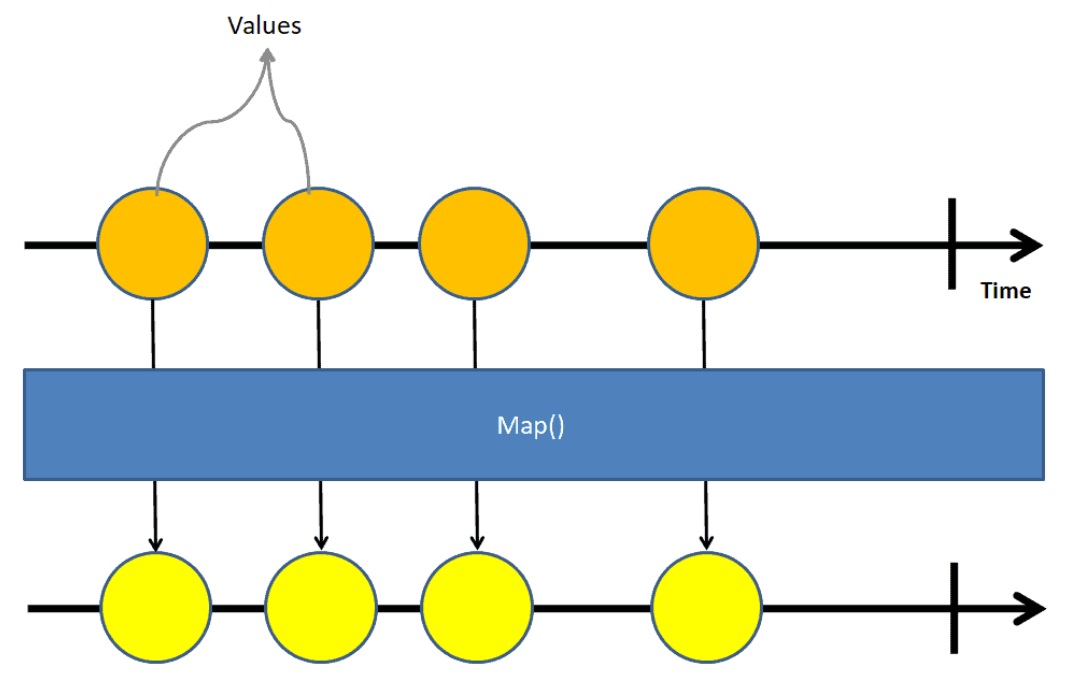
The following table lists some of the commonly used operators
| AREA | OPERATORS |
|---|---|
| Combination | combineLatest, concat, merge, startWith , withLatestFrom, zip |
| Filtering | debounceTime, distinctUntilChanged,filter, take ,takeUntil ,takeWhile ,takeLast ,first ,last ,single ,skip ,skipUntil ,skipWhile,skipLast , |
| Transformation | bufferTime, concatMap ,map ,mergeMap ,scan ,switchMap ,ExhaustMap ,reduce |
| Utility | tap ,delay ,delaywhen |
| Error Handling | throwerror, catcherror, retrywhen, |
| Multicasting | share |
The pipe method accepts operators such as filter, map, as arguments. Each argument must be separated by a comma. The order of the operators is important because when a user subscribes to an observable, the pipe executes the operators in a sequence in which they are added.
There are two ways we can use the pipe. One as an instance of observable and the other way is to use if as standalone method
To use observable we need it to import from the rxjs library. If you are intend to use the pipe standalone function, then you also need to import it as well. All the operators are available in the library rxjs/operators.
import { Observable, of, pipe} from 'rxjs';
import { map, filter, tap } from 'rxjs/operators'
The pipe as an instance method is used as below. We the operators op1, op2 etc are passed as the argument to pipe method. The output of op1 method becomes input of the op2 operator and so forth.
obs.pipe(
  op1(),
  op2(),
  op3(),
  op3(),
)
Here is the example of using pipe with map & filter operator.
import { Component, OnInit } from '@angular/core';
import { Observable, of} from 'rxjs';
import { map, filter, tap } from 'rxjs/operators'


@Component({
  selector: 'app-root',
  templateUrl: './app.component.html',
  styleUrls: ['./app.component.css']
})
export class AppComponent implements OnInit {

  obs = new Observable((observer) => {
    observer.next(1)
    observer.next(2)
    observer.next(3)
    observer.next(4)
    observer.next(5)
    observer.complete()
  }).pipe(
    filter(data => data > 2),                    //filter Operator
    map((val) => {return val as number * 2}),    //map operator
  )

 data = [];

  ngOnInit() {
    this.obs1.subscribe(
      val => {
        console.log(this.data)
      }
    )
  }

}


//result
[6, 8, 10]
The following example makes use of pipe with map, filter & tap operator. The tap operator returns a new observable which is a mirror copy of the source observable. We use it mostly for debugging purposes ( for example for logging the values of observable as shown below).
import { Component, OnInit } from '@angular/core';
import { Observable, of, pipe } from 'rxjs';
import { map, filter, tap } from 'rxjs/operators'


@Component({
  selector: 'app-root',
  templateUrl: './app.component.html',
  styleUrls: ['./app.component.css']
})
export class AppComponent implements OnInit {

  obs = new Observable((observer) => {
    observer.next(1)
    observer.next(2)
    observer.next(3)
    observer.next(4)
    observer.next(5)
    observer.complete()
  }).pipe(
    tap(data => console.log('tap '+data)),           //tap
    filter(data => data > 2),                        //filter
    tap(data => console.log('filter '+data)),        //tap
    map((val) => { return val as number * 2 }),      //map
    tap(data => console.log('final '+data)),         //tap
  )


  data = [];

  ngOnInit() {

    this.obs.subscribe(
      val => {
        this.data.push(val)
        console.log(this.data)
      }
    )

  }
}
We can also use the pipe as a standalone function to compose operators and re use the pipe at other places.
import { Component, OnInit } from '@angular/core';
import { Observable, of, pipe } from 'rxjs';
import { map, filter, tap } from 'rxjs/operators'


@Component({
  selector: 'app-root',
  templateUrl: './app.component.html',
  styleUrls: ['./app.component.css']
})
export class AppComponent implements OnInit {


  customOperator = pipe(
    tap(data => console.log('tap '+data)),
    filter(data => data > 2),
    tap(data => console.log('filter '+data)),
    map((val) => {
      return val as number * 2
    }),
    tap(data => console.log('final '+data)),
  );


  obs = new Observable((observer) => {
    observer.next(1)
    observer.next(2)
    observer.next(3)
    observer.next(4)
    observer.next(5)
    observer.complete()
  }).pipe(
    this.customOperator,
    tap(data => console.log('final '+data)),
  )


  data = [];

  ngOnInit() {

    this.obs.subscribe(
      val => {
        this.data.push(val)
        console.log(this.data)
      }
    )

  }
}
You can also use the stand alone pipe as shown below.
  customOperator = pipe(
    tap(data => console.log('tap '+data)),
    filter(data => data > 2),
    tap(data => console.log('filter '+data)),
    map((val) => {
      return val as number * 2
    }),
    tap(data => console.log('final '+data)),
  );


  obs = new Observable((observer) => {
    observer.next(1)
    observer.next(2)
    observer.next(3)
    observer.next(4)
    observer.next(5)
    observer.complete()
  })

  ngOnInit() {
    this.customOperator(this.obs).subscribe();
  }
