
Angular Pipes takes data as input and formats or transform the data to display in the template. We use them to change the appearance of the data before presenting it to the user. The most common use case of pipes is displaying the dates in the correct format as per the user’s locale.
In this tutorial, we will show you how to use Angular Pipes. We will see how to pass arguments to the pipe and how to chain multiple pipes. We are also going to look at the few of the angular built-in pipes like currency pipe, date pipe, number pipe,percent pipe ,decimal pipe, & slice pipe etc.
The syntax of the pipe is as follows
Expression | pipeOperator[:pipeArguments]
Where
Expression
: is the expression, which you want to transform
|
: is the Pipe Character
pipeOperator
: name of the Pipe
pipeArguments
: arguments to the Pipe
In this example let use Angular built in date pipe to transform the date
import { Component } from '@angular/core';
import { FormsModule } from '@angular/forms';

@Component({
    selector: 'app-root',
    templateUrl: `<p> Unformatted date : {{toDate }} </p>
                  <p> Formatted date : {{toDate | date}} </p>`
})
export class AppComponent
{
    title: string = 'pipe Example' ;
    toDate: Date = new Date();
}
In the above example, we are taking current date and transforming it into the easily readable format using the date pipe. We have included the unformatted date format for comparison. The output is as shown below
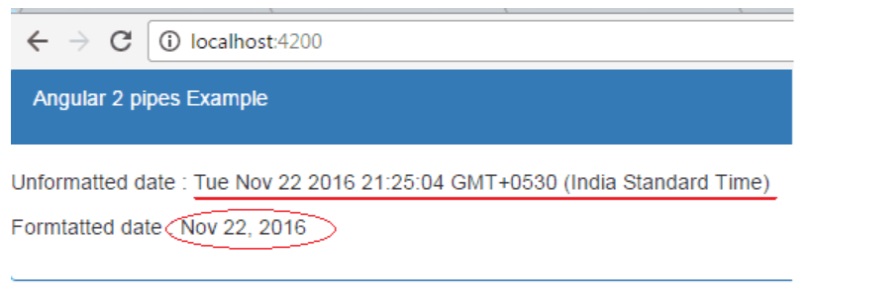
Example of Angular Pipes
We can also pass optional arguments to the pipe. The arguments are added to the pipe using a colon (:) sign followed by the value of the argument. If there are multiple arguments separate each of them with the colon (:). For example, we can pass the format as the argument to the date pipe, which is Optional. The medium is one of the valid value of the format argument, which displays the date in yMMMdjms format. The example code is as shown below.
{{toDate | date:'medium'}}
The parameter medium displays the date as Nov 22,2016, 10:04:10 PM
Pipes can be chained together to make use of multiple pipes in one expression. For example in the following code, the toDate is passed to the Date Pipe. The output of the Date pipe is then passed to the uppercase pipe.
{{toDate | date:'medium'}}
The Angular has several built-in pipes, which you can use in your application. You can read about them from thislink
Some of the important pipes are Date Pipe, Uppercase Pipe,Lowercase Pipe,Number Pipe/ Decimal Pipe,Currency Pipe, and Percent Pipe, etc
The Date pipe formats the date according to locale rules. The syntax of the date pipe is as shown below
{{toDate | date:'medium'}}
Where
date_expression is a date object or a number
date is the name of the pipe
format format is the date and time format string which indicates the format in which date/time components are displayed.
Some of the common format strings are
| Component | format | Example |
|---|---|---|
| Year | y | 2016 |
| Year | yy | 16 |
| Month | M | 9 |
| Month | M | 99 |
| Month | MMM | Nov |
| Month | MMMM | November |
| Day | d | 9 |
| Day | dd | 09 |
| hour | j | 9 |
| hour | jj | 09 |
| hour | h | 9 AM |
| hour | hh | 09 AM |
| hour24 | H | 13 |
| hour24 | HH | 13 |
| minute | m | 9 |
| minute | mm | 09 |
| second | s | 9 |
| second | ss | 99 |
| second | ss | 99 |
| Time zone | z | Pacific Standard time |
| Time zone | Z | GMT-8:00 |
| Time zone | a | PM |
| era | G | AD |
| era | GGGG | Anno Domini |
| Format Name | Equivalent Format strng | Example(for en-US) |
|---|---|---|
| medium | yMMMdjms | Sep 3, 2010, 12:05:08 PM |
| short | yMdjm | 9/3/2010, 12:05 PM |
| fullDate | yMMMMEEEEd | Friday, September 3, 2010 |
| longDate | yMMMMd | September 3, 2010 |
| mediumDate | yMMMd | Sep 3, 2010 |
| shortDate | yMd | 9/3/2010 |
| mediumTime | jms | 12:05:08 PM |
| shortTime | jm | 12:05 PM |
Format argument also supports some predefined commonly used formats
You can read about the complete list from link
import { Component } from '@angular/core';
import { FormsModule } from '@angular/forms';
@Component({
    selector: 'app-root',
    template:`<p>medium : {{toDate | date:'medium'}} </p>
              <p>short : {{toDate | date:'short'}} </p>
              <p>fullDate : {{toDate | date:'fullDate'}} </p>
              <p>longDate : {{toDate | date:'longDate'}} </p>
              <p>mediumDate : {{toDate | date:'mediumDate'}} </p>
              <p>shortDate : {{toDate | date:'shortDate'}} </p>
              <p>mediumTime : {{toDate | date:'mediumTime'}} </p>
              <p>dd-MM-y : {{toDate | date:'dd-MM-y'}} </p>
              <p>dd-MM-yy HH:mm : {{toDate | date:'dd-MM-yy HH:mm'}} </p>`
})
export class AppComponent
{
    title: string = 'Angular pipes Example' ;
    toDate: Date = new Date();
}
As the name suggests, these pipes transform the string to Uppercase or lowercase
import { Component } from '@angular/core';
import { FormsModule } from '@angular/forms';

@Component({
    selector: 'app-root',
    template:`<p>Unformatted :{{msg}} </p>
              <p>Uppercase :{{msg | uppercase}} </p>
              <p>Lowercase :{{msg | lowercase}} </p>`
})
export class AppComponent
{
    title: string = 'Angular pipes Example' ;
    msg: string= 'Welcome to Angular';
}
Read more about uppercasepipe & lowercasepipe
Creates a new List or String containing a subset (slice) of the string or array. This Pipe uses the JavaScript API Array.prototype.slice() and String.prototype.slice().
array_or_string_expression | slice:start[:end]
Where
array_or_string_expression is the string to slice
slice is the name of the pipe
start is the start position/index from where the slicing will start
end is the ending index/position in the array/string
The slice pipes take two arguments. The first argument start is the starting index of the string/array. The second argument end is the ending index of the string/array. If the start or end index is negative then the index is counted from end of the string/array
import { Component } from '@angular/core';
import { FormsModule } from '@angular/forms';
@Component({
    selector: 'app-root',
    template:`<p>Complete String :{{msg}} </p>
              <p>Example 1 :{{msg | slice:11:20}} </p>
              <p>Example 2 :{{msg | slice:-9}} </p>`
})

export class AppComponent
{
    title: string = 'Angular pipes Example' ;
    msg: string= 'Welcome to Angular ';
}

Both the above examples will d
Both the above examples will display Angular. You can read more about slice from this link
The Decimal Pipe is used to Format a number as Text. This pipe will format the number according to locale rules.
number_expression | number[:digitInfo]
Where
number_expression is the number you want to format
number is the name of the pipe
digitInfo is a string which has the following format
{minIntegerDigits}.{minFractionDigits}-{maxFractionDigits}Where
minIntegerDigits is the minimum number of integer digits to use. Defaults to 1.
minFractionDigits is the minimum number of digits after fraction. Defaults to 0.
maxFractionDigits is the maximum number of digits after fraction. Defaults to 3.
import { Component } from '@angular/core';
import { FormsModule } from '@angular/forms';
@Component({
    selector: 'app-root',
    template: `<p> Unformatted :{{num}}</p>
               <p> Formatted :{{num | number}}</p>
               <p> Formatted :{{num | number:'3.1-2'}}</p>
               <p> Formatted :{{num | number:'7.1-5'}} </p>`
})

export class AppComponent
{
    title: string = 'Angular pipes Example' ;
    num: number= 9542.14554;
}
Formats the given number as a percentage according to locale rules.
number_expression | percent[:digitInfo]
Where
number_expression is the number you want to format
percent is the name of the pipe
digitInfo is a string which has the following format. It is similar to used in decimal pipe
import { Component } from '@angular/core';
import { FormsModule } from '@angular/forms';

@Component({
    selector: 'app-root',
    template:`<p>Unformatted :{{per}} </p>
              <p>Example 1 :{{per | percent }} </p>
              <p>Example 2 :{{per | percent:'1.2-2'}} </p>`
})
export class AppComponent
{
    title: string = 'Angular pipes Example' ;
    per: number= .7414;2';
}
More about Percent pipe from the link
Formats a number as currency using locale rules.
number_expression | currency[:currencyCode[:symbolDisplay[:digitInfo]]]
Where
number_expression currency to format a number as currency.
Currency is the name of the pipe
currencyCode is the ISO 4217 currency code, such as USD for the US dollar and EUR for the euro.
symbolDisplay is a boolean indicating whether to use the currency symbol or code. Use true to display symbol and false to use code
digitInfois similar to the one used in decimal pipe
import { Component } from '@angular/core';
import { FormsModule } from '@angular/forms';
@Component({
    selector: 'app-root',
    template: `<p>Unformatted :{{cur}} </p>
               <p>Example 1 :{{cur | currency }} </p>
               <p>Example 2 :{{cur | currency:'INR':true:'4.2-2'}} </p>`
})

export class AppComponent
{
    title: string = 'Angular pipes Example' ;
    cur: number= 175;
}
Read more about the currencyPipe from the link
