
We use select options when there are many options to choose from. Learn how to use them in Angular. We will show you how to set the Default Value for the select. Listen to the Select option change event and react to it. Dynamically update the Dropdown list option & Dynamically Set Value etc. We will cover both Reactive Forms & Template-driven forms.
Create a contactForm using the Reactive Form as shown below. The Form has only one Formcontrol field i.e. country. The value for the country is going to come from the countries array. We will store the id in the country field
export class AppComponent implements OnInit  {

  contactForm:FormGroup;

  countries = [
    { id: 1, name: "United States" },
    { id: 2, name: "Australia" },
    { id: 3, name: "Canada" },
    { id: 4, name: "Brazil" },
    { id: 5, name: "England" }
  ];

  constructor(private fb:FormBuilder) {
  }

  ngOnInit() {

    this.contactForm = this.fb.group({
      country: [null]
    });
  }

  submit() {
    console.log("Form Submitted")
    console.log(this.contactForm.value)
  }

}
The select option for the country is as shown below.
<form [formGroup]="contactForm" (ngSubmit)="submit()">

<p>

  <select formControlName="country">
    <option [ngValue]="null" disabled>Select Country</option>
    <option *ngFor="let country of countries" [ngValue]="country.id">{{country.name}}</option>
  </select>

  <button type="submit">Submit</button>
</p>

</form>
The formControlName directive maps the select to the country field of the contactForm. (<select> < formControlName="country">)
<option> <[ngValue]="null" disabled> displays the Select Country when no value for country is selectedor country is null
The ngFor loops through the "countries" array and displays the country.name in the drop down. You can also display the country.name - country.id or any other property of the country
We want to return the id of the country. Hence we use the [ngValue]="country.id". You can also use [ngValue]="country", in which case it will return the country object.
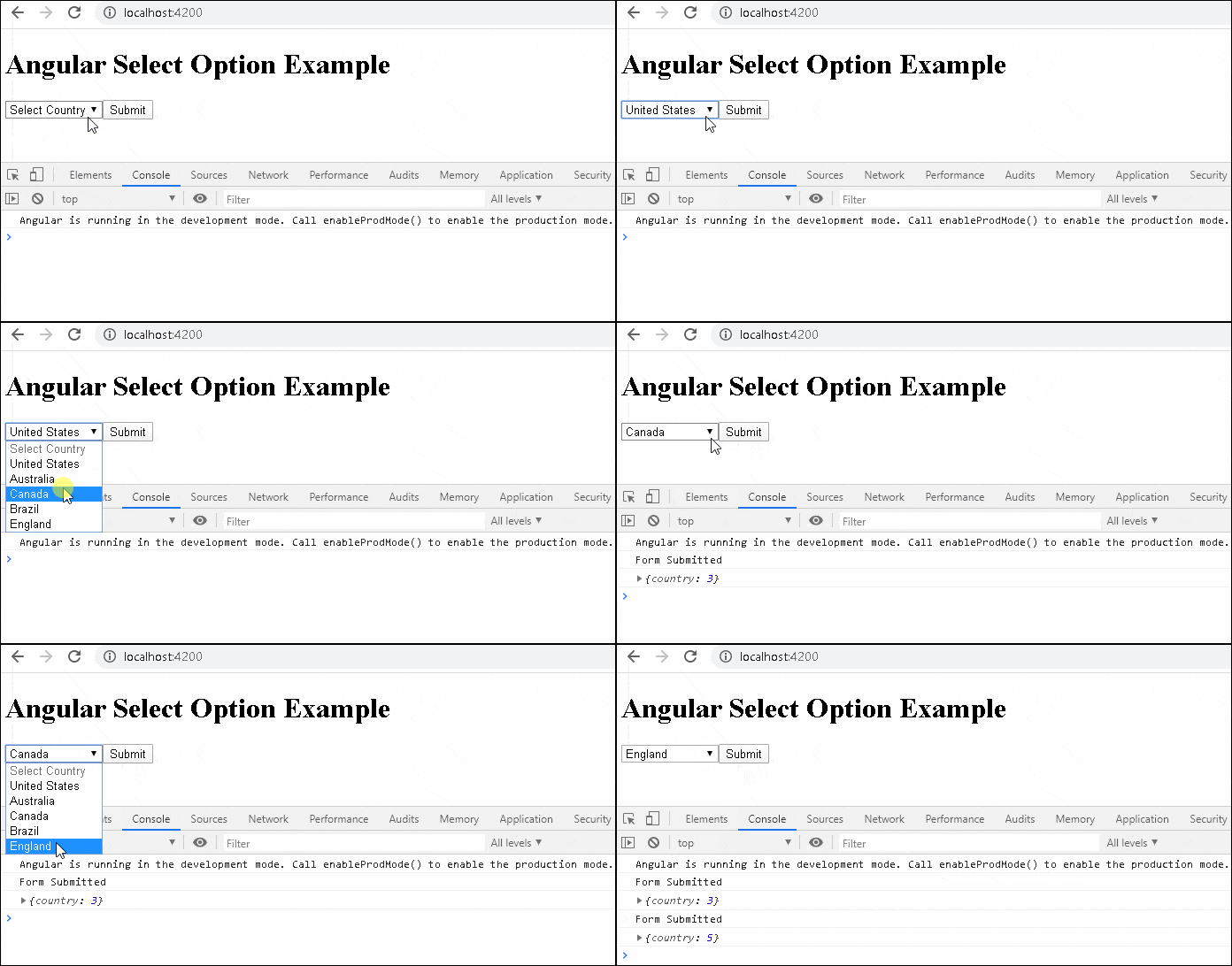
We can set the value of a FormControl using either setValue or patchValue.
Set the default values when defining the form to pass the default value. The following code sets the default country as Australia. This works only once when we load the component for the first time
ngOnInit() {
    this.contactForm = this.fb.group({
      country: [2]
    });
)
The other method is to create a separate setDefaults method, which you call any time.
ngOnInit() {

  this.contactForm = this.fb.group({
    country: [null]
  });

  this.setDefaults();
}

setDefaults() {
  this.contactForm.get("country").patchValue(null);
}
Listen to the change event using the valueChanges event as shown below.
  this.contactForm.get("country").valueChanges
    .subscribe(f=> {
      this.onCountryChanged(f);
  })

  onCountryChanged(value) {
    console.log('onCountryChanged')
    console.log(value)
  }
You can dynamically add or remove options from the countries array and it will reflect in the drop down immediately.
Ask for the new country in template.
//Template

<p>
  <input [(ngModel)]="country_name">
  <button (click)="addCountry()">Add</button>
</p>
And add it to countries array after verifying it does not exists.
//Component

 country_name="";

 addCountry() {
    const country = this.countries.find(el => el.name === this.country_name);
    if (!country) {
      let id=Math.max.apply(Math, this.countries.map(function(o) { return o.id; }))
      this.countries.push({id:id+1, name:this.country_name})
      this.country_name="";
    }
  }
The following dynamically changes the value of the country via code.
//Template

<p>
  <input [(ngModel)]="set_country">
  <button (click)="setCountry()">Set Country</button>
</p>
//Component

set_country="";

setCountry() {
  const country = this.countries.find(el => el.name === this.set_country);
  if (country) {
    this.contactForm.get("country").patchValue(country.id);
  }
}
The final application
Complete Code
app.component.html
app.component.html

<h1> Angular Select Option Example</h1>

<form [formGroup]="contactForm" (ngSubmit)="submit()">

<p>

  <select formControlName="country">
    <option [ngValue]="null" disabled>Select Country</option>
    <option *ngFor="let country of countries" [ngValue]="country.id">{{country.name}}</option>
  </select>

  <button type="submit">Submit</button>
</p>

</form>

<p>
  <input [(ngModel)]="country_name">
  <button (click)="addCountry()">Add</button>
</p>


<p>
  <input [(ngModel)]="set_country">
  <button (click)="setCountry()">Set Country</button>
</p>
import { Component, ViewChild, OnInit } from '@angular/core';
import { NgForm, FormGroup, FormControl, FormBuilder } from '@angular/forms';

@Component({
  selector: 'app-root',
  templateUrl: './app.component.html',
  styleUrls: ['./app.component.css']
})
export class AppComponent implements OnInit {

  title = 'Angular Select Options Example';
  contactForm: FormGroup;

  constructor(private fb: FormBuilder) {
  }

  country_name="";
  set_country="";

  countries = [
    { id: 1, name: "United States" },
    { id: 2, name: "Australia" },
    { id: 3, name: "Canada" },
    { id: 4, name: "Brazil" },
    { id: 5, name: "England" }
  ];


  ngOnInit() {

    this.contactForm = this.fb.group({
      country: [null]
    });

    this.setDefaults();

    this.contactForm.get("country").valueChanges
      .subscribe(f => {
        this.onCountryChanged(f);
      })
  }

  submit() {
    console.log("Form Submitted")
    console.log(this.contactForm.value)
  }

  setDefaults() {
    this.contactForm.get("country").patchValue(null);
  }

  onCountryChanged(value) {
    console.log('onCountryChanged')
    console.log(value)
  }

  addCountry() {
    const country = this.countries.find(el => el.name === this.country_name);
    if (!country) {
      let id=Math.max.apply(Math, this.countries.map(function(o) { return o.id; }))
      this.countries.push({id:id+1, name:this.country_name})
      this.country_name="";
    }
  }

  setCountry() {
    const country = this.countries.find(el => el.name === this.set_country);
    if (country) {
      this.contactForm.get("country").patchValue(country.id);
    }
  }
}
The following is the code for the select options in Template Driven Forms. Also refer to the tutorial on how to set value in template driven forms.
We get the reference to the contactForm using the @ViewChild.
Use the setTimeout() to wait for a change detection cycle so that the @ViewChild updates the reference to the contactForm. Without it the contactForm will return null.
To Listen to the change we use the event binding using the (ngModelChange)="onCountryChanged($event)". We can also use the valueChanges
Rest of the code is very similar to the Reactive forms.
import { Component, ViewChild, OnInit } from '@angular/core';
import { NgForm, FormGroup, FormControl, FormBuilder } from '@angular/forms';

@Component({
  selector: 'app-root',
  templateUrl: './app.component.html',
  styleUrls: ['./app.component.css']
})
export class AppComponent implements OnInit {

  title = 'Angular Select Options Example';

  @ViewChild("contactForm",null) contactForm:NgForm;


  constructor(private fb: FormBuilder) {
  }

  country_name="";
  set_country="";

  countries = [
    { id: 1, name: "United States" },
    { id: 2, name: "Australia" },
    { id: 3, name: "Canada" },
    { id: 4, name: "Brazil" },
    { id: 5, name: "England" }
  ];


  ngOnInit() {

    setTimeout(() => {
      this.setDefaults();

    })

  }

  submit() {
    console.log("Form Submitted")
    console.log(this.contactForm.value)
  }

  setDefaults() {
    this.contactForm.form.get("country").patchValue(null);
  }

  onCountryChanged(value) {
    console.log('onCountryChanged')
    console.log(value)
  }


  addCountry() {
    const country = this.countries.find(el => el.name === this.country_name);
    if (!country) {
      let id=Math.max.apply(Math, this.countries.map(function(o) { return o.id; }))
      this.countries.push({id:id+1, name:this.country_name})
      this.country_name="";
    }
  }

  setCountry() {
    const country = this.countries.find(el => el.name === this.set_country);
    if (country) {
      this.contactForm.form.get("country").patchValue(country.id);
    }
  }

}
<h1> Angular Select Option Example</h1>

<form #contactForm="ngForm" (ngSubmit)="submit()">

  <p>

    <select name="country" ngModel (ngModelChange)="onCountryChanged($event)">
      <option [ngValue]="null" disabled>Select Country</option>
      <option *ngFor="let country of countries" [ngValue]="country.id">{{country.name}}</option>
    </select>

    <button type="submit">Submit</button>

  </p>

  </form>

<p>
  <input [(ngModel)]="country_name">
  <button (click)="addCountry()">Add</button>
</p>


<p>
  <input [(ngModel)]="set_country">
  <button (click)="setCountry()">Set Country</button>
</p>
