
The Dependency Injection system in Angular uses tokens to uniquely identify a provider. There are three types of tokens that you can create in Angular. They are Type Token, String Token, and Injection Token.
We declare the provider with providers metadata. This is what it looks like.
providers :[{ provide: ProductService, useClass: ProductService }]
The syntax has two properties. provide (provide: ProductService) & provider (useClass: ProductService)
The first property Provide holds the Token or DI Token. The Tokens act like a key. The DI systems need the key to locate provider in the Providers array.
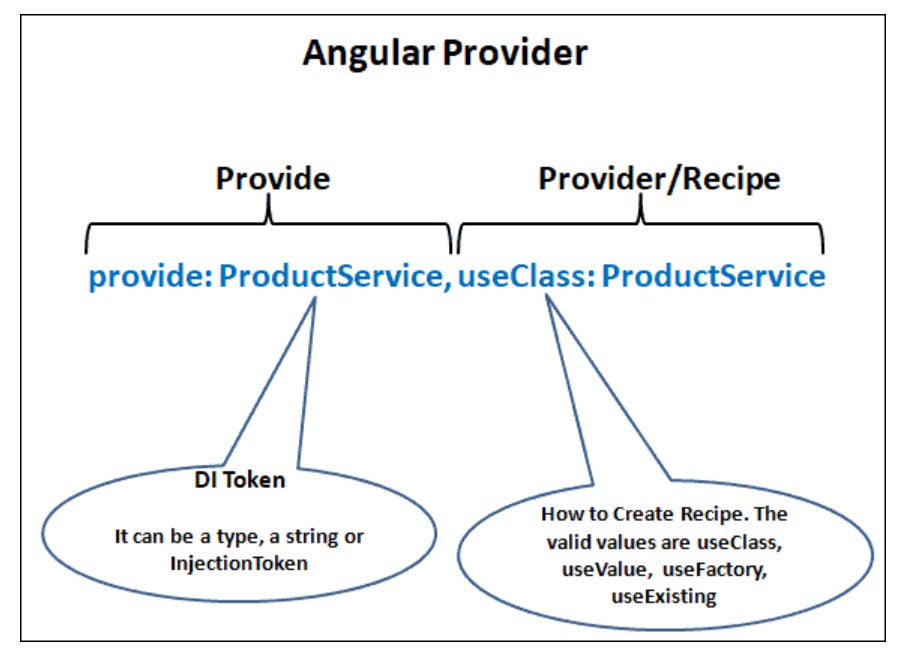
The Token can be either a type, a string or an instance of InjectionToken.
Here the type being injected is used as the token.
For example, we would like to inject the instance of the ProductService, we will use the ProducService as the Token as shown below.
providers :[{ provide: ProductService, useClass: ProductService }]
The ProductService is then injected into the component by using the following code.
class ProductComponent {
  constructor(private productService : ProductService ) {}
}
You can keep the same token (ProductService) and change the class to another implementation of the Product service. For example, in the following code, we change it to BetterProductService.
providers: [
{ provide: ProductService, useClass: BetterProductService },
Angular does not complain if we use the token again. In the following example token ProductService used twice. In such a situation last to register wins (BetterProductService).
providers: [
{ provide: ProductService, useClass: ProductService },
{ provide: ProductService, useClass: BetterProductService }
]
You can use the Type token only if you have Type representation. But that is not always the case. Sometimes we must inject simple string values or simple object literal, where there is no type.
We can use string tokens in such a scenario.
The string PRODUCT_SERVICE in the example below is a string token.
providers: [{ provide: 'PRODUCT_SERVICE', useClass: ProductService }]
You can then use Inject the ProductService using the @Inject method
export class AppComponent {
  products: Product[];

  constructor(
    @Inject,('PRODUCT_SERVICE') private productService: ProductService
  ) {}
  providers: [
    { provide: 'PRODUCT_SERVICE', useClass: const CONFIG = {
  apiUrl: 'http://my.api.com',
  fake: true,
  title: 'Injection Token Example'
};

@NgModule({
  imports: [BrowserModule, FormsModule],
  declarations: [AppComponent, HelloComponent],
  bootstrap: [AppComponent],
  providers: [
    { provide: 'PRODUCT_SERVICE', useClass: ProductService },
    { provide: 'USE_FAKE', useValue: true },
    { provide: 'APIURL', useValue: 'http://SomeEndPoint.com/api' },
    { provide: 'CONFIG', useValue: CONFIG }
  ]
})
export class AppModule {}
export class AppComponent {
  products: Product[];

  constructor(
    @Inject,('PRODUCT_SERVICE') private productService: ProductService,
    @Inject,('USE_FAKE') public fake: boolean,
    @Inject,('APIURL') public ApiUrl: String,
    @Inject,('CONFIG') public Config: any
  ) {}
The String tokens are easy to use but prone to error. Two developers can use the same token at different parts of the app. Third-party libraries can also use the same token.
If we re-use the token, the last to register overwrites all previously registered tokens.
String tokens are easier to mistype, making it difficult to track & maintain in big applications. This is where the InjectionToken comes into the picture.
To understand the issue, look at the example app from Stackblitz. The app has two Angular Modules.
To understand the issue, look at the example app from Stackblitz. The app has two Angular Modules.
One is ProductModule which implements the ProductService and registers it using the string Injection token PRODUCT_SERVICE
The second module is SomeOtherModule which implements a SomeService and registers it with the same string token PRODUCT_SERVICE
In AppComponent we inject the PRODUCT_SERVICE. We want the Product Service to come from our Product Module.
import { Component, Inject } from '@angular/core';

//We want Product Service from ProductModule
import { Product, ProductService } from './productmodule/product.service';

@Component({
  selector: 'my-app',
  templateUrl: './app.component.html',
  providers: [],
})
export class AppComponent {
  products: Product[];

  constructor(
    @Inject,('PRODUCT_SERVICE') private productService: ProductService
  ) {}

  getProducts() {
    this.products = this.productService.getProducts();
  }
}
AppModule imports both modules. The Order of import here determines which service is used in our component.
import { NgModule } from '@angular/core';
import { BrowserModule } from '@angular/platform-browser';
import { FormsModule } from '@angular/forms';

import { AppComponent } from './app.component';
import { HelloComponent } from './hello.component';
import { ProductModule } from './productmodule/product.module';
import { AnotherModule } from './anothermodule/another.module';

@NgModule,({
  imports: [BrowserModule, FormsModule,
             ProductModule, AnotherModule],   //Change the order and you will see different services used in app component
  declarations: [AppComponent, HelloComponent],
  bootstrap: [AppComponent],
})
export class AppModule {}
If we place ProductModule last in the import array, the code works correctly. But if we import AnotherModule last, then the code does not work and PRODUCT_SERVICE string injection token will use the service from the AnotherModule.
The Injection Token allows us to create a token to inject the values that don’t have a runtime representation.
It is very similar to string tokens. But instead of using a hardcoded string, we create the Injection Token by creating a new instance of the InjectionToken class. They ensure that the tokens are always unique.
In Angular 4 and prior versions used OpaqueToken. It is now deprecated and replaced by InjectionToken.
To create an Injection Token, first, we need to import InjectionToken from @angular/core
import { InjectionToken } from '@angular/core';
Create a new Injection Token APIURL InjectionToken
export const APIURL = new InjectionToken<string>('Api.url');
The code above creates a new instance of InjectionToken APIURL. We can also specify the optional type parameter, <string> , and the token description, Api.url. Use the token description to specify the token’s purpose.
The code below creates a new injection token without type and an empty string as its description.
export const APIURL = new InjectionToken('');
Register it in the providers array.
providers: [
{ provide: APIURL, useValue: 'http://SomeEndPoint.com/api' },
Inject it into the Component.
export class AppComponent {
  constructor(@Inject,(APIURL) public ApiUrl: string,) { }
}
The following example shows how to use the Injection Token. You can refer to the Stackblitz for the code.
token.ts
import { InjectionToken } from '@angular/core';
import { ProductService } from './product.service';

//export const APIURL = new InjectionToken<string>('Api.url');
export const APIURL = new InjectionToken('');
export const USE_FAKE = new InjectionToken<boolean>('Fake');
export const PRODUCT_SERVICE = new InjectionToken<ProductService>(
  'Product.Service'
);
export const APP_CONFIG = new InjectionToken<any>('Application.Config');
import { NgModule } from '@angular/core';
import { BrowserModule } from '@angular/platform-browser';
import { FormsModule } from '@angular/forms';

import { AppComponent } from './app.component';
import { HelloComponent } from './hello.component';
import { ProductService } from './product.service';
import { BetterProductService } from './better-product.service';
import { PRODUCT_SERVICE, USE_FAKE, APIURL, APP_CONFIG } from './tokens';

const CONFIG = {
  apiUrl: 'http://my.api.com',
  fake: true,
  title: 'Injection Token Example'
};

@NgModule({
  imports: [BrowserModule, FormsModule],
  declarations: [AppComponent, HelloComponent],
  bootstrap: [AppComponent],
  providers: [
    { provide: PRODUCT_SERVICE, useClass: ProductService },
    { provide: USE_FAKE, useValue: true },
    { provide: APIURL, useValue: 'http://SomeEndPoint.com/api' },
    { provide: APP_CONFIG, useValue: CONFIG }
  ]
})
export class AppModule {}
import { Component, Inject } from '@angular/core';
import { ProductService } from './product.service';
import { Product } from './product';
import { PRODUCT_SERVICE, USE_FAKE, APIURL, APP_CONFIG } from './tokens';

@Component({
  selector: 'my-app',
  templateUrl: './app.component.html',
  providers: []
})
export class AppComponent {
  products: Product[];

  constructor(
    @Inject,(PRODUCT_SERVICE) private productService: ProductService,
    @Inject,(USE_FAKE) public fake: String,
    @Inject,(APIURL) public ApiUrl: String,
    @Inject,(APP_CONFIG) public Config: any
  ) {}

  getProducts() {
    this.products = this.productService.getProducts();
  }
}
The Injection token ensures that the tokens are always unique. Even if the two libraries use the same name for the Angular Dependency Injection System, inject the right dependency. You can refer to the example application
