
In this tutorial, we look at how error handling in Angular. We also learn how to create a Global Error handler or custom error handler in Angular. We learn why we need to handle errors and some of the best practices. In the end we will learn few tips like how to Inject services to global error handler, How to show user notification page etc.
Handling error is an important part of the application design. The JavaScript can throws errors each time something goes wrong. For Example, the Javascipt throws errors in the following conditions
The apart from the above, the unexpected errors can happen any time. like broken connection, null pointer exception, no internet, HTTP errors like unauthorized user, session expired etc.
The Angular handles the errors, but it wont do anything except writing it the console. And that is not useful either to the user or to the developer.
There are two types of error handling mechanism in Angular. One catches all the client side errors and the other one catches the HTTP Errors.
The HTTP Errors are thrown, when you send a HTTP Request using the HttpClient Module. The errors again falls into two categories. One is generated by the server like unauthorized user, session expired, Server down etc. The Other one is generated at the client side, while trying to generate the HTTP Request. These errors could be network error, error while generating the request etc
The HTTP errors are handled by the HTTP Interceptors
All other errors thrown by the code falls into this category. These are are handled by the ErrorHandler class, which is the default error handler for Angular.
The default Error handling in Angular is handled by Errorhandler class, which is part of the @angular/core module. This is global error handler class which catches all exception occurring in the App. This class has a method handleError(error). Whenever the app throws an unhandled exception anywhere in the application angular intercepts that exception. It then invokes the method handleError(error) which writes the error messages to browser console.
Create a new Angular application. Add the following code snippet to app.component.html & app.component.ts
app.component.html
<h1> {{title}} </h1>

<button (click)="throwError1()"> Throw Error-1 </button>
<button (click)="throwError2()"> Throw Error-2 </button>

<router-outlet></router-outlet>
import { Component } from '@angular/core';

@Component({
  selector: 'app-root',
  templateUrl: './app.component.html',
  styleUrls: ['./app.component.css']
})
export class AppComponent
{
    title: string = 'Global Error Handler in Angular' ;

    throwError1() {
      var a= b;
    }

    throwError2() {
      try {
        var a= b;
      } catch (error) {
         //here you can handle the error
         //
      }
    }
}
The code mimics an error by using the statement var a= b;, where b is not defined. The first method throwError1() does not handle error, while throwError2() method uses try..catch block to handle the error.
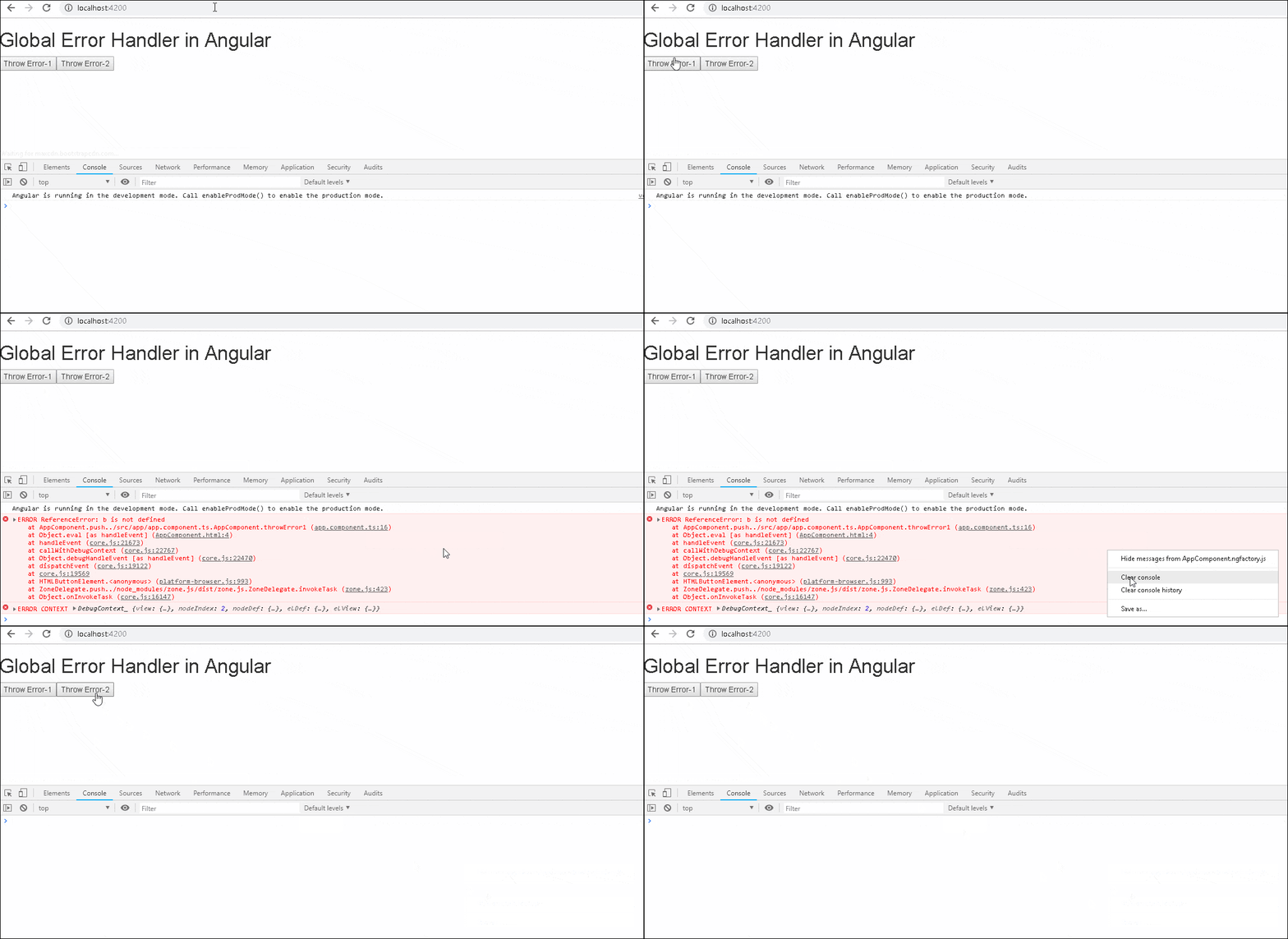
Run the app and keep the chrome developer tool open. Click on throw error 1 button. The default Error Handler of angular intercepts the error and writes to the console as shown in image below
But, clicking on the throw error 2 button, does not trigger the Error Handler as it is handled by using the try..catch block.
The built in ErrorHandler is simple solution and provides a good option while developing the app. But it does not help to find out the error thrown in the the production environment. We have no way of knowing about the errors which happen at the users end.
Hence, it advisable to create our own global error handler class, because
To create a custom error handler service, we need to use the following steps.
First.create a GlobalErrorHandlerService which implements the ErrorHandler Then, override the handleError(error) method and handle the error.
export class GlobalErrorHandlerService implements ErrorHandler {

  constructor() {
  }

  handleError(error) {
     console.error('An error occurred:', error.message);
  }

}
Next, register the GlobalErrorHandlerService in the Application root module using the token ErrorHandler.
@NgModule({
  ------
  providers: [
    { provide: ErrorHandler, useClass: GlobalErrorHandlerService },
  ]
})
export class AppModule { }
Create global-error-handler.service.ts and add the following code.
import { ErrorHandler, Injectable} from '@angular/core';

@Injectable()
export class GlobalErrorHandlerService implements ErrorHandler {

    constructor() {
    }

    handleError(error) {
       console.error('An error occurred:', error.message);
       console.error(error);
       alert(error);
   }

}
Next, open the pp.module.ts and register the GlobalErrorHandlerService using the injection token ErrorHandler.
import { BrowserModule } from '@angular/platform-browser';
import { NgModule,ErrorHandler } from '@angular/core';

import { AppComponent } from './app.component';
import  {GlobalErrorHandlerService} from './global-error-handler.service';

@NgModule({
  declarations: [
    AppComponent
  ],
  imports: [
    BrowserModule,
  ],
  providers: [
    { provide: ErrorHandler, useClass: GlobalErrorHandlerService },
  ],
  bootstrap: [AppComponent]
})
export class AppModule { }
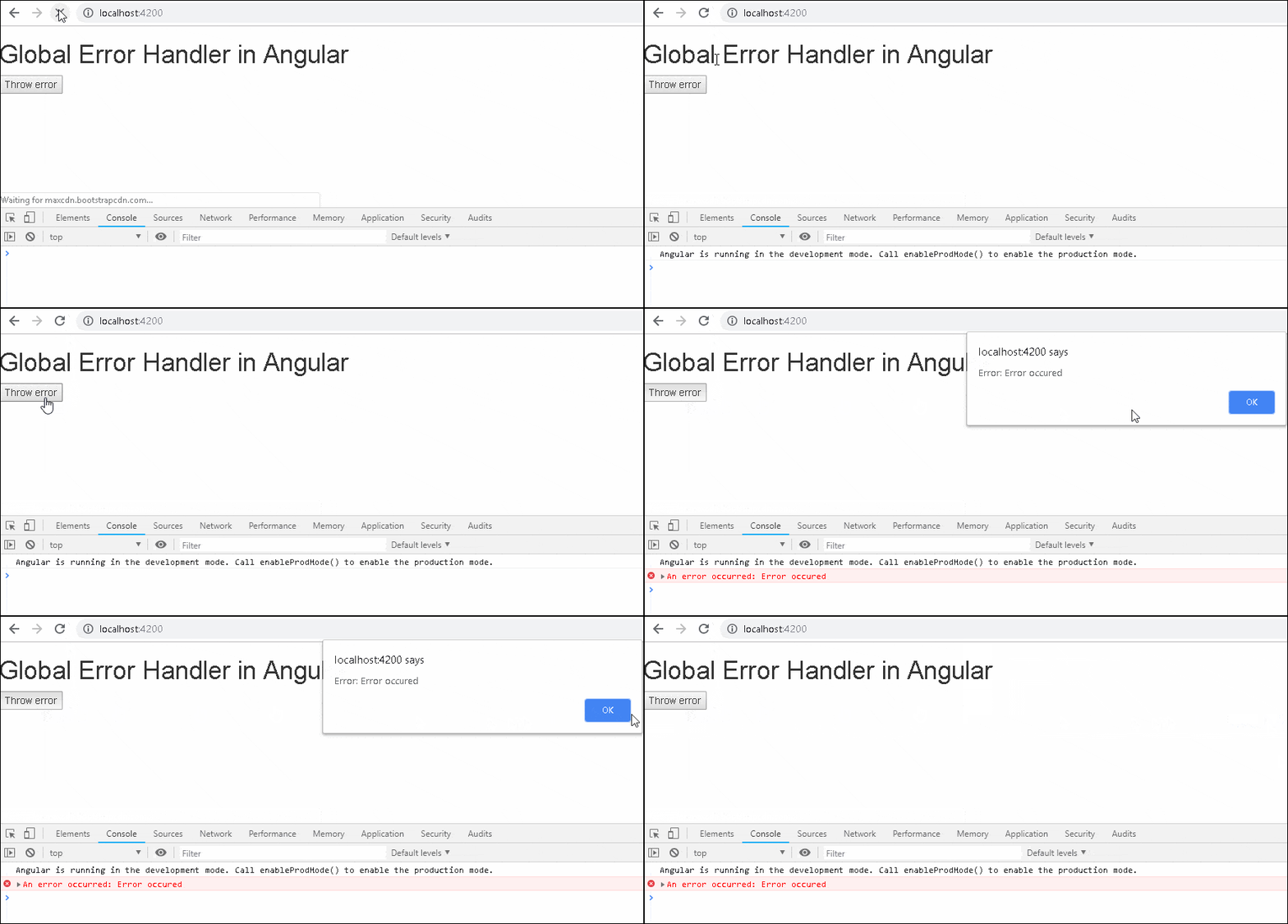
Run the app and you will see that the our custom error handler gets invoked, when you click on the button throw error.
Now, we learned how to handle errors, here are a few things you should keep in mind while designing an Error Handler service.
The Angular creates the error handler service before the providers. Otherwise, it won’t be able catch errors that occur very early in the application. It also means that the angular providers won’t be available to the ErrorHandler.
What if we wanted to use another service in the error handler. Then, we need to use the Injector instance to directly to inject the dependency and not depend on the Dependency injection framework
To do that first we need to import the injector
Then we need to inject the injector to the GlobalErrorHandlerService.
Finally, use the injector to get the instance of any required service.
The following example service uses the injector to get the Router Service.
import { ErrorHandler, Injectable, Injector} from '@angular/core';
import { Router } from '@angular/router';

@Injectable()
export class GlobalErrorHandlerService implements ErrorHandler {

    constructor(private injector: Injector) {
    }

    handleError(error) {

        let router = this.injector.get(Router);
        console.log('URL: ' + router.url);
        console.error('An error occurred:', error.message);

       alert(error);
   }
}
It is a good design practice to notify the user regarding the error by using the error page.
error.component .ts
import { Component } from '@angular/core';

@Component({
  template: `
     <h2>An unknown error occurred.</h2>
  `
})
export class ErrorComponent {
}
Do not forget to add it in the routing Module.
app-routing.module.ts
import { NgModule } from '@angular/core';
import { Routes, RouterModule } from '@angular/router';
import { ErrorComponent } from './error.component ';

const routes: Routes = [
  {path: 'error', component: ErrorComponent }
]

@NgModule({
  imports: [RouterModule.forRoot(routes)],
  exports: [RouterModule],
  providers: []
})
export class AppRoutingModule { }
And in the GlobalErrorHandlerService, inject router and use router.navigate(['/error']) to go to the custom error page
import { ErrorHandler, Injectable, Injector} from '@angular/core';
import { Router } from '@angular/router';

@Injectable()
export class GlobalErrorHandlerService implements ErrorHandler {

    constructor(private injector: Injector) {    }

    handleError(error) {

        let router = this.injector.get(Router);
        console.log('URL: ' + router.url);
        console.error(error);

        router.navigate(['/error']);
   }

}
You can refer to the tutorial HTTP Error Handling in Angular
