
The Angular ConcatMap maps each value from the source observable into an inner observable, subscribes to it, and then starts emitting the values from it replacing the original value. It creates a new inner observable for every value it receives from the Source. It merges the values from all of its inner observables in the order in which they are subscribed and emits the values back into the stream. Unlike SwitchMap, ConcatMap does not cancel any of its inner observables. It is Similar to MergeMap except for one difference that it maintains the order of its inner observables.
The syntax of the concatMap operator is as shown below.
concatMap(project: (value: T, index: number) => O): OperatorFunction<T, ObservedValueOf<O>>
project: is a function that we use to manipulate the values emitted by the source observable. The project function accepts two arguments. one is value i.e. the value emitted by the source observable. The second argument is index number. The index number starts from 0 for the first value emitted and incremented by one for every subsequent value emitted. It is similar to the index of an array. The project function must return an observable.
To use concatMap in Angular first we need to import it our Component or Service.
import { concatMap } from 'rxjs/operators';
In the following code, we have two observables srcObservable which emits 1,2,3,4 & innerObservable which emits 'A','B','C','D'.
let srcObservable= of(1,2,3,4)
let innerObservable= of('A','B','C','D')

srcObservable.pipe(
  concatMap( val => {
    console.log('Source value '+val)
    console.log('starting new observable')
    return innerObservable
  })
)
.subscribe(ret=> {
  console.log('Recd ' + ret);
})


//Output
Source value 1
starting new observable
Recd A
Recd B
Recd C
Recd D
Source value 2
starting new observable
Recd A
Recd B
Recd C
Recd D
Source value 3
starting new observable
Recd A
Recd B
Recd C
Recd D
Source value 4
starting new observable
Recd A
Recd B
Recd C
Recd D
The ConcatMap receives its values from the srcObservable. For each value, it creates a new observable i.e. innerObservable. It also automatically subscribes to the innerObservable. The innerObservable emits the values (A, B, C, D), and pushes it to the subscribers.
The ConcactMap differs from the MergeMap, the way it handles the inner observable. ConcatMap always waits for the previous inner observable to finish before creating a new observble. This will ensure that the subscribers will receive the data in the order in which the observable’s are subscribed.
Hence the subscribers will receive the values A, B, C, D four times. Once for each value of the srcObservable.
The map operators emit value as observable. The ConcatMap creates an inner observable, subscribes to it, and emits its value as observable. It emits the value in the order in which it creates the observable.
The Following example shows the difference between ConcatMap & map.
The map operator below maps the value coming from the source observable to a new value by multiplying it by 2. It then emits it into the observable stream. The subscribers will receive the values 2, 4, 6 & 8.
let obs= of(1,2,3,4)

//Using MAP
obs.pipe(
  map(val => {
    return val*2      //Returning Value
  })
)
.subscribe(ret=> {
  console.log('Recd from map : ' + ret);
})

//Output
Recd from map : 2
Recd from map : 4
Recd from map : 6
Recd from map : 8
In the ConcatMap example, only thing that changes is how we return the new value from our project function. The map returns the value as val*2, while the concatMap returns the value as observable (of(val*2)) using the of function. It also subscribes to the newly created observable and emits its value to the stream.
let obs= of(1,2,3,4)

obs.pipe(
   concatMap( val => {
     return of(val*2)  //Returning observable
   })
)
.subscribe(ret=> {
  console.log('Recd from concatMap : ' + ret);
 })

//Output
Recd from concatMap: 2
Recd from concatMap: 4
Recd from concatMap: 6
Recd from concatMap: 8
ConcatMap never cancels any of its inner observable. It waits for them to finish and emit value. It also waits for the previous inner observable to finish before creating a new observable.
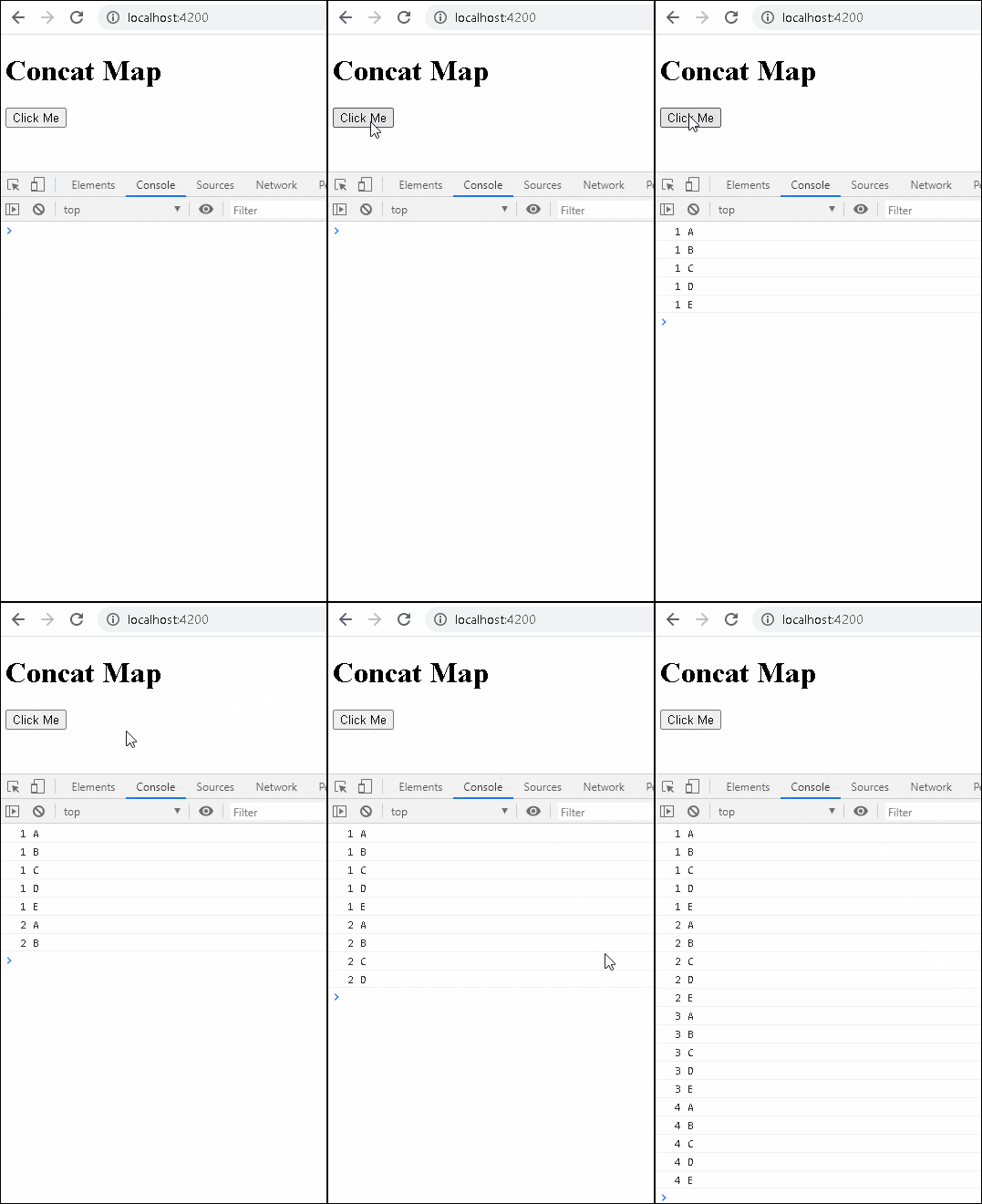
In the following example, we create an observable from the click event of a button using the fromEvent method. On every click of the button, the ConcatMap operator returns an inner observable delayedObs
The delayedObs emits 5 values separated by 1000 ms.
import { Component, OnInit, ViewChild, AfterViewInit } from '@angular/core';
import { of, from, fromEvent, interval, Observable } from 'rxjs';
import { switchMap, map, catchError } from 'rxjs/operators';

@Component({
  selector: 'app-root',
  template: `<button #button>Click Me</button>`,
})
export class AppComponent implements AfterViewInit{

  @ViewChild('button',{static:true}) button;
  clicks$:Observable<any>;

  ngAfterViewInit() {
    this.clicks$ = fromEvent(this.button.nativeElement, 'click');
    this.concatMapExample3();
  }

  delayedObs(count:number) {
    return new Observable((observer) => {
      setTimeout(() => { observer.next(count+" A") }, 1000);
      setTimeout(() => { observer.next(count+" B") }, 2000);
      setTimeout(() => { observer.next(count+" C") }, 3000);
      setTimeout(() => { observer.next(count+" D") }, 4000);
      setTimeout(() => { observer.next(count+" E"); observer.complete() }, 5000);
    })
  }

  concatMapExample3() {

    let obs=

    this.clicks$
      .pipe(
        concatMap(() => {
          this.count=this.count+1;
          return this.delayedObs(this.count)
        })
      )
      .subscribe(val => console.log(val));
  }

}
When you click on the button, the clicks observable emits its first value. Inside the concatMap we increase the count by 1 and pass it to the delayedObs. The concatMap subscribes to the delayedObs. It starts emitting values A to E prepended by the count.
When you click again, the concatMap checks if the previous observable has finished. If not it waits for it to finish before subscribing to the delayedObs
The concatMap collects all the emitted values from all of its inner observables and emits it into the subscribers.
You can verify from the following result that even though we click multiple times on the click button, the results always appear in the correct order.
The following are some of the real use cases for the concatMap in Angular
Consider a scenario where you receive data from an observable (outer observable). For each of those values, you want to call another observable (inner observable) to get more data. The scenario like this is an ideal use case for ConcatMap
In the following example, we have an array of a breed of dogs. We convert the array into an observable. This becomes our outer observable
For each of those dog breeds emitted by the outer observable, we make an HTTP request to get the sub-breeds using the free Dog API. The URL for the HTTP request constructed using the dog breed, which we receive from the outer observable.
The ConcatMap automatically subscribes to all of its inner observable and waits for them to complete. It then pushes the values from them into the subscribers.
of("hound", "mastiff", "retriever")        //outer observable
  .pipe(
    concatMap(breed => {
      const url = 'https://dog.ceo/api/breed/' + breed + '/list';
      return this.http.get<any>(url)       //inner observable
    })
  )
  .subscribe(data => {
    console.log(data)
  })
The above code, without using the concatMap is as follows. The code makes use of nested observable.
of("hound", "mastiff", "retriever")
  .subscribe(breed => {
    const url = 'https://dog.ceo/api/breed/' + breed + '/list';

    this.http.get<any>(url)
      .subscribe(data => {
        console.log(data)
      })
  })
The ConcatMap create a one inner observable for each value of outer observable. To Create more than one inner observable, we can make use of the ForkJoin Operator.
In the following example, along with a list of breeds, we also send a query for a random image of the dog breed. This requires us to send two HTTP get request in Angular. We create two observables obs1 & obs2 to do that. Then we use the forJoin to merge obs1 with obs2 and return a new observable.
MergeHTTPRequestWithFork() {

  //const url='https://dog.ceo/api/breed/'+hound+'/list';

  of("hound", "mastiff", "retriever")
    .pipe(
      concatMap(breed => {
        const url1 = 'https://dog.ceo/api/breed/' + breed + '/list';
        const url2 = 'https://dog.ceo/api/breed/' + breed + '/images/random';

        let obs1= this.http.get<any>(url1)
        let obs2= this.http.get<any>(url2)

        return forkJoin(obs1,obs2)

      })
    )
    .subscribe(data => {
      console.log(data)
    })

}
