
This guide shows you how to migrate existing project to standalone components in
Angular. ng generate command helps us to Migrate an existing Angular Project to
Standalone
Components. It will also migrate the directives and pipes to Standalone API. The Angular CLI takes
care of the majority of the migration work, but there might be a need for a few minor changes from
your end. In this article we will discuss the steps involved in migrating to standalone components
in Angular in detail.
The migration to standalone components process consists of three
steps. All of them done using the ng generate command.
ng generate @angular/core:standalone
When you run the above command, it will ask you to choose from the type of migration (or step) as shown below
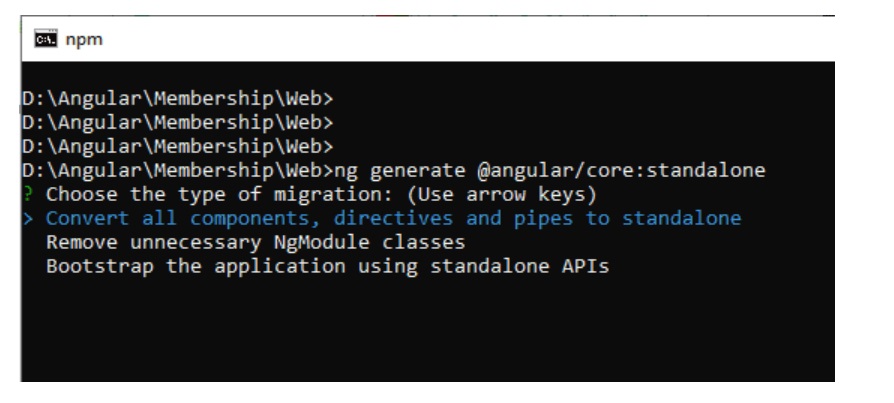
The three migration types are.
These three steps are discussed below.
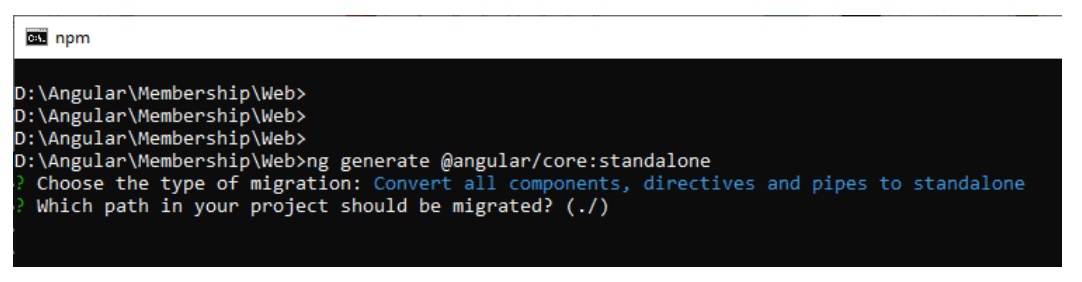
After choosing the migration type, you will be asked to specify the path
(relative to the Project root). Use this if you the application is very large. Leaving it blank
will migrate the entire application (The default path is ./ which points to the
project route).
You can also install the older version of Angular CLI by appending the version no as shown below
This will look for every Component, Directive & Pipe and does the following
For example
LoginComponent before migration
@Component({
    templateUrl: 'login.component.html',
})
export class LoginComponent implements OnInit {

}
LoginComponent after migration to Standalone Component.
@Component({
    templateUrl: 'login.component.html',
    standalone: true,
    imports: [CommonModule, ReactiveFormsModule]
})

export class LoginComponent implements OnInit {
}
LoginModule before migration.
@NgModule({
  declarations: [ LoginComponent, ChangePasswordComponent ],
  imports: [ RouterModule.forChild(appRoutes), SharedModule ],
  providers: [],
  exports : [ ],
  bootstrap: []
})
export class LoginModule { }
LoginModule after migration. You can see that LoginComponent & ChangePasswordComponent are removed from the declarations array.
@NgModule({
  declarations: [ ],
  imports: [ RouterModule.forChild(appRoutes), SharedModule ],
  providers: [],
  exports : [ ],
  bootstrap: []
})
export class LoginModule { }
If we migrate all Components, Directives & Pipes, then NgModules are no longer necessary. This step will remove all the NgModules that are safe to remove.
A module is considered “safe to remove” if it:
It is very likely that it will not be able to remove all the NgModules. For Example, if NgModule contain RouterModule.forChild(routes) or RouterModule.forRoot(routes), Migration step will not delete it. You need to change them manually.
This will not touch the AppModule (i.e. root module of the application)
This last step will remove the AppModule and configure the application to bootstrap using the standalone API. Run this step only after you completed previous steps for the entire application.
The following is the example main.ts file before migration.
import { enableProdMode } from '@angular/core';
import { platformBrowserDynamic } from '@angular/platform-browser-dynamic';

import { AppModule } from './app/app.module';
import { environment } from './environments/environment';

if (environment.production) {
  enableProdMode();
}

platformBrowserDynamic().bootstrapModule(AppModule)
  .catch(err => console.log(err));
main.ts after migration.
import { enableProdMode, importProvidersFrom } from '@angular/core';
import { platformBrowserDynamic } from '@angular/platform-browser-dynamic';

import { environment } from './environments/environment';
import { AppComponent } from './app/app.component';
import { LoginModule } from './app/login';
import { SharedModule } from './app/shared';
import { routing } from './app/app.routing';
import { CommonModule } from '@angular/common';
import { BrowserModule, bootstrapApplication } from '@angular/platform-browser';
import { HTTP_INTERCEPTORS } from '@angular/common/http';
import {  AuthenticationService, HttpInterceptorService, SharedService } from './app/core';

if (environment.production) {
  enableProdMode();
}

bootstrapApplication(AppComponent, {
    providers: [
        importProvidersFrom(BrowserModule, CommonModule, routing, SharedModule, LoginModule),
         AuthenticationService,
        {
            provide: HTTP_INTERCEPTORS,
            useClass: HttpInterceptorService,
            multi: true
        },
        SharedApiService
    ]
})
  .catch(err => console.log(err));
Now, you know what each steps does, you can proceed with the migration. Before proceeding ensure that
The migration runs in three distinct operations. You should verify the app after each step and may need to make necessary changes. Remember to commit changes in a separate branch.
If you are migrating a large application, then you may consider migrating specific paths at a time.
run the command ng generate @angular/core:standalone and select
“Convert all components, directives and pipes to standalone“.
Once done, test your application & commit your changes.
run the command ng generate @angular/core:standalone and select
“Remove unnecessary NgModule classes“.
Once done, test your application & commit your changes.
If you migrating each path, then ensure that you complete the Step 1 & Step 2.
run the command ng generate @angular/core:standalone and select
“Bootstrap the application using standalone APIs“.
Test you application after the above step.
The migration script may fail to migrate some parts of the application. In such cases it will leave a TODO comment. Check all those comments and take necessary action.
That it.
