
In this guide, we learn about Angular HTTP Error Handling. Whenever the error occurs in an HTTP operation, the Angular wraps it in an httpErrorResponse Object before throwing it back. We catch the httpErrorResponse either in our component class or in the data service class or globally. The Global HTTP error handling is done using the Angular HTTP Interceptor.
Suggested Reading: Error Handling in Angular
The HttpClient captures the errors and wraps it in the generic HttpErrorResponse, before passing it to our app. The error property of the HttpErrorResponse contains the underlying error object. It also provides additional context about the state of the HTTP layer when the error occurred.
The HTTP errors fall into two categories. The back end server may generate the error and send the error response. Or the client-side code may fail to generate the request and throw the error (ErrorEvent objects).
The server might reject the request for various reasons. Whenever it does it will return the error response with the HTTP Status Codes such as Unauthorized (401), Forbidden (403), Not found (404), internal Server Error (500), etc. The Angular assigns the error response to error property of the HttpErrorResponse.
The client-side code can also generate the error. The error may be due to a network error or an error while executing the HTTP request or an exception thrown in an RxJS operator. These errors produce JavaScript ErrorEvent objects. The Angular assigns the ErrorEvent object to error property of the HttpErrorResponse.
In both the cases, the generic HttpErrorResponse is returned by the HTTP Module. We will inspect the error property to find out the type of Error and handle accordingly.
We can catch the HTTP Errors at three different places.
Refer to our tutorial on Angular HTTP Get Request. We created a GitHubService, where we made a GET request to the GitHub API to get the list of Repositories. The following is the getRepos() method from the service. We have intentionally changed the URL (uersY) so that it will result in an error.
getRepos(userName: string): Observable<any> {
   return this.http.get(this.baseURL + 'usersY/' + userName + '/repos')
}
We subscribe to the httpClient.get method in the component class
  public getRepos() {
    this.loading = true;
    this.errorMessage = "";
    this.githubService.getReposCatchError(this.userName)
      .subscribe(
        (response) => {                           //Next callback
          console.log('response received')
          this.repos = response;
        },
        (error) => {                              //Error callback
          console.error('error caught in component')
          this.errorMessage = error;
          this.loading = false;

          //throw error;   //You can also throw the error to a global error handler
        }
      )
  }
The subscribe method has three callback arguments.
.subscribe(success, error, completed);
The observable invokes the first callback success, when the HTTP request successfully returns a response. The third call back completed is called when the observable finishes without any error.
The second callback error, is invoked when the HTTP Request end in an error. We handle error here by figuring out the type of error and handle it accordingly. It gets the error object which is of type HttpErrorResponse.
       (error) => {                              //Error callback
          console.error('error caught in component')
          this.errorMessage = error;
          this.loading = false;
        }
We can also catch errors in the service, which makes the HTTP Request using the catchError Operator as shown below. Once you handle the error, you can re-throw it back to the component for further handling.
getRepos(userName: string): Observable<repos[]> {
    return this.http.get<repos[]>(this.baseURL + 'usersY/' + userName + '/repos')
      .pipe(
        catchError((err) => {
          console.log('error caught in service')
          console.error(err);

          //Handle the error here

          return throwError(err);    //Rethrow it back to component
        })
      )
  }
The type of error we may encounter vary. But some of those errors are common to every HTTP request. For Example
We can check all these errors in the service or in component, but our app may contain many such service or components. Checking for common errors in each and every method is inefficient and error-prone.
The Right thing to do is to handle only the errors specific to this API call in this component/service and move all the common errors to one single place. This is where we use the HTTP Interceptor.
The HTTP Interceptor is a service, which we create and register it globally at the root module using the Angular Providers. Once defined, it will intercept all the HTTP requests passing through the app. It intercepts when we make the HTTP request and also intercepts when the response arrives. This makes it an ideal place to catch all the common errors and handle it
We create the Interceptor by creating a Global Service class, which implements the HttpInterceptor Interface. Then we will override the intercept method in that service.
The following code shows a simple GlobalHttpInterceptorService
import {Injectable} from "@angular/core";
import {HttpEvent, HttpHandler, HttpInterceptor,HttpRequest,HttpResponse,HttpErrorResponse} from '@angular/common/http';
import {Observable, of, throwError} from "rxjs";
import {catchError, map} from 'rxjs/operators';

@Injectable()
export class GlobalHttpInterceptorService implements HttpInterceptor {

  constructor(public router: Router) {
  }

  intercept(req: HttpRequest<any>, next: HttpHandler): Observable<HttpEvent<any>> {

    return next.handle(req).pipe(
      catchError((error) => {
        console.log('error is intercept')
        console.error(error);
        return throwError(error.message);
      })
    )
  }
}
The caching of the Error is done using the catchError RxJS operator. We then re-throw it to the subscriber using the throwError
The catchError is added to the request pipeline using the RxJs pipe operator. When the error occurs in the HTTP Request it is intercepted and invokes the catchError. Inside the catchError you can handle the error and then use throwError to throw it to the service.
We then register the Interceptor in the Providers array of the root module using the injection token HTTP_INTERCEPTORS. Note that you can provide more than one Interceptor (multi: true).
providers: [
    GitHubService,
    { provide: HTTP_INTERCEPTORS, useClass: GlobalHttpInterceptorService, multi: true  }
]
Next, step is what to do with the errors
The server-side errors return status codes, we can take appropriate actions based on that. For Example for Status code 401 Unauthorized, we can redirect the user to the login page, for 408 Request Timeout, we can retry the operation, etc.
if (error instanceof HttpErrorResponse) {
    if (error.error instanceof ErrorEvent) {
        console.error("Error Event");
    } else {
        console.log(`error status : ${error.status} ${error.statusText}`);
        switch (error.status) {
            case 401:      //login
                this.router.navigateByUrl("/login");
                break;
            case 403:     //forbidden
                this.router.navigateByUrl("/unauthorized");
                break;
        }
    }
} else {
    console.error("some thing else happened");
}
return throwError(error);
For Server errors with status codes 5XX, you can simply ask the user to retry the operation. You can do this by showing an alert box or redirect him to a special page or show the error message at the top of the page bypassing the error message to a special service AlertService.
For other errors, you can simply re-throw it back to the service.
return throwError(error);
You can further handle the error in service or throw it back to the component.
The component must display the error message to the user. You can also throw it back to a global error handler in Angular.
.subscribe(
   (response) => {
      this.repos = response;
   },
   (error) => {
      //Handle the error here
      //If not handled, then throw it
      throw error;
   }
)
The complete code of this example
app.component.html
<h1 class="heading"><strong>Angular HTTP</strong>Error Example</h1>

<div class="form-group">
  <label for="userName">GitHub User Name</label>
  <input type="text" class="form-control" name="userName" [(ngModel)]="userName">
</div>

<div class="form-group">
  <button type="button" (click)="getRepos()">Get Repos</button>
</div>

<div *ngIf="loading">loading...</div>

<div *ngIf="errorMessage" class="alert alert-warning">
  <strong>Warning!</strong> {{errorMessage | json}}
</div>

<table class='table'>
  <thead>
    <tr>
      <th>ID</th>
      <th>Name</th>
      <th>HTML Url</th>
      <th>description</th>
    </tr>
  </thead>
  <tbody>
    <tr *ngFor="let repo of repos;">
      <td>{{repo.id}}</td>
      <td>{{repo.name}}</td>
      <td>{{repo.html_url}}</td>
      <td>{{repo.description}}</td>
    </tr>
  </tbody>
</table> -

<pre>{{repos | json}}</pre>
import { Component } from '@angular/core';

import { GitHubService } from './github.service';
import { repos } from './repos';

@Component({
  selector: 'app-root',
  templateUrl: './app.component.html',
})
export class AppComponent {
  userName: string = "tektutorialshub"
  repos: repos[];

  loading: boolean = false;
  errorMessage;

  constructor(private githubService: GitHubService) {
  }

  public getRepos() {
    this.loading = true;
    this.errorMessage = "";
    this.githubService.getReposCatchError(this.userName)
      .subscribe(
        (response) => {                           //Next callback
          console.log('response received')
          this.repos = response;
        },
        (error) => {                              //Error callback
          console.error('error caught in component')
          this.errorMessage = error;
          this.loading = false;

          throw error;
        }
      )
  }
}
import { Injectable } from '@angular/core';

import { HttpClient, HttpParams, HttpHeaders } from '@angular/common/http';
import { Observable, throwError } from 'rxjs';
import { map, catchError } from 'rxjs/operators';

import { repos } from './repos';

@Injectable( {providedIn:'root'})
export class GitHubService {

  baseURL: string = "https://api.github.com/";

  constructor(private http: HttpClient) {
  }

  //Any Data Type
  getRepos(userName: string): Observable<any> {
    return this.http.get(this.baseURL + 'usersY/' + userName + '/repos')
  }


  //With catchError
  getReposCatchError(userName: string): Observable<repos[]> {
    return this.http.get<repos[]>(this.baseURL + 'usersY/' + userName + '/repos')
      .pipe(
        catchError((err) => {
          console.log('error caught in service')
          console.error(err);
          return throwError(err);
        })
      )
  }

}
import { Injectable } from "@angular/core";
import { HttpEvent, HttpHandler, HttpInterceptor, HttpRequest, HttpErrorResponse } from '@angular/common/http';
import { Observable, of, throwError } from "rxjs";
import { catchError, map } from 'rxjs/operators';
import { Router } from '@angular/router';

@Injectable()
export class GlobalHttpInterceptorService implements HttpInterceptor {

  constructor(public router: Router) {
  }

  //1.  No Errors
  intercept1(req: HttpRequest<any>, next: HttpHandler): Observable<HttpEvent<any>> {

    return next.handle(req).pipe(
      catchError((error) => {
        console.log('error in intercept')
        console.error(error);
        return throwError(error.message);
      })
    )
  }

  //2. Sending an Invalid Token will generate error
  intercept(req: HttpRequest<any>, next: HttpHandler): Observable<HttpEvent<any>> {

    const token: string = 'invald token';
    req = req.clone({ headers: req.headers.set('Authorization', 'Bearer ' + token) });

    return next.handle(req).pipe(
      catchError((error) => {
        console.log('error in intercept')
        console.error(error);
        return throwError(error.message);
      })
    )
  }

  intercept3(req: HttpRequest<any>, next: HttpHandler): Observable<HttpEvent<any>> {

    const token: string = 'invald token';
    req = req.clone({ headers: req.headers.set('Authorization', 'Bearer ' + token) });

    return next.handle(req).pipe(
      catchError((error) => {

        let handled: boolean = false;
        console.error(error);
        if (error instanceof HttpErrorResponse) {
          if (error.error instanceof ErrorEvent) {
            console.error("Error Event");
          } else {
            console.log(`error status : ${error.status} ${error.statusText}`);
            switch (error.status) {
              case 401:      //login
                this.router.navigateByUrl("/login");
                console.log(`redirect to login`);
                handled = true;
                break;
              case 403:     //forbidden
                this.router.navigateByUrl("/login");
                console.log(`redirect to login`);
                handled = true;
                break;
            }
          }
        }
        else {
          console.error("Other Errors");
        }

        if (handled) {
          console.log('return back ');
          return of(error);
        } else {
          console.log('throw error back to to the subscriber');
          return throwError(error);
        }

      })
    )
  }
}
import { ErrorHandler, Injectable, Injector } from '@angular/core';
import { HttpErrorResponse } from '@angular/common/http';
import { throwError } from 'rxjs';

@Injectable()
export class GlobalErrorHandlerService implements ErrorHandler {

  constructor() {
  }


  handleError(error: Error | HttpErrorResponse) {
    console.log('GlobalErrorHandlerService')
    console.error(error);
  }

}
import { BrowserModule } from '@angular/platform-browser';
import { NgModule ,ErrorHandler } from '@angular/core';
import { HttpClientModule,HTTP_INTERCEPTORS} from '@angular/common/http';
import { FormsModule } from '@angular/forms';

import { AppComponent } from './app.component';

import { GlobalHttpInterceptorService} from './global-http-Interceptor.service';
import { AppRoutingModule } from './app-routing.module';
import { GlobalErrorHandlerService } from './global-error-handler.service';


@NgModule({
  declarations: [
    AppComponent
  ],
  imports: [
    BrowserModule,
    HttpClientModule,
    FormsModule,
    AppRoutingModule
  ],
  providers: [
    { provide: HTTP_INTERCEPTORS,    useClass: GlobalHttpInterceptorService,    multi: true  },
    { provide: ErrorHandler, useClass:GlobalErrorHandlerService}
],
  bootstrap: [AppComponent]
})
export class AppModule { }
import { NgModule } from '@angular/core';
import { Routes, RouterModule } from '@angular/router';


const routes: Routes = [];

@NgModule({
  imports: [RouterModule.forRoot(routes)],
  exports: [RouterModule]
})
export class AppRoutingModule { }
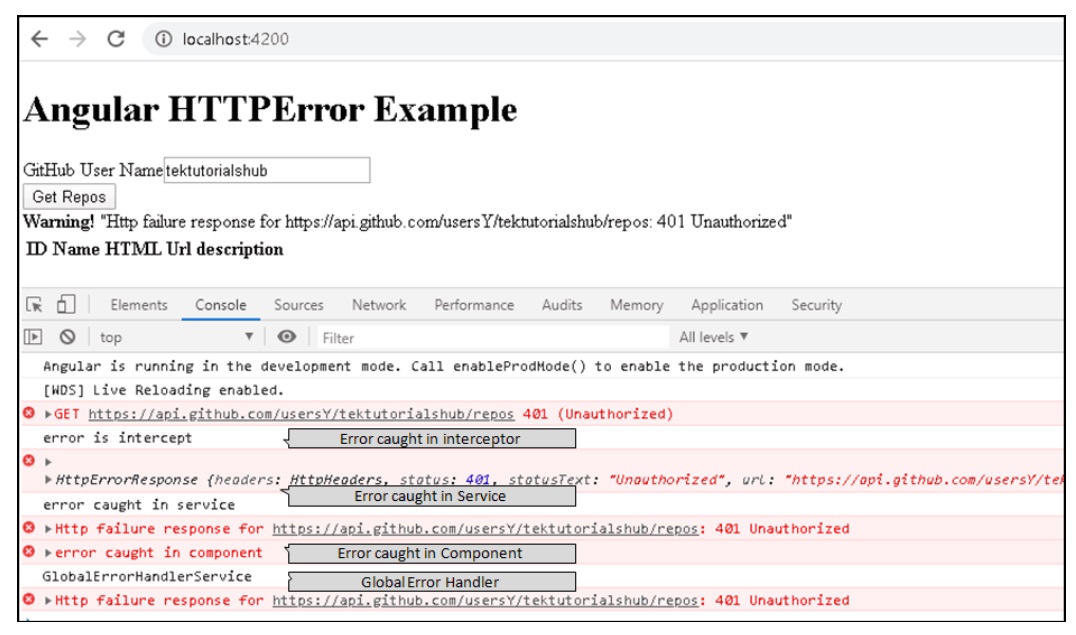
Using HTTP Interceptors you can catch HTTP Errors and handle it appropriately. Check the HTTP status codes and take appropriate actions like redirecting to the login page, or redirecting to an error page or else throw the error back to the subscriber for further handling of the error.
