
Lazy loading is the technique where angular loads the Modules only on a need basis rather than all at once. It is also called on-demand loading. By default, Angular Loads the modules eagerly. Lazy Loading of Angular Modules reduces the initial load time of the app. We use the loadChilden method of the Angular Router to lazy load them when the user navigates to a route. In this article, we will show you how to implement lazy loading
The Angular apps get bigger in size as we add more and more features. The Angular Modules help us to manage our app by creating separate modules for each new feature. But, as the app gets bigger in size, slower it loads. That is because of angular loads the entire application upfront.
The slow loading app does not leave a good impression on the user. By Loading only a part of the app (i.e lazy loading), the app appears to run faster to the user. The faster loading app gives you a performance boost and also results in a good user experience.
In Angular, the Lazy loading works at the module level. i.e. you can lazy load only the Angular Modules. We cannot lazy load the Individual components.
The Lazy loading works via the Angular Router Module. The loadChildren method of the Angular Router is responsible to load the Modules
We define the modules which we want to lazy load, when we define the routes. Starting from the Angular 8, we have a new syntax for lazy loading.
{path: "admin", loadChildren: () => import('./admin/admin.module').then(m => m.AdminModule)},
The admin is the path is the URL path segment to the AdminModule. The loadChildren is where we configure the Lazy Loading.
We need to provide call back function to loadChildren argument. The call back must load the AdminModule. We use the dynamic import syntax using the import method. The import method loads the module from the path, which we provide as the argument to it.
import('./admin/admin.module').then(m => m.AdminModule)
When the user navigates to the admin URL or to any of its child routes like admin/dashboard, the router will fetch the AdminModule and loads the routes and components of the AdminModule
The lazy loaded module loads only for the first visit of the URL, it will not load when we revisit that URL again.
When we define an AdminModule to lazy loaded, the angular creates a separate bundle for the entire module.
If you are using Angular 7 or lower versions, then use the following
syntax
The loadChildren accepts the value as string. The string is split into two
sections
separated by #.The first part is the full path to the module file (without the ts
extension). In the example above ./admin/admin.module points to
admin.module.ts file. The second part is the
export class name of the Module. i.e AdminModule
{path: "admin", loadChildren:'./admin/admin.module#AdminModule'},
Let us build a simple app. The app will have two modules. One is SharedModule which we load eagerly. The other module is AdminModule. First, we load the AdminModule eagerly and later we we update it to use the Lazy Loading.
The AdminModule contains three components DashboardComponent, RightsComponent; UserComponent. The Module contains, three routes defined as children of Admin Route defined in the AdminRoutingModule
{  path: 'admin',
        children :[
            { path: 'dashboard', component: DashboardComponent},
            { path: 'user', component: UserComponent},
            { path: 'rights', component: RightsComponent},
        ]
    },
The above routes are registered using the forChild method()
The Complete source code of AdminModule is as below
src/app/admin/pages/dashboard/dashboard.component.ts
  import { Component } from '@angular/core';

  @Component({
    template: `<h1>Dashboard Component</h1>`,
  })
  export class DashboardComponent {
    title = '';
  }
import { Component } from '@angular/core';

@Component({
  template: '<h1>Rights Component</h1>',
})
export class RightsComponent {
  title = '';
}
import { Component } from '@angular/core';

@Component({
  template: '<h1>User Component</h1>',
})
export class UserComponent {
  title = '';
}
export * from './dashboard/dashboard.component';
export * from './rights/rights.component';
export * from './user/user.component';
import { NgModule } from '@angular/core';
import { Routes, RouterModule } from '@angular/router';

import { UserComponent , RightsComponent ,DashboardComponent } from './pages';

const routes: Routes = [
    {  path: 'admin',
        children :[
            { path: 'dashboard', component: DashboardComponent},
            { path: 'user', component: UserComponent},
            { path: 'rights', component: RightsComponent},
        ]
    },
];

@NgModule({
  imports: [RouterModule.forChild(routes)],
  exports: [RouterModule]
})
export class AdminRoutingModule { }
import { NgModule } from '@angular/core';

import { AdminRoutingModule } from './admin.routing.module';
import { UserComponent,RightsComponent,DashboardComponent } from './pages';


@NgModule({
  declarations: [UserComponent,RightsComponent,DashboardComponent],
  imports: [
    AdminRoutingModule,
  ],
  providers: [],
})
export class AdminModule { }
export * from './admin.module';
export * from './pages';
The SharedModule contains HeaderComponent & FooterComponent. The HeaderComponent contains the navigation menu.
src/app/shared/layout/footer/footer.component.ts
import { Component } from '@angular/core';

@Component({
  selector: 'app-footer',
  templateUrl: './footer.component.html'
})
export class FooterComponent {
}
<p>(c) All Rights Reserved</p>
import { Component, OnInit } from '@angular/core';

@Component({
  selector: 'app-header',
  templateUrl: './header.component.html',
  styleUrls: ['./header.component.css']
})
export class HeaderComponent {
}
<ul>
    <li>
      <a class="navbar-brand" routerLink="">home</a>
    </li>
    <li>
      <a class="navbar-brand" routerLink="/admin/dashboard">Dashboard</a>
    </li>
    <li>
      <a class="navbar-brand" routerLink="/admin/rights">rights</a>
  </li>
  <li>
    <a class="navbar-brand" routerLink="/admin/user">user</a>
  </li>
</ul>
ul {
    list-style-type: none;
    margin: 0;
    padding: 0;
    overflow: hidden;
    background-color: #333333;
}

li {
    float: left;
}

li a {
    display: block;
    color: white;
    text-align: center;
    padding: 16px;
    text-decoration: none;
}

li a:hover {
    background-color: #111111;
}
export * from './footer/footer.component';
export * from './header/header.component';
import { CommonModule } from '@angular/common';
import { NgModule } from '@angular/core';
import { FormsModule, ReactiveFormsModule } from '@angular/forms';
import { HttpClientModule } from '@angular/common/http';
import { RouterModule } from '@angular/router';
import { HeaderComponent, FooterComponent } from './layout';


@NgModule({
  imports: [
    CommonModule,
    FormsModule,
    ReactiveFormsModule,
    HttpClientModule,
    RouterModule
  ],
  declarations: [ HeaderComponent,FooterComponent ],
  exports: [
    CommonModule,
    FormsModule,
    ReactiveFormsModule,
    HttpClientModule,
    RouterModule,
    HeaderComponent,FooterComponent
  ]
})
export class SharedModule {
}
export * from './shared.module';
export * from './layout';
The Root Module uses the forRoot method to register the routes. Right now it does not contain any routes. It also imports the AdminModule
import { Component } from '@angular/core';
import { HeaderComponent, FooterComponent } from './shared';

@Component({
  selector: 'app-root',
  templateUrl: './app.component.html',
  styleUrls: ['./app.component.css']
})
export class AppComponent {
  title = 'Module Demo';
}
<app-header></app-header>

<h1>Lazy loaded module Demo</h1>

<router-outlet></router-outlet>
<app-footer></app-footer>
import { NgModule } from '@angular/core';
import { Routes, RouterModule } from '@angular/router';

const routes: Routes = [
];

@NgModule({
  imports: [RouterModule.forRoot(routes)],
  exports: [RouterModule]
})
export class AppRoutingModule { }
import { BrowserModule } from '@angular/platform-browser';
import { NgModule } from '@angular/core';

import { AppRoutingModule } from './app-routing.module';

import { AppComponent } from './app.component';
import { SharedModule} from './shared';
import { AdminModule} from './admin';

@NgModule({
  declarations: [
    AppComponent,
  ],
  imports: [
    BrowserModule,
    AppRoutingModule,
    SharedModule,
    AdminModule
  ],
  providers: [],
  bootstrap: [AppComponent]
})
export class AppModule { }
Test the app by running it.
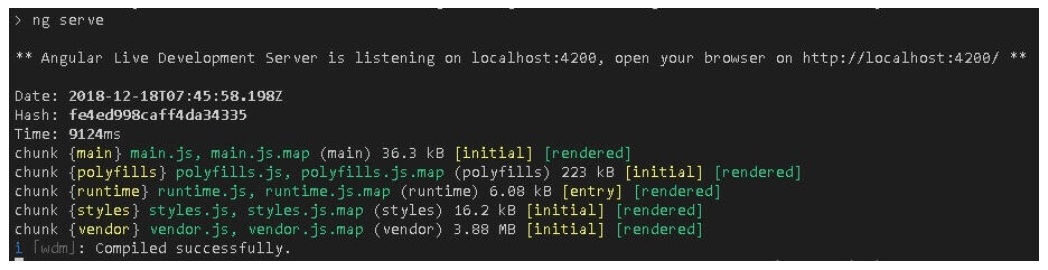
When you run the ng Serve command, you will see that it generates the five JavaScript files ( called chunks) main.js,polyfills.js,runtime.js,styles.js,vendor.js. As you add more and more features those are added to the main.js file
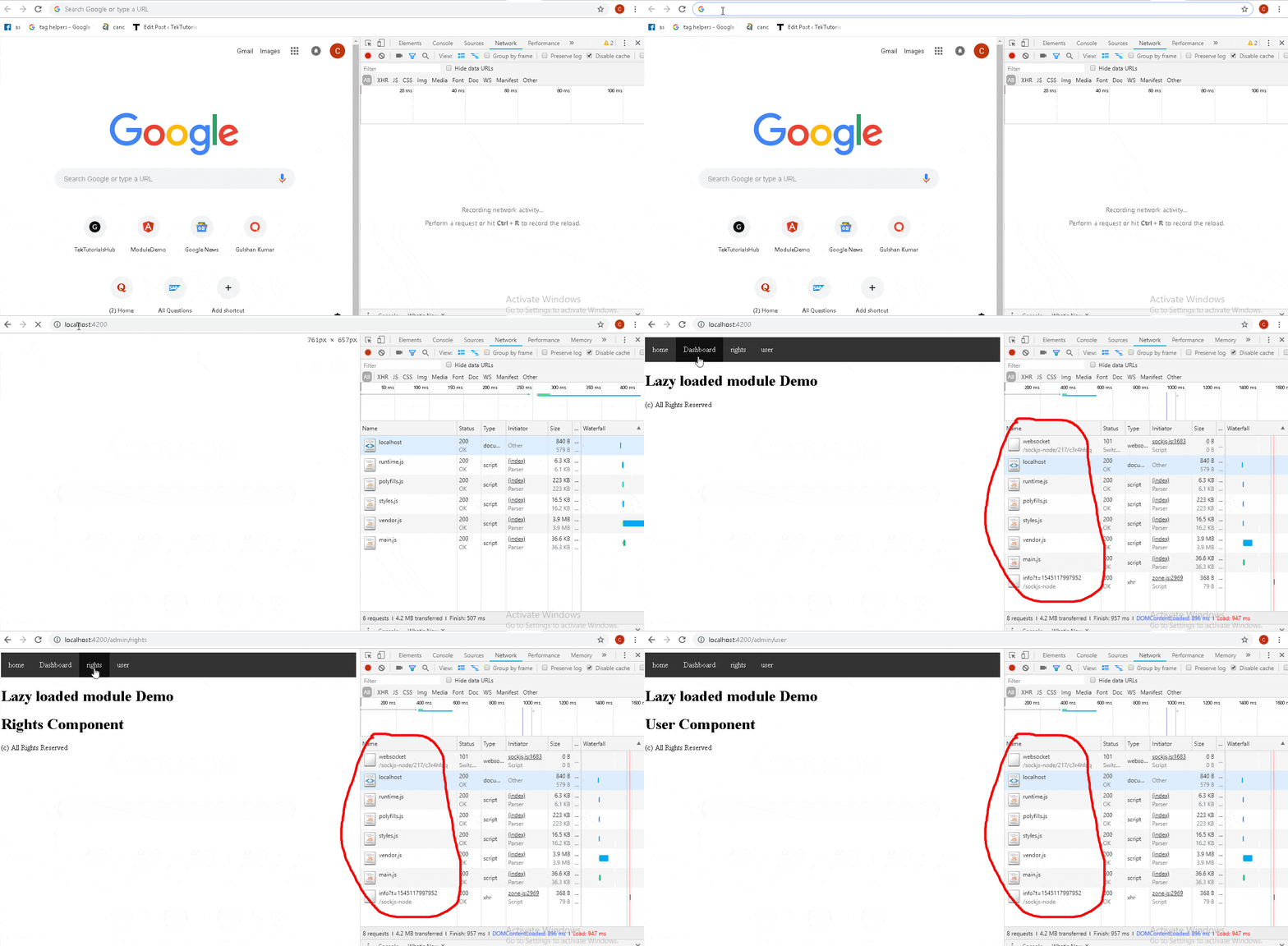
Ctrl + Shift + I to open the chrome developer console and and open the network tab. Run the app and you will see that all the chunks are loaded upfront
To Lazy Load AdminModule, First we need to add the following route in the AppRoutingModule. This route instructs the router load the AdminModule from the path ./admin/admin/module.ts when user navigates to the Admin route
const routes: Routes = [
  {path: "admin", loadChildren: () => import('./admin/admin.module').then(m => m.AdminModule)},
];
Next, we need to remove the import of AdminModule from the AppModule. If you did not do it, the module will be loaded eagerly.
Finally, We need to change the route definition in the AdminRoutingModule. We have removed the parent route admin as it is now moved to the AppRoutingModule. Since this is a lazy-loaded module, the routes we specify will automatically become the child route of admin
const routes: Routes = [
    { path: 'dashboard', component: DashboardComponent},
    { path: 'user', component: UserComponent},
    { path: 'rights', component: RightsComponent},
];
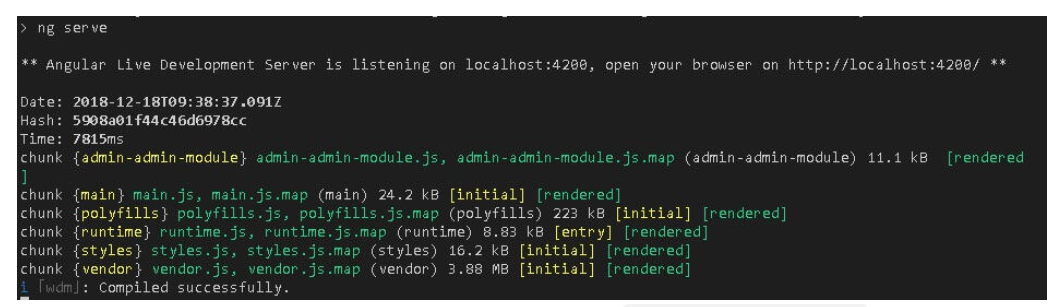
Now, when you run ng serve command, you will notice the admin-admin.module.js file. The Angular compiler generates a separate js file for each lazy loaded module. This file is loaded only when it is needed by the router.
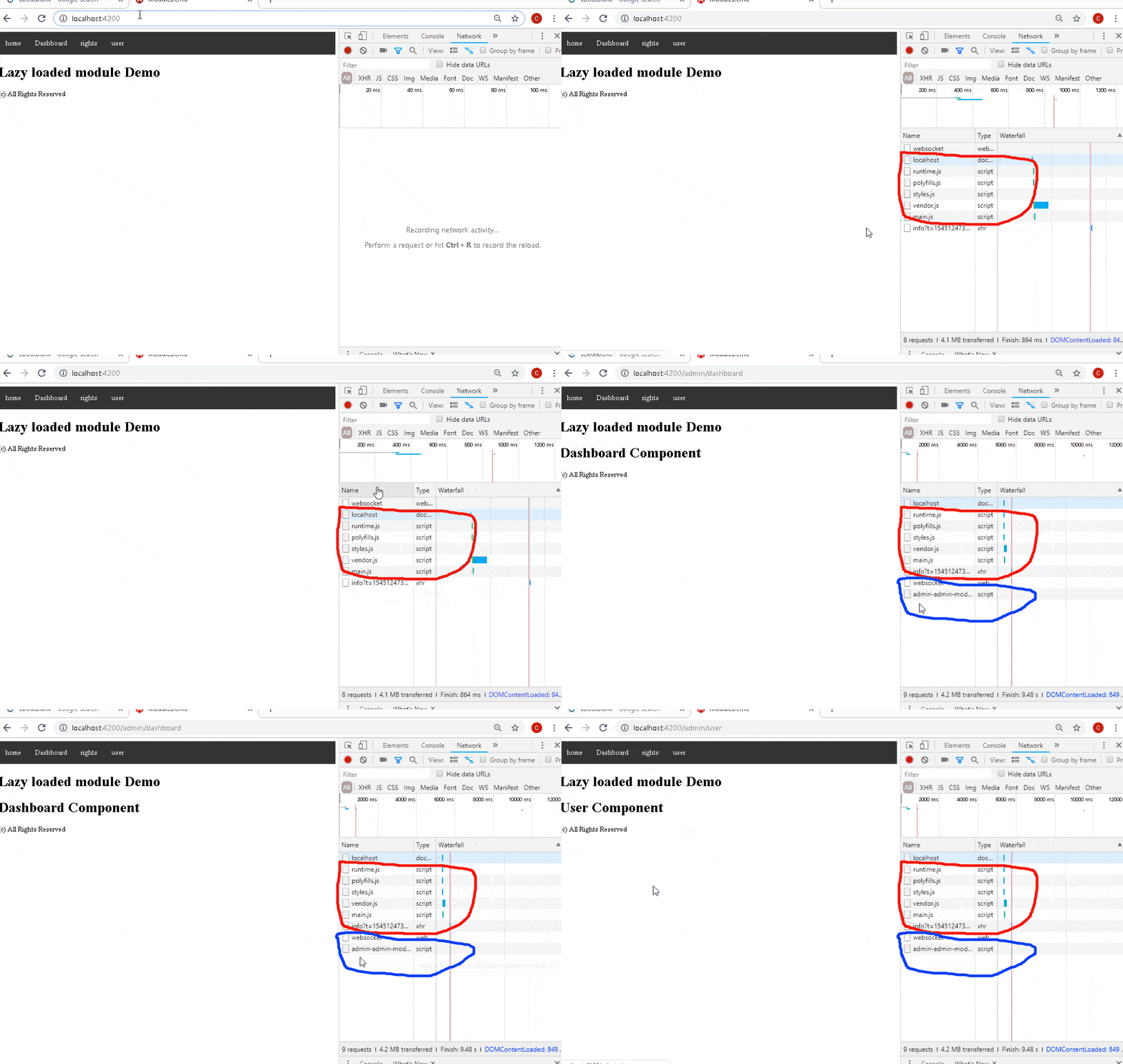
You can test it by running the app. You can notice that admin-admin.module.js is not loaded when you run the app. It is loaded only when you click either on Dashboard, user or rights menu.
We need to be careful when we create a service or provide a services in Lazy loaded module.
Any Service defined in the Lazy Loaded Module, will not be load until the user navigates to that module. Hence we cannot use them anywhere else in the application.
The Angular creates a separate injector for the lazy loaded module. Therefore, any service we provide in the lazy loaded module gets its own instance of the service.
Hence create a service in the lazy loaded module, only if it is used within the lazy loaded Module. Else consider moving it to the AppModule or a special CoreModule. For More read Folder structure in Angular
Do not import lazy loaded modules in any other modules. This will make the angular to load the module eagerly and can have unexpected bugs.
Be careful when you import other modules in the lazy loaded module. If the other modules providers any services, then the lazy loaded module will get a new instance of the service. This may have unintended side effects, if the services are intended to be app-wide singleton
The Angular Modules and lazy loading of those modules is one of the best features of angular. You should load only the SharedModule & CoreModule upfront and lazy load rest of the application.
