
Most apps need some sort of Run-time configuration information, which it needs to load at startup. For example, if your app requires data, then it needs to know the base location of your REST endpoints. Also, development, testing & production environments may have different endpoints. This tutorial covers how to read the config file in angular using the APP_INITIALIZER
The Angular has the environment variables where you can keep the runtime settings, but it has limitations. The setting of the environment variables are defined at build time and cannot be changed at run time.
We can keep the configuration information in a database. But we still need to store the REST endpoints to connect to the database.
The right approach is to store the configuration information in a config file in a secured location. We will deploy the configuration file along with the App. The App can load the configuration from it when the application loads.
For the examples in this tutorial, we will keep it in the src/app/assets/config folder
You can use any format to store the configuration. The popular choice is either JSON or XML format. For Example appConfig.json or appConfig.xml
Below is the typical structure of the configuration file (or config file) in JSON format.
{
   "appTitle": "APP_INITIALIZER Example App",

   "apiServer" : {
        "link1" :"http://amazon.com",
        "link2" :"http://ebay.com"
    },

   "appSetting"             : {
        "config1"    : "Value1",
        "config2"    : "Value2",
        "config3"    : "Value3",
        "config3"    : "Value4"
    }
}
Some of the configuration information is needed before we load our first page. Hence it is better to read the configuration very early in the application. The Angular provides the injection token named APP_INITIALIZER , which it executes when the application starts.
The APP_INITIALIZER is the predefined injection token provided by Angular. The Angular will execute the function provided by this token when the application loads. If the function returns the promise, then the angular will wait until the promise is resolved. This will make it an ideal place to read the configuration and also to perform some initialization logic before the application is initialized.
To use APP_INITIALIZER first we need to import it our Root Module.
import { NgModule, APP_INITIALIZER } from '@angular/core';
Next, We need to create a service, which is responsible for reading the configuration file. The AppConfigService in the example below loads the configuration in its load method
@Injectable()
export class AppConfigService {
   constructor(private http: HttpClient) {}
   load() {
       //Read Configuration here
   }
}
Next, create a factory method, which calls the load method of AppConfigService. We need to inject the appConfigService into the factory method as shown below
export function initializeApp(appConfigService: AppConfigService) {
  return () => appConfigService.load();
}
Finally, use the APP_INITIALIZER token to provide the initializeApp using the useFactory. Remember to use the deps to add AppConfigService as a dependency as the initializeApp uses that service. The multi: true allows us to add more than one provider to the APP_INITIALIZER token.
providers: [
  AppConfigService,
  { provide: APP_INITIALIZER,useFactory: initializeApp, deps:  [AppConfigService], multi: true}
],
Suggested Reading
To Read the Config or Configuration file, we need to make an HTTP GET request and return a Promise.
If you do not return a promise, then angular will not wait for the function to finish. The observable is not yet supported
    load() {

        const jsonFile = `assets/config/config.json`;

        return new Promise<void>((resolve, reject) => {
            this.http.get(jsonFile).toPromise().then((response : IAppConfig) => {
               AppConfigService.settings = <IAppConfig>response;
               console.log( AppConfigService.settings);
               resolve();   //Return Sucess
            }).catch((response: any) => {
               reject(`Failed to load the config file`);
            });
        });
    }
Create a new Angular App.
We will use the JSON format for our configuration.
First, We will create an Interface IAppConfig
Create the app-config.service.ts in the src/app folder and create IAppConfig as shown below.
export interface IAppConfig {

    env: {
        name: string
    }

    apiServer: {
        link1:string,
        link2:string,
    }
}
Then create the actual configuration file in the assets/config/config.json as shown below
{
    "env": {
        "name":"Dev"
    },

    "apiServer" : {
        "link1" :"http://amazon.com",
        "link2" :"http://ebay.com"
    }
}
The task of the service is to send the HTTP GET request to the config.json file and store the configuration.
import { Injectable } from '@angular/core';
import { HttpClient } from '@angular/common/http';

@Injectable()
export class AppConfigService {

    static settings: IAppConfig;

    constructor(private http: HttpClient) {}

    load() {

        const jsonFile = `assets/config/config.json`;

        return new Promise<void>((resolve, reject) => {
            this.http.get(jsonFile).toPromise().then((response : IAppConfig) => {
               AppConfigService.settings = <IAppConfig>response;

               console.log('Config Loaded');
               console.log( AppConfigService.settings);
               resolve();

            }).catch((response: any) => {
               reject(`Could not load the config file`);
            });
        });
    }
}
Create static settings variable
static settings: IAppConfig;
Next, we inject HttpClient in the constructor. We use the HTTP get method to read the configuration file.
constructor(private http: HttpClient) {}
In the load method, jsonFile constant is assigned to the location of the config file.
const jsonFile = assets/config/config.json;
Then, we return the Promise
return new Promise<void>((resolve, reject) => {
Inside the Promise we make a GET request to the config file. The returned response is mapped to the IAppConfig interface.
this.http.get(jsonFile).toPromise().then((response : IAppConfig) => {
Assign it to the settings variable. Note that it is a static variable. Hence, we are using AppConfigService.settings here.
AppConfigService.settings = <IAppConfig>response;
Output the values to the console
console.log('Config Loaded');
console.log( AppConfigService.settings);
And Finally, call the resolve to return the Promise
resolve();
And, in case of any errors catch it and reject the Promise. The Angular will stop loading the application
.catch((response: any) => {
   reject(`Could not load the config file`);
});
Next, step is to inject the Service in AppModule
import { BrowserModule } from '@angular/platform-browser';
import { NgModule, APP_INITIALIZER } from '@angular/core';
import { HttpModule } from '@angular/http';

import { AppRoutingModule } from './app-routing.module';

import { AppComponent } from './app.component';
import { AboutUsComponent,  ContactUsComponent, HomeComponent} from './pages'
import { AppConfigService } from './app-config.service';
import { HttpClientModule } from '@angular/common/http';


export function initializeApp(appConfigService: AppConfigService) {
  return (): Promise<any> => {
    return appConfigService.load();
  }
}

@NgModule({
  declarations: [
    AppComponent, AboutUsComponent,HomeComponent,ContactUsComponent
  ],
  imports: [
    HttpClientModule,
    BrowserModule,
    AppRoutingModule,
  ],
  providers: [
    AppConfigService,
    { provide: APP_INITIALIZER,useFactory: initializeApp, deps: [AppConfigService], multi: true}
  ],
  bootstrap: [AppComponent]
})
export class AppModule { }
First, we need to import APP_INITIALIZER from the @angular/core.
import { NgModule, APP_INITIALIZER } from '@angular/core';
Next import AppConfigService & HttpClientModule
import { AppConfigService } from './app-config.service';
import { HttpClientModule } from '@angular/common/http';
We have appConfigService which loads the configuration. Now we need a function, which invokes the load method. Hence we will create a function initializeApp, which calls the appConfigService.load() method
export function initializeApp(appConfigService: AppConfigService) {
  return (): Promise<any> => {
    return appConfigService.load();
  }
}
Finally, we need to tell angular to execute the initializeApp on application startup. We do that by adding it to the providers array using the APP_INITIALIZER token as shown below.
  providers: [
    AppConfigService,
    { provide: APP_INITIALIZER,useFactory: initializeApp, deps: [AppConfigService], multi: true}
  ],
The useFactory is used because initializeApp is a function and not a class
We make use of the deps:[AppConfigService] flag to let angular know that initializeApp has a dependency on AppConfigService.
The multi : true creates the multi-provider DI token. The APP_INITIALIZER is a multi-provider token. We can define more than one Provider for APP_INITIALIZER. The Angular Injector invokes each of them in the order they appear in the Providers array.
The following AboutUsComponent shows how to read the runtime settings in the component
import { Component } from '@angular/core';
import { AppConfigService} from '../../app-config.service';

@Component({
    template: `About Us`,
})
export class AboutUsComponent
{
    protected apiServer = AppConfigService.settings.apiServer;

    constructor() {
        console.log(this.apiServer.link1);
        console.log(this.apiServer.link2);
    }
}
First import the AppConfigService in the component/service.
import { AppConfigService} from '../../app-config.service';
Next, get a reference to the AppConfigService.settings
protected apiServer = AppConfigService.settings.apiServer;
And the use it in your component/service etc
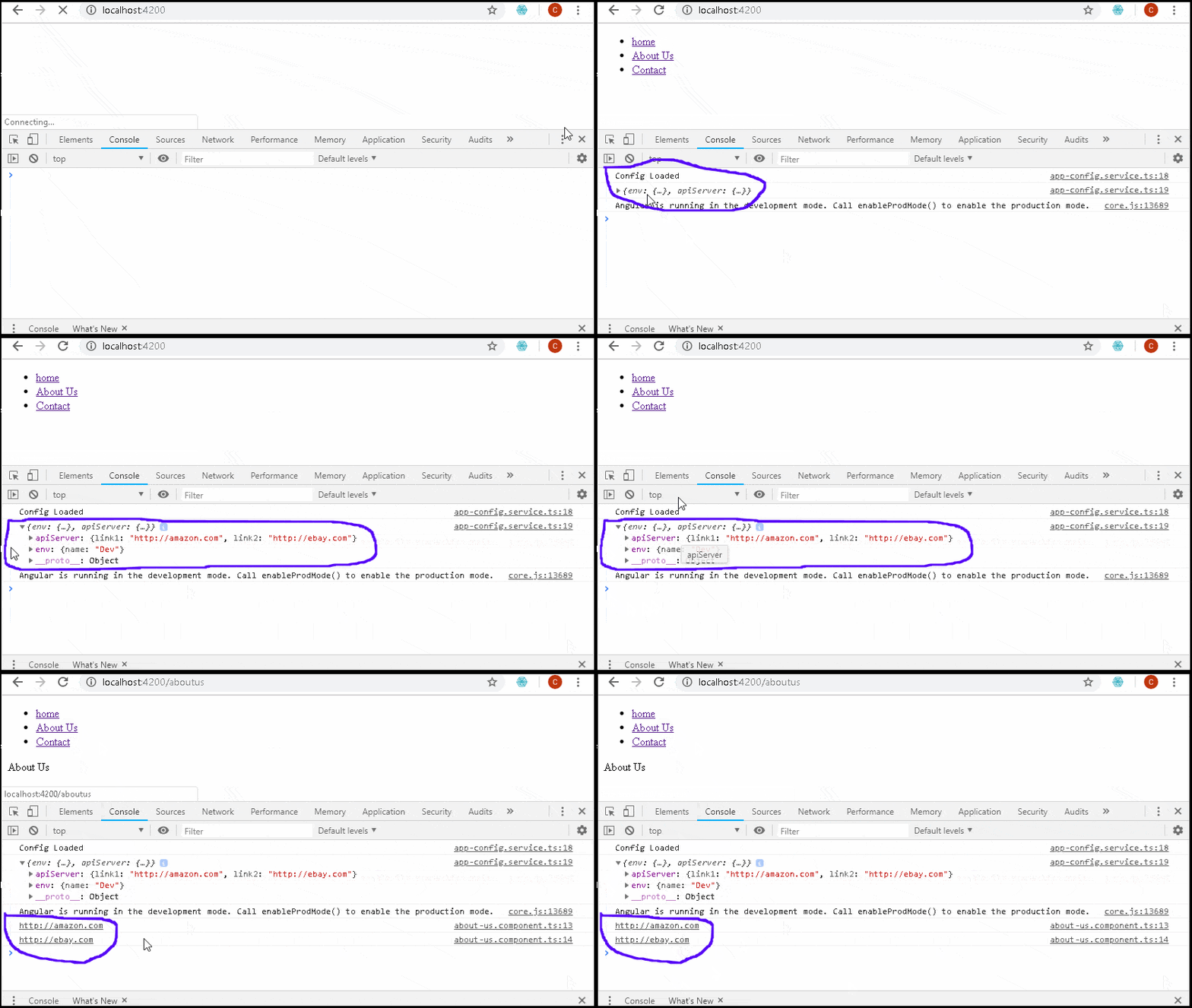
In this article, we learned how to create and runtime configuration and use it in an angular application. We use the injection token APP_INITIALIZER provided by Angular to hook into the Angular initialization process and read the config file. The config file is in JSON format and stored in the src/app/assets/config folder. We make an HTTP GET request to get the data from the config file.
