
In this tutorial let us learn how to Unsubscribe from an observable in angular. An observable which is not Unsubscribed will lead to memory leak & Performance degradation.
In the example below, we have ChildComponent, which subscribes to an observable in its ngOnInit hook. The observable emits a new value for every 2000 ms.
In the AppComponent, we use the ngIf to show and remove the ChildComponent.
app.component.html
<h1>Angular Unsubscribe from Observable Example</h1>

Show Child :
<input
  type="checkbox"
  id="showChild"
  name="showChild"
import { Component, VERSION } from "@angular/core";

@Component({
  selector: "my-app",
  template: `
    <h1>Angular Unsubscribe from Observable Example</h1>

    Show Child :
    <input
      type="checkbox"
      id="showChild"
      name="showChild"
      [(ngModel)]="showChild"
    />

    <app-child-component *ngIf="showChild"></app-child-component>
  `,
  styleUrls: ["./app.component.css"]
})
export class AppComponent {
  name = "Angular " + VERSION.major;

  showChild = false;
}
import { Component, OnInit } from "@angular/core";
import { timer, interval } from "rxjs";

@Component({
  selector: "app-child-component",
  templateUrl: "./child.component.html",
  styleUrls: ["./child.component.css"]
})
export class ChildComponent implements OnInit {
  src = interval(2000);
  id = Date.now();

  constructor() {}

  ngOnInit() {
    console.log("Component Created " + this.id);

    this.src.subscribe(value => {
      console.log("Received " + this.id);
    });
  }

  ngOnDestroy() {
    console.log("Component Destroyed " + this.id);
  }
}
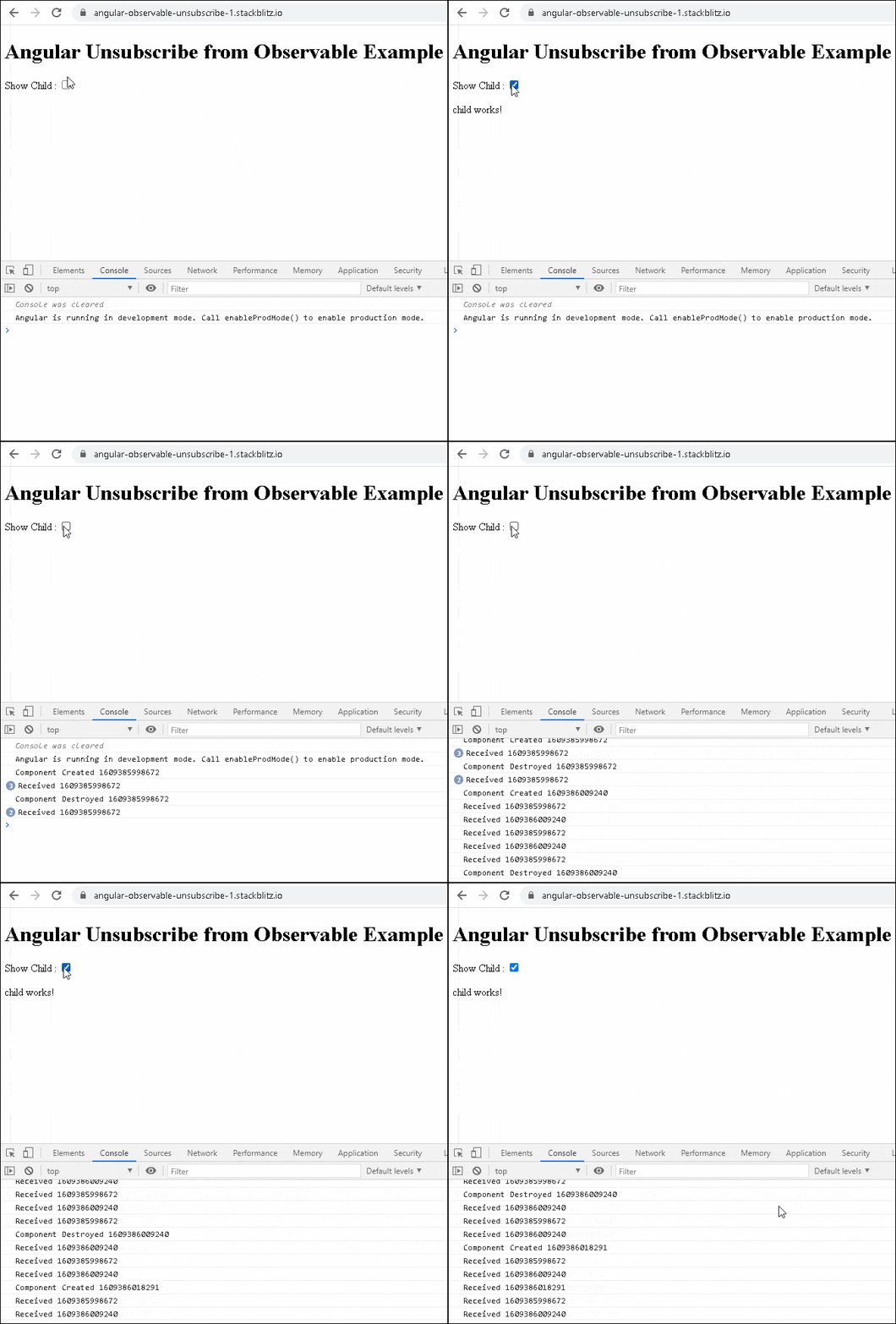
The subscription starts to emit values when the child component is rendered by Angular. But when we destroy the component, the observable still keeps emitting new values. We can see this in console window.
If we render the child component again, it starts a new subscription. Now we have two subscriptions running. As and when we create a new instance of the child component, it will create a new subscription, and those subscriptions never cleaned up.
Unsubscribing from an observable as easy as calling Unsubscribe() method on the subscription. It will clean up all listeners and frees up the memory
To do that, first create a variable to store the subscription
obs: Subscription;
Assign the subscription to the obs variable
    this.obs = this.src.subscribe(value => {
      console.log("Received " + this.id);
    });
Call the unsubscribe() method in the ngOnDestroy method.
  ngOnDestroy() {
    this.obs.unsubscribe();
  }
When we destroy the component, the observable is unsubscribed and cleaned up.
The final code is shown below
Child.Component.ts
import { Component, OnInit } from "@angular/core";
import { timer, interval, Subscription } from "rxjs";

@Component({
  selector: "app-child-component",
  templateUrl: "./child.component.html",
  styleUrls: ["./child.component.css"]
})
export class ChildComponent implements OnInit {
  src = interval(2000);
  id = Date.now();
  obs: Subscription;

  constructor() {}

  ngOnInit() {
    console.log("Component Created " + this.id);

    this.obs = this.src.subscribe(value => {
      console.log("Received " + this.id);
    });
  }

  ngOnDestroy() {
    console.log("Component Destroyed " + this.id);
    this.obs.unsubscribe();
  }
}
There is no need to unsubscribe from every subscription. For Example, the observables, which are finite in nature. Although it does not harm if you do so.
In Angular you do not have to Unsubscribe in the following scenariosUse Async pipe to subscribe to an observable, it automatically cleans up, when we destroy the component.
Convert all infinite observables to finite observable using the Take or First Operators.
The Take Operator emits the first n number of values and then stops the source observable.
export class AppComponent {

  obs = of(1, 2, 3, 4, 5).pipe(take(2));

  ngOnInit() {
    this.obs.subscribe(val => console.log(val));
  }
}

****Console ******
1
2
The first operator emits the first value and then stops the observable. But It sends an error notification if does not receive any value.
export class AppComponent {

  obs = of(1, 2, 3, 4, 5).pipe(first());

  ngOnInit() {
    this.obs.subscribe(val => console.log(val));
  }
}

****Console ******
1
Using Unsubscribe is the simplest & easiest way.
Store each subscription in a local variable and call unsubscribe on them in the ngOnDestroy hook
import { Component, OnInit } from "@angular/core";
import { timer, interval, Subscription } from "rxjs";

@Component({
  selector: "app-child-component",
  templateUrl: "./child.component.html",
  styleUrls: ["./child.component.css"]
})
export class ChildComponent implements OnInit {
  src1 = interval(1000);
  src2 = interval(1500);
  src3 = interval(2000);

  id = Date.now();
  obs1: Subscription;
  obs2: Subscription;
  obs3: Subscription;

  constructor() {}

  ngOnInit() {
    console.log("Component Created " + this.id);

    this.obs1 = this.src1.subscribe(value => {
      console.log("Src1 " + this.id);
    });

    this.obs2 = this.src2.subscribe(value => {
      console.log("Src2 " + this.id);
    });

    this.obs3 = this.src3.subscribe(value => {
      console.log("Src3 " + this.id);
    });
  }

  ngOnDestroy() {

    if (this.obs1) this.obs1.unsubscribe();
    if (this.obs2) this.obs2.unsubscribe();
    if (this.obs3) this.obs3.unsubscribe();

    console.log("Component Destroyed " + this.id);
  }
}
Instead of local variable for each subscription, you can create an array and add each subscription into it
let subs: Subscription[] = [];
Push each subscriptions to array
    this.subs.push(
      this.src1.subscribe(value => {
        console.log("Src1 " + this.id);
      })
    );
In the ngOnDestroy hook, call unsubscribe on each subscriptions
  ngOnDestroy() {
    this.subs.forEach(sub => sub.unsubscribe());

    console.log("Component Destroyed " + this.id);
  }
We can make use of TakeUntil Operator.
The takeUntil operator emits values from the source observable until the notifier Observable emits a value. It then completes the source observable.
To use takeUntil first, we create a notifier observable stop$
stop$ = new Subject<void>();
This notifier observable emits a value when the component is destroyed. We do that in ngOnDestroy hook.
  ngOnDestroy() {
    this.stop$.next();
    this.stop$.complete();
  }
We add the takeUntil(this.stop$) to all the observable we subscribe. When the component is destroyed all of them automatically unsubscribed. Remember to add it to the last in the pipe Operator.
    this.src.pipe(takeUntil(this.stop$)).subscribe(value => {
      console.log("Obs1 " + this.id);
    });
Complete code.
import { Component, OnInit } from "@angular/core";
import { timer, interval, Subscription, Subject } from "rxjs";
import { takeUntil } from "rxjs/operators";

@Component({
  selector: "app-child-component",
  templateUrl: "./child.component.html",
  styleUrls: ["./child.component.css"]
})
export class ChildComponent implements OnInit {
  stop$ = new Subject<void>();
  src = interval(2000);

  id = Date.now();

  constructor() {}

  ngOnInit() {
    console.log("Component Created " + this.id);

    this.src.pipe(takeUntil(this.stop$)).subscribe(value => {
      console.log("Obs1 " + this.id);
    });

    this.src.pipe(takeUntil(this.stop$)).subscribe(value => {
      console.log("Obs2  " + this.id);
    });
  }

  ngOnDestroy() {
    this.stop$.next();
    this.stop$.complete();
    console.log("Component Destroyed " + this.id);
  }
}
Instead of creating the notifier observable in every component, you can create on in a BaseComponent and reuse it everywhere.
base.component.ts
import { Component, OnDestroy } from "@angular/core";
import { Subject } from "rxjs";

@Component({
  template: ``
})
export class BaseComponent implements OnDestroy {
  stop$ = new Subject<void>();

  ngOnDestroy() {
    this.stop$.next();
    this.stop$.complete();
    console.log("BaseComponent Destroyed ");
  }
}
Extend every component using BaseComponent.
child.component.ts
import { Component, OnInit } from "@angular/core";
import { timer, interval, Subscription, Subject } from "rxjs";
import { takeUntil } from "rxjs/operators";
import { BaseComponent } from "../base.component";

@Component({
  selector: "app-child-component",
  templateUrl: "./child.component.html",
  styleUrls: ["./child.component.css"]
})
export class ChildComponent extends BaseComponent implements OnInit {
  src = interval(2000);

  id = Date.now();

  constructor() {
    super();
  }

  ngOnInit() {
    console.log("Component Created " + this.id);

    this.src.pipe(takeUntil(this.stop$)).subscribe(value => {
      console.log("Obs1 " + this.id);
    });

    this.src.pipe(takeUntil(this.stop$)).subscribe(value => {
      console.log("Obs2  " + this.id);
    });
  }

  ngOnDestroy() {
    super.ngOnDestroy();
    console.log("Component Destroyed " + this.id);
  }
}
Note that if you wish you use the constructor or ngOnDestroy in the
child component, then remember to use the super &
super.ngOnDestroy() to
call the base constructor & ngOnDestroy of the base component..
