
It is very important to know how the framework works before you start using it. In this article let us look at some of the important Angular building blocks of Angular. This article also walks you through the architecture & core concepts of Angular.
The first big change in Angular over AngularJs is Components. The Components replace the Controllers of AngularJs. But that is where the similarity ends. Angular Components do not look like Controllers. The Components are actually similar to the directives of AngularJs.
The Architecture of an Angular Application is based on the idea of Components. An Angular application starts with a Top-level component called the Root Component. We then add child components forming a tree of loosely coupled components.
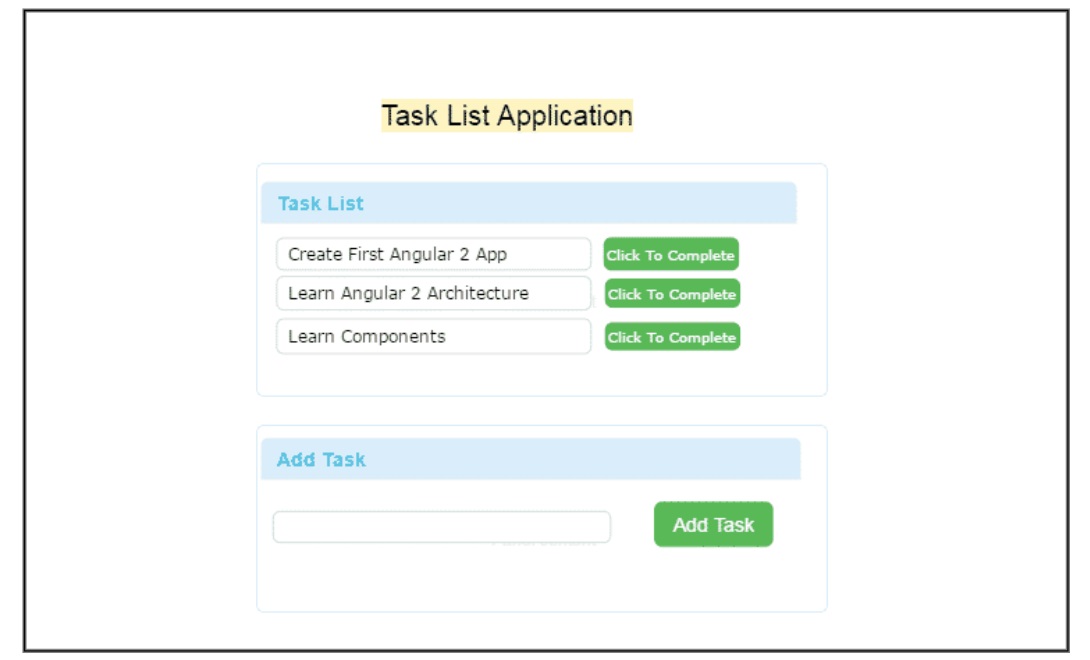
Please look over the user interface of the Task List Application shown above. The Application shows a list of Tasks; at the bottom, you can add a new task.
The above application is simple but comprises several parts. You can see that in the image below. You can see that it consists of three components, Services that get injected into the components and directives that help to manipulate the DOM.
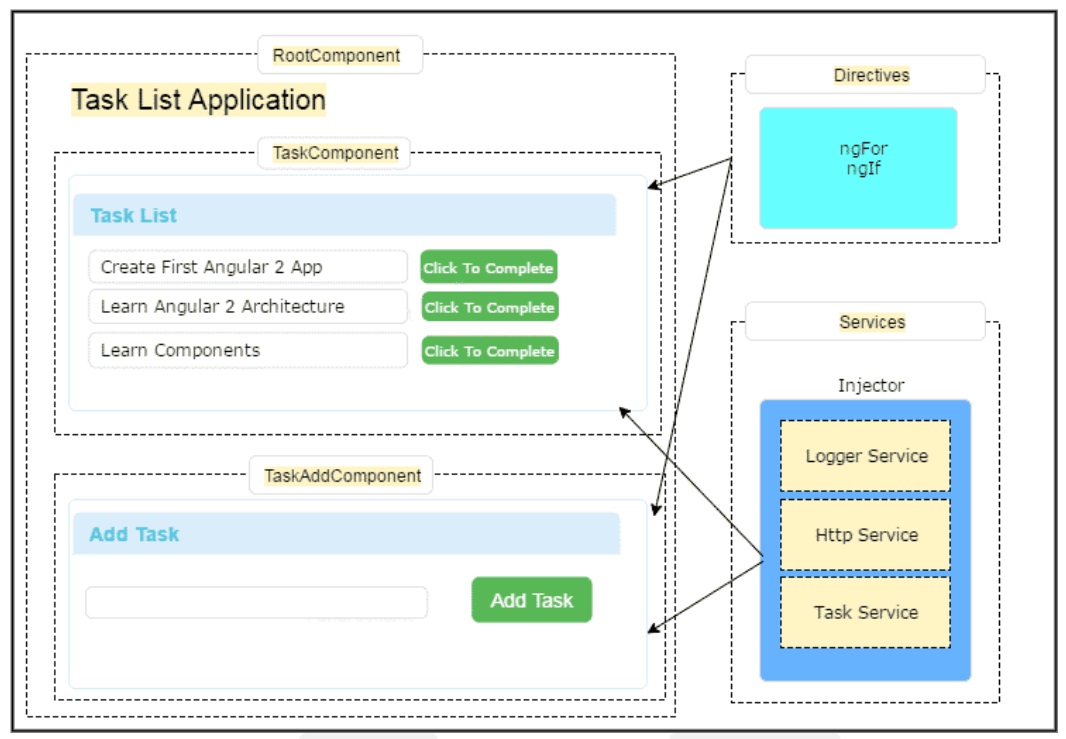
Our application has three Components. At the top, we have rootComponent. Under the rootComponent, we have two other components. One is TaskComponent, which displays the list of Tasks, and TaskAddComponent, which allows us to create new tasks.
The Angular Components are plain javascript classes and aredefined using @component Decorator. This Decorator provides the component with the View to display ( known as Template) & Metadata about the class
The Components use data binding to get the data from the Component to our View (Template). We use the special HTML markup known as the Angular Template Syntax to achieve this.
On the right side, we have Angular Services. The Angular Services provide services to our Component, like fetching data from the database using Task Service, logging application events using logger Services, and making an HTTP request to the back-end server using HTTP service.
The Responsibility to provide the instance of the Service to the Components falls on Angular Injector. It injects services into the components using Dependency Injection .
We also have Directives , which help us to manipulate the application’s ( structure directives) or style ( attribute directive) of the application. The directives help us to transform the DOM as per our needs.
The diagram above shows that an Angular application consists of several building blocks like components, services, and directives. We create more such blocks as the application grows. Using the Angular Modules concept, Angular provides an excellent way to organize these building blocks.
We will create components, services, and directives and put them inside the Angular Modules. We use the special directive to create the Modules. The Angular Module is also called ngModule.
Use Angular Module ( or ngModule) to organize the Angular code within a bigger application. The application is made up of several Angular modules acting together. Each Module implements a specific feature or functionality of the application.
Do not confuse Angular Module with JavaScript Modules. The Angular Modules are specific to Angular. The JavaScript Modules are part of the JavaScript language specification. The ES2015 specifications set the standard for defining modules.
In JavaScript as per the ES2015 specification, each file is a module. There is one module per file and one file per module.
These Modules define the scope of the variables, functions, and classes defined inside the module. These variables are always local to the module and are not visible outside the module
The modules are helpful only if they have public methods or properties. The modules help us to create public members by using the Export statement. The other modules can use these public members using the Import statement.
Angular uses the JavaScript modules via the Typescript.
We build components, Services, and directives using the JavaScript Module. Each Component is a JavaScript Module. Each Service is a JavaScript Module. And then, we combine them using the Angular Module.
In Angular Application, we mainly build Components, Services & Directives. Angular provides a very consistent way to define these building blocks. These are defined inside a JavaScript Module and follows the pattern shown below
import { Component } from '@angular/core';

@Component({
})
export class AppComponent
{
    SomeObject : any;
    Title : string ="Hello Angular";

    getSomeObject(): any {
       return this.SomeObject;
    }
}
The above example has three Parts, An import statement at the top. A class (AppComponent) is at the bottom, which we define with an export statement. We decorate the class with a decorator @Component immediately above the class.
The import statement tells Angular where to find the external functions we use in our module. All the external dependencies, like third-party libraries, our modules, or modules from Angular, must be imported. An Import statement is part of the ES2015 specifications. It is similar to the import statement of Java or using the statement of C#
You can import only the exported members from the other modules.
The Class contains the logic of the application. It can have methods & properties just like c# or java classes. The class must be defined with the export keyword if you want to use the class in another module.
AppComponent is just a class. There is nothing Angular about it. It is the decorator who tells angular how to treat the class.
For Example, @Component decorator tells the Angular that the Class is a Component. Similarly, a @Directive tells the Angular that the class is a Directive. Angular currently has the following class decorator.
Looking at the task application in the previous section, you can identify an Angular Applications seven main building blocks.
The Angular Component is a class, which we decorate by @Component class decorator.
The Component controls the part of our user interface (or view). The Task List application listed above has three components. The TaskComponent displays the list of Tasks. The TaskAddComponent helps us to create new tasks. The rootComponent is the Parent component of these components and only displays the application’s name.
The component, that we had created in the Create Your First Angular Application as shown below
import { Component } from '@angular/core';

@Component({
  selector: 'app-root',
  templateUrl: './app.component.html',
  styleUrls: ['./app.component.css']
})
export class AppComponent {
  title = 'GettingStarted';
}
The Component has four important parts
The Import statement imports the dependencies required by this component. The class contains the application logic. The @Component class decorator decorates it.
The Component needs a View to display. The Template defines that View.
The Template is just a subset of HTML that tells Angular how to display the view. It is a standard HTML page using tags like h1, h2, etc. It also uses Angular-specific markup like {} (for interpolation), [] (for Property binding), etc.
Metadata tells angular how to Process the class.
We attach the Metadata to a class using a class decorator. When we attach @Component class decorator to the class, then it becomes Component class.
The class decorator uses the configuration object, which provides Angular with the necessary information to create the component. For Example,@Component directives come with configuration options like selector,templateURL (or template),directives, etc
Angular uses the Data Binding to get the data from the Component to our View (Template). This is done using the special HTML Angular-specific markup known as the Template Syntax.
The Angular supports four types of Data binding
Data is bound from component to View
Data is bound from the component to the property of an HTML control in the view like
The DOM Events are bound from View to a method in the Component
The data flow in both directions from view to component or from component to view
The Directives help us to manipulate the view.
A directive is a class we create using the @Directive class decorator. It contains the metadata and logic to manipulate the DOM.
The Views are created by Angular using the Templates defined in the Components. These templates are dynamic and are actually transformed according to the Directives.
Angular supports two types of directives. One is structural directives which change the structure of the View, and the other one is attribute directives, which alters the style of our view.
The Services provide service to the Components or the other Services.
Angular does not have any specific definition for Services. You create a class,export a method that does some particular task, and it becomes a service. You do not have to do anything else.
For Example.
export class MyLogger {
    AddTolog(msg: any)
    {
        console.log(msg);
    }
}
And in any of our controllers, we can just invoke it using
log :MyLogger = new MyLogger();

constructor() {
    this.log.AddTolog("Component Created");
}
These are plain Javascript Modules. There is nothing Angular about these Services. What Angular does is make these services available to the components using what is known as dependency injection.
Dependency injection is a method by which a new instance of a service is injected into the component (or pipe,directive,services, etc.) which requires it. A Component, Directive, Pipe, or Service that requires service is called the consumer of the service.
Consumers declare the dependencies that they need in their constructor.injector looks for that dependency in the Angular Provider. reads the dependencies from the constructor of the Consumer. It then The Provider provides the instance and injector, then injects it into the consumer.
The Injectable is a decorator, which you need to add to the consumer of the dependency. This decorator tells angular that it must Inject the constructor arguments via theAngular DI system. But @Injectable () decorator is unnecessary if the class already has other Angular decorators like @Component, @pipe or @directive etc. Because all these are a subtype of Injectible.
We’ve learned what an Angular application looks like. We also learned the Angular Architecture concepts. The building blocks for the Angular application are components, directives, templates, metadata, services & dependency injection.
