
Angular Preloading Strategy is yet another way to speed up the load time of the Angular Apps. We build Modular apps using the Angular Modules. The Angular loads all the modules, all the modules. We can solve this problem by lazy loading those modules. The Angular allows us further optimize our app using a technique called PreLoading. In this article let us explore what is Preloader is. We will also learn to use the built in Preloading strategies like NoPreloading & PreloadAllModules. Later, we will look how to build a custom Preloading strategy so as to fully control what gets lazy loaded and what gets Preloaded.
Preloading in Angular means loading the Lazy loaded Modules in the background asynchronously, while user is interacting with the app. This will help boost up the loading time of the app
The Angular apps are modular and allows us build apps in chunks of modules. We can load these modules lazily, when the user navigates to a route. We need to mark the modules to be lazy loaded using the loadChildren property of the router.
By Lazy loading the modules, we can reduce the initial download size of the app, and thus making app load quickly. This is very useful in case of big apps. But when user navigates to a lazy loaded part of the app, the angular will have to download the module from the server, which means that user will have to wait for the download to finish.
By Preloading the lazy loaded module, the user do not have to wait for the module to be downloaded as the module is already downloaded in the background.
To make use of Preloading, first we need to enable lazy loading of the Modules. Mark the modules with the loadChildren, when you define routes as shown below. The angular will lazy load those modules.
const routes: Routes = [
  {path: "admin", loadChildren:'./admin/admin.module#AdminModule'},
];
And then, you can enable preloading by using the preloadingStrategy: PreloadAllModules, while registering the routes using the forRoot method.
RouterModule.forRoot(routes, {preloadingStrategy: PreloadAllModules})
The Angular provides two built in strategies out of the box. one is PreloadAllModules and other one is NoPreloading
This will disables all the preloading. This is default behavior i.e. if you don not specify the preloadingStrategy, then the angular assumes you do not want preloading
RouterModule.forRoot(routes,
   {
      preloadingStrategy: NoPreloading
   }
This strategy will preload all the lazy loaded modules.
RouterModule.forRoot(routes,
   {
      preloadingStrategy: PreloadAllModules
   })
With PreloadAllModules all the modules are preloaded, which may actually create a bottleneck if the application has large no of modules to be loaded.
The better way strategy would be
To selectively preload a module, we need to make use of custom preloading strategy.
First create a class, which implements the built in PreloadingStrategy class
The class must implement the method preload(). In this method, we determine whether to preload the module or not. The method signature is as follows
abstract preload(route: Route, fn: () => Observable<any>): Observable<any>

Parameters
 route Route
 fn () => Observable

Returns
Observable<any>
The first parameter is the active Route. We can use this to extract the information about the route, which is being is loaded.
The second parameter is Observable function, which we need to return if we want to preload this module. We can return Observable of null, if we do not wish to preload the module.
The following is a simple example of the preload method, which checks if the route has preload data defined. If defined it will return the load parameter, which will preload the module. If not then of(null) is returned indicating that the preload is not required
preload(route: Route, load: () => Observable<any>): Observable<any> {

    if (route.data && route.data['preload']) {
      console.log('preload called');
      return load();
   } else {
      console.log('no preload');
      return of(null);
    }
  }
In a real application, you may set a delay before preloading the module. You can also set different delay for different routes also.
Consider the following two routes. We have added data to the route. The both the routes have different delays.
const routes: Routes = [
  {path: "admin", loadChildren:'./admin/admin.module#AdminModule',data: { preload: true, delay:5000 }},
  {path: "test", loadChildren:'./test/test.module#TestModule',data: { preload: true, delay:10000 }},
];
The following is the CustomPreloadingStrategy class.
import { Injectable } from '@angular/core';
import { Observable, of, timer  } from 'rxjs';
import { flatMap } from 'rxjs/operators'

import { PreloadingStrategy, Route } from '@angular/router';

@Injectable()
export class CustomPreloadingStrategy implements PreloadingStrategy {

    preload(route: Route, loadMe: () => Observable<any>): Observable<any> {

    if (route.data && route.data['preload']) {
      var delay:number=route.data['delay']
      console.log('preload called on '+route.path+' delay is '+delay);
      return timer(delay).pipe(
        flatMap( _ => {
          console.log("Loading now "+ route.path);
          return loadMe() ;
        }));
    } else {
      console.log('no preload for the path '+ route.path);
      return of(null);
    }
  }

}
First, our class implements the PreloadingStrategy.
@Injectable()
export class CustomPreloadingStrategy implements PreloadingStrategy {
The preload method, which takes two arguments route and an observable and returns an observable
preload(route: Route, loadMe: () => Observable<any>): Observable<any> {
Next, we check the route data. If the preload is true, then we check for delay.
preload(route: Route, loadMe: () => Observable<any>): Observable<any> {
Next, we return the loadMe() after the specified delay using the timer. Before that we write to console the path being loaded.
return timer(delay).pipe(
        flatMap( _ => {
          console.log("Loading now "+ route.path);
          return loadMe() ;
        }));
And if not route.data is defined or preload is false, we return the observable of null of(null).
} else {
      console.log('no preload for the path '+ route.path);
      return of(null);
}
Finally, we need to provide it in the AppModule as shown below
import { BrowserModule } from '@angular/platform-browser';
import { NgModule } from '@angular/core';

import { AppRoutingModule } from './app-routing.module';

import { AppComponent } from './app.component';
import { CustomPreloadingStrategy } from './custom-preloading-strategy.service';

@NgModule({
  declarations: [
    AppComponent,
  ],
  imports: [
    BrowserModule,
    AppRoutingModule,
  ],
  providers: [CustomPreloadingStrategy],
  bootstrap: [AppComponent]
})
export class AppModule { }
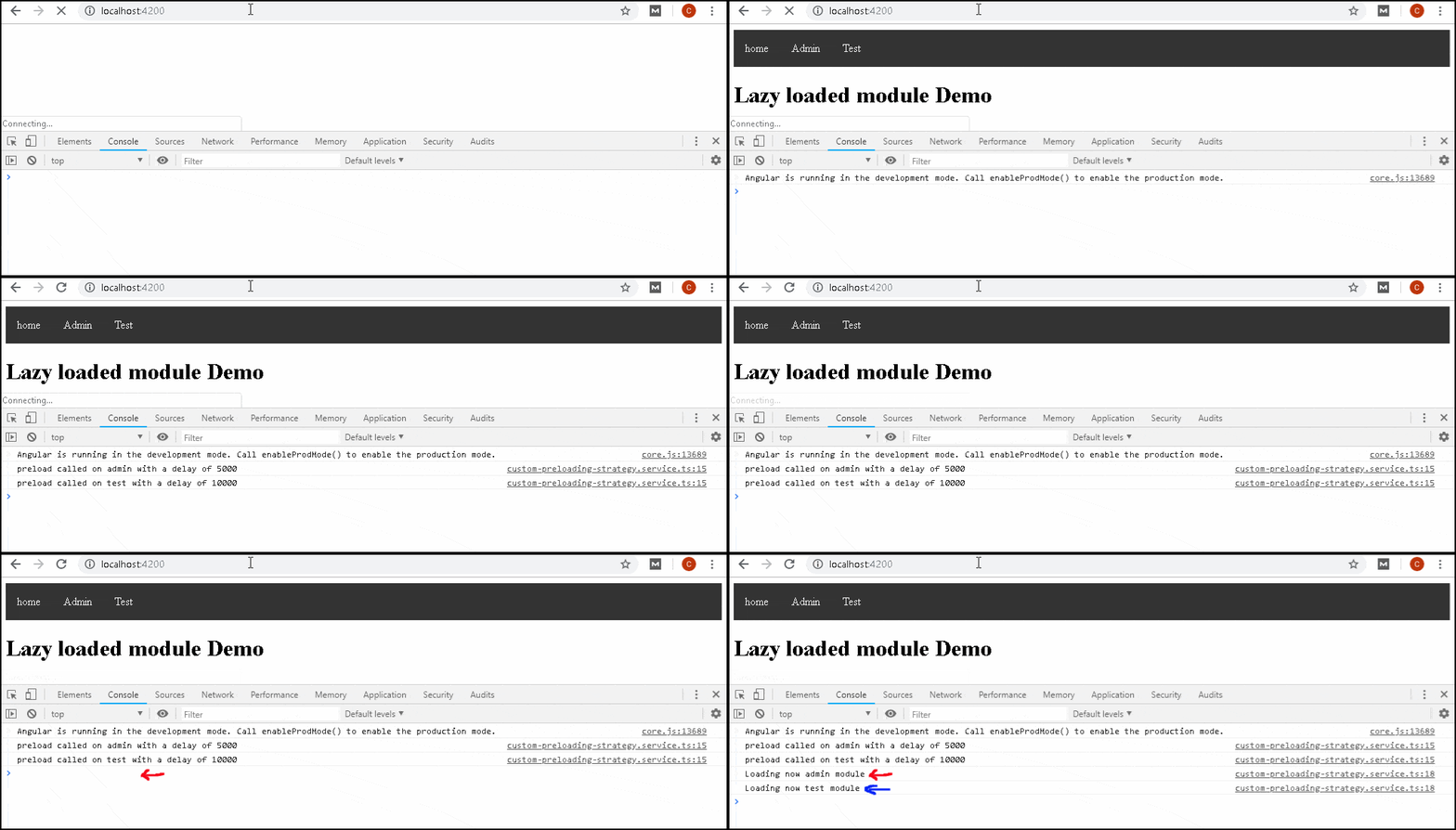
The following image shows how after the delay admin & test modules are loaded.
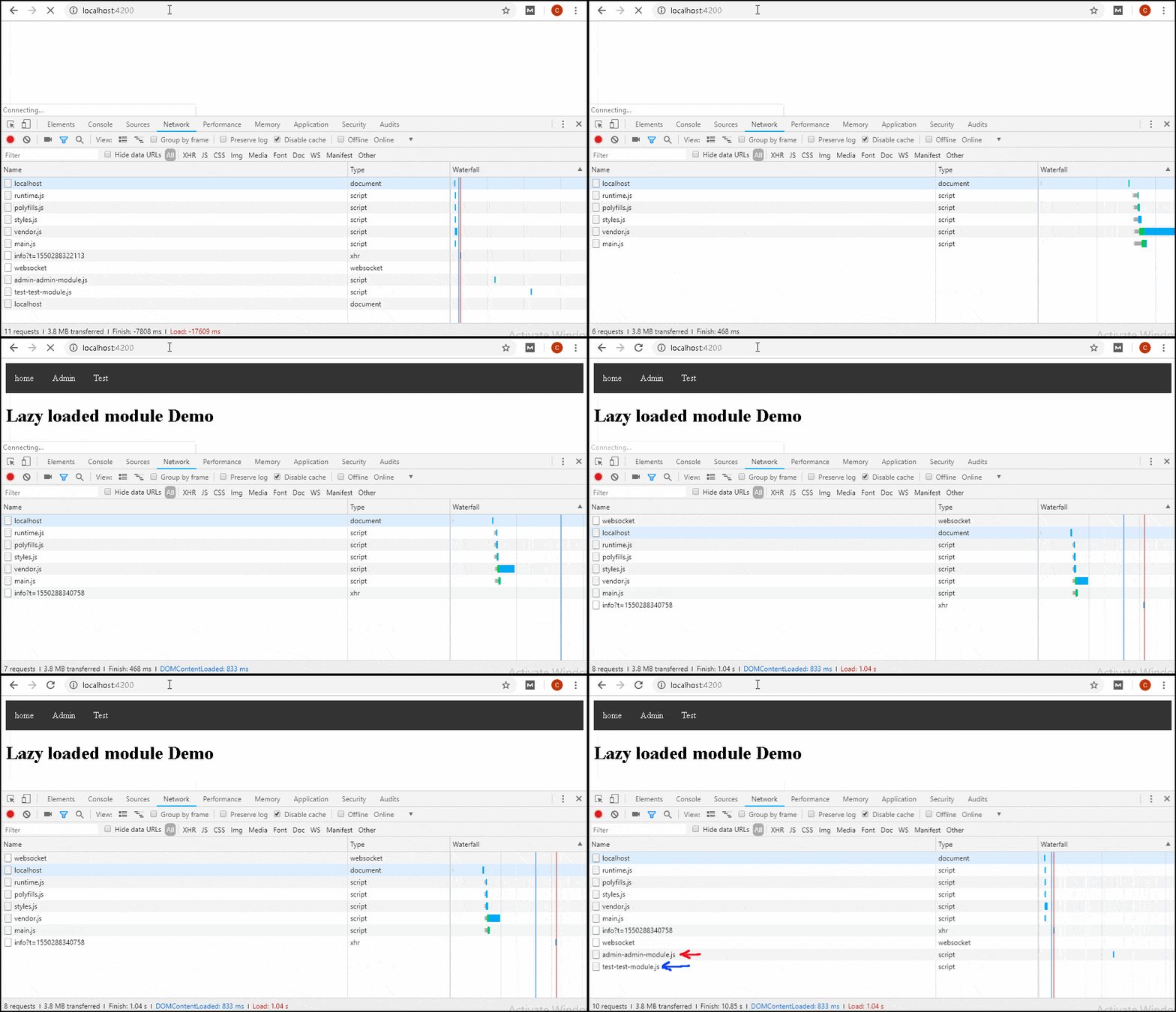
You can also verify it from the Network tab.
import { NgModule } from '@angular/core';
import { Routes, RouterModule } from '@angular/router';
import { CustomPreloadingStrategy } from './custom-preloading-strategy.service';


const routes: Routes = [
  {path: "admin", loadChildren:'./admin/admin.module#AdminModule',data: { preload: true, delay:5000 }},
  {path: "test", loadChildren:'./test/test.module#TestModule',data: { preload: true, delay:10000 }},
];


@NgModule({
  imports: [RouterModule.forRoot(routes, { preloadingStrategy: CustomPreloadingStrategy})],
  exports: [RouterModule]
})
export class AppRoutingModule { }
ul {
    list-style-type: none;
    margin: 0;
    padding: 0;
    overflow: hidden;
    background-color: #333333;
}

li {
    float: left;
}

li a {
    display: block;
    color: white;
    text-align: center;
    padding: 16px;
    text-decoration: none;
}

li a:hover {
    background-color: #111111;
}
<ul>
    <li>
      <a class="navbar-brand" routerLink="">home</a>
    </li>
    <li>
      <a class="navbar-brand" routerLink="/admin/dashboard">Admin</a>
    </li>
    <li>
      <a class="navbar-brand" routerLink="/test">Test</a>
  </li>

  </ul>

<h1>Lazy loaded module Demo</h1>

<router-outlet></router-outlet>
import { Component } from '@angular/core';


@Component({
  selector: 'app-root',
  templateUrl: './app.component.html',
  styleUrls: ['./app.component.css']
})
export class AppComponent {
  title = 'Module Demo';
}
import { BrowserModule } from '@angular/platform-browser';
import { NgModule } from '@angular/core';

import { AppRoutingModule } from './app-routing.module';

import { AppComponent } from './app.component';
import { CustomPreloadingStrategy } from './custom-preloading-strategy.service';

@NgModule({
  declarations: [
    AppComponent,
  ],
  imports: [
    BrowserModule,
    AppRoutingModule,
  ],
  providers: [CustomPreloadingStrategy],
  bootstrap: [AppComponent]
})
export class AppModule { }
import { Injectable } from '@angular/core';
import { Observable, of, timer  } from 'rxjs';
import { flatMap } from 'rxjs/operators'

import { PreloadingStrategy, Route } from '@angular/router';


@Injectable()
export class CustomPreloadingStrategy implements PreloadingStrategy {

    preload(route: Route, loadMe: () => Observable<any>): Observable<any> {

    if (route.data && route.data['preload']) {
      var delay:number=route.data['delay']
      console.log('preload called on '+route.path+' with a delay of '+delay);
      return timer(delay).pipe(
        flatMap( _ => {
          console.log("Loading now "+ route.path+' module');
          return loadMe() ;
        }));
    } else {
      console.log('no preload for the path '+ route.path);
      return of(null);
    }
  }
import { NgModule } from '@angular/core';

import { AdminRoutingModule } from './admin.routing.module';
import { DashboardComponent } from './dashboard.component';


@NgModule({
  declarations: [DashboardComponent],
  imports: [
    AdminRoutingModule,
  ],
  providers: [],
})
export class AdminModule { }
import { NgModule } from '@angular/core';
import { Routes, RouterModule } from '@angular/router';

import { DashboardComponent } from './dashboard.component';


const routes: Routes = [
    { path: 'dashboard', component: DashboardComponent},
    { path: '', redirectTo:'dashboard'}
];


@NgModule({
  imports: [RouterModule.forChild(routes)],
  exports: [RouterModule]
})
export class AdminRoutingModule { }
  import { Component } from '@angular/core';

  @Component({
    template: `<h1>Dashboard Component</h1>`,
  })
  export class DashboardComponent {
    title = '';
  }
import { NgModule } from '@angular/core';

import { TestRoutingModule } from './test.routing.module';
import { TestComponent } from './test.component';


@NgModule({
  declarations: [TestComponent],
  imports: [
    TestRoutingModule,
  ],
  providers: [],
})
export class TestModule { }
import { NgModule } from '@angular/core';
import { Routes, RouterModule } from '@angular/router';

import { TestComponent  } from './test.component';


const routes: Routes = [
    { path: 'list', component: TestComponent},
    { path: '', redirectTo:'list'},
];


@NgModule({
  imports: [RouterModule.forChild(routes)],
  exports: [RouterModule]
})
export class TestRoutingModule { }
  import { Component } from '@angular/core';

  @Component({
    template: `<h1>Test Component</h1>`,
  })
  export class TestComponent {
    title = '';
  }
