
The Angular Observable tutorial (or Angular RxJs Tutorial ) covers what an observable is and how to use Observables in Angular applications. When we talk about Angular Observable, we hear a lot of terms like Reactive programming, data streams, observables, Observers, RxJS, etc. It is essential to understand these terms before we start using the observables.
Rx stands for Reactive programming. It is defined as programming with asynchronous data streams. So, it is essential that you understand what a data stream is.
A data stream is the data that arrives over some time. The stream of data can be anything. Like variables, user inputs, properties, caches, data structures, and even failures, etc
Consider the example of a sequence of x and y positions of mouse click events. Assume that the user has clicked on the locations (12, 15), (10, 12), (15, 20), and (17, 15) in that order.
The following diagram shows how the values arrive over a period of time. As you can see, the stream emits the values as they happen, i.e., asynchronously.
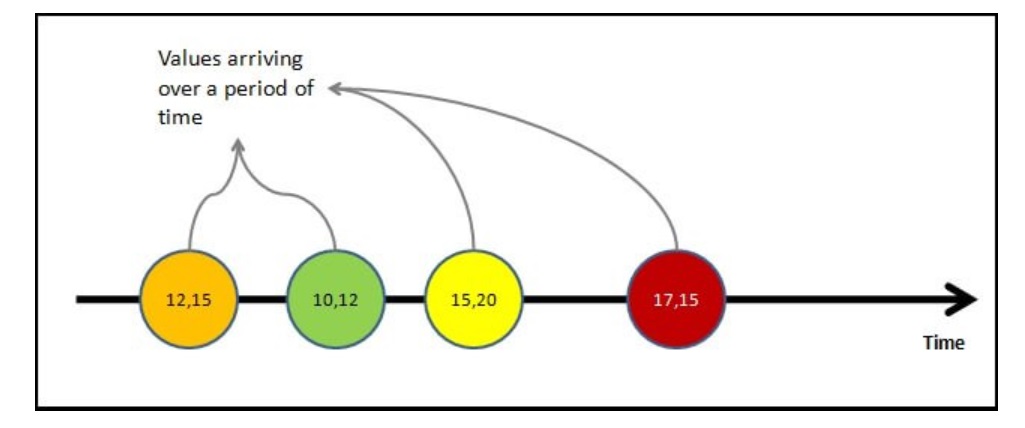
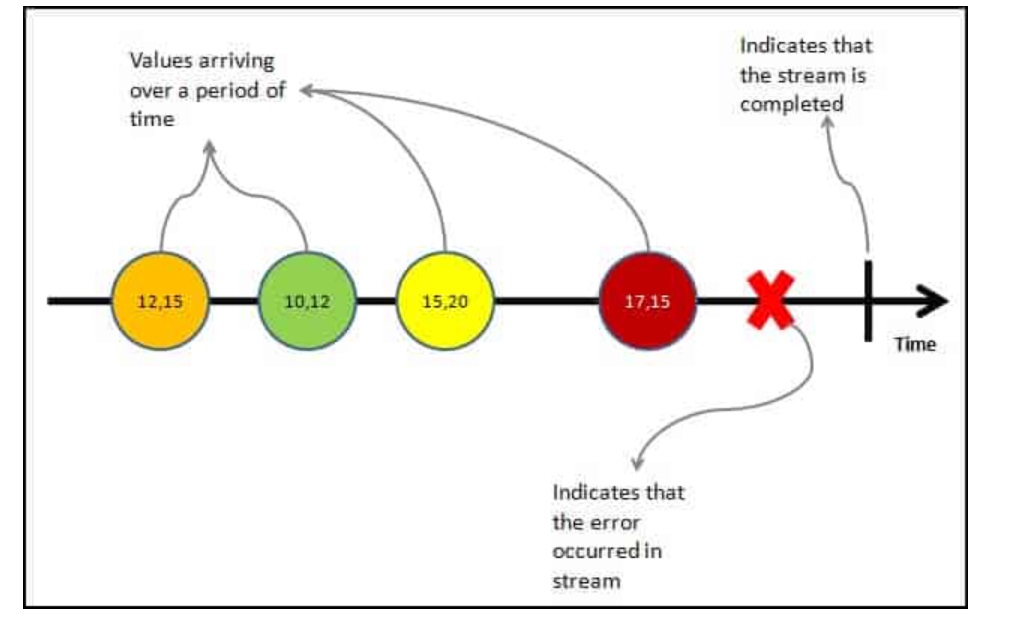
Value is not the only thing that streams emit. The stream may complete as the user closes the window or app. Or an error may happen, resulting in the stream’s closure. At any point in time, the stream may emit the following three things.
Value:
i.e., the next value in the stream
Complete:
The stream has ended
Error:
The error has stopped the stream.
The following diagram shows all three possibilities in a stream
As said earlier the stream of data can be anything. For Example
Important Points regarding streams can
Now we have understood what a data stream is, let us look at what is Reactive Programming is
Reactive programming is about creating the stream, emitting value, error, or complete signals, manipulating, transferring, or doing something useful with the data streams.
This is where the RxJs come into the picture.
The introduction to Reactive Programming you’ve been missing gives you a very nice introduction to Reactive Programming. Also, refer to Introduction to Rx
The RxJS (Reactive Extensions Library for JavaScript) is a Javascript library that allows us to work with asynchronous data streams.
Angular uses the RxJS library heavily in its framework to implement Reactive Programming. Some of the examples where reactive programming is used are
The RxJs has two main players
Observable is a function that converts the ordinary data stream into an observable one. You can think of Observable as a wrapper around the ordinary data stream.
An observable stream or simple Observable emits the value from the stream asynchronously. It emits the complete signals when the stream completes or an error signal if the stream errors out.
Observables are declarative. You define an observable function just like any other variable. The observable starts to emit values only when someone subscribes to it.
The Observable is only useful if someone consumes the value emitted by the observable. We call them observers or subscribers.
The observers communicate with the Observable using callbacks
The observer must subscribe to the observable to receive the value from the observable. While subscribing, it optionally passes the three callbacks. next(), error() & complete()
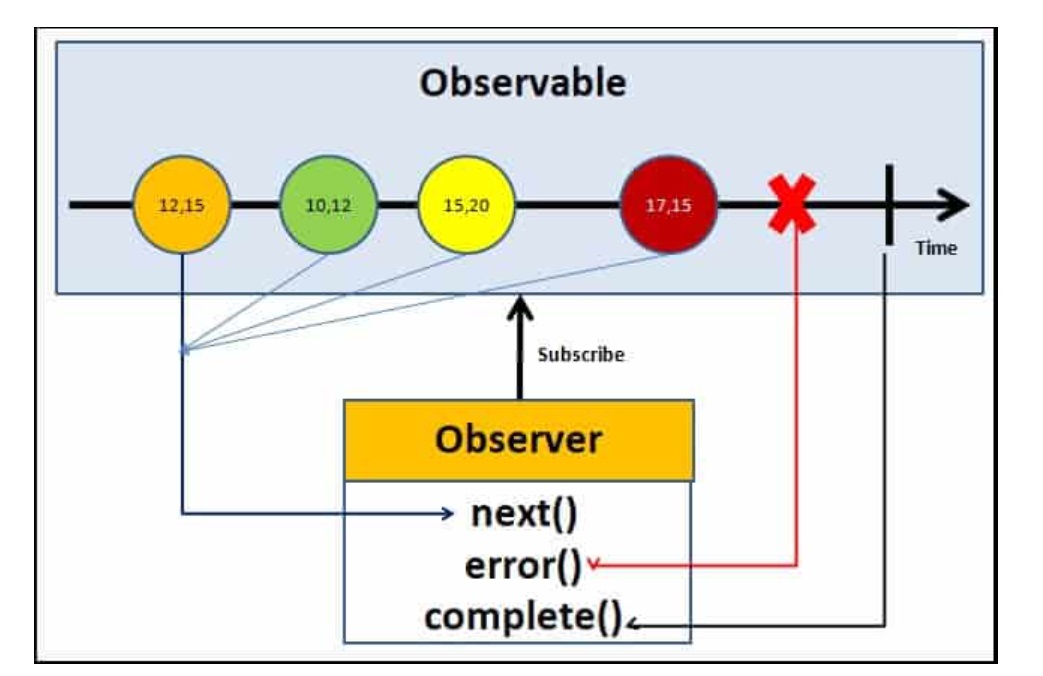
The observable emits the value as soon as the observer or consumer subscribes to it.
The observable invokes the next() callback whenever the value arrives in the stream. It passes the value as the argument to the next callback. If the error occurs, then the error() callback is invoked. It invokes the complete() callback when the stream completes.
Now we have learned the basics of the RxJs Observable, let us now see how it works using an example.
Create a new project in angular. Remove the contents from app.component.html. Open the app.component.ts
RxJs library is installed automatically when you create the Angular project. Hence there is no need to install it.
Import the Observable from the rxjs library
import { Observable } from 'rxjs';
There are a few ways in which you can create observable in angular. The simplest is to use the Observable constructor. The observable constructor takes the observer (or subscriber) as its argument. The subscriber will run when this observable’s subscribe() method executes.
The following example creates an observable of a stream of numbers 1, 2, 3, 4, 5
obs = new Observable((observer) => {
     console.log("Observable starts")
     observer.next("1")
     observer.next("2")
     observer.next("3")
     observer.next("4")
     observer.next("5")
   })
The variable obs is now of Type observable.
The above example declares the obs as observable but does not instantiate it. To make the observable emit values, we need to subscribe to them.
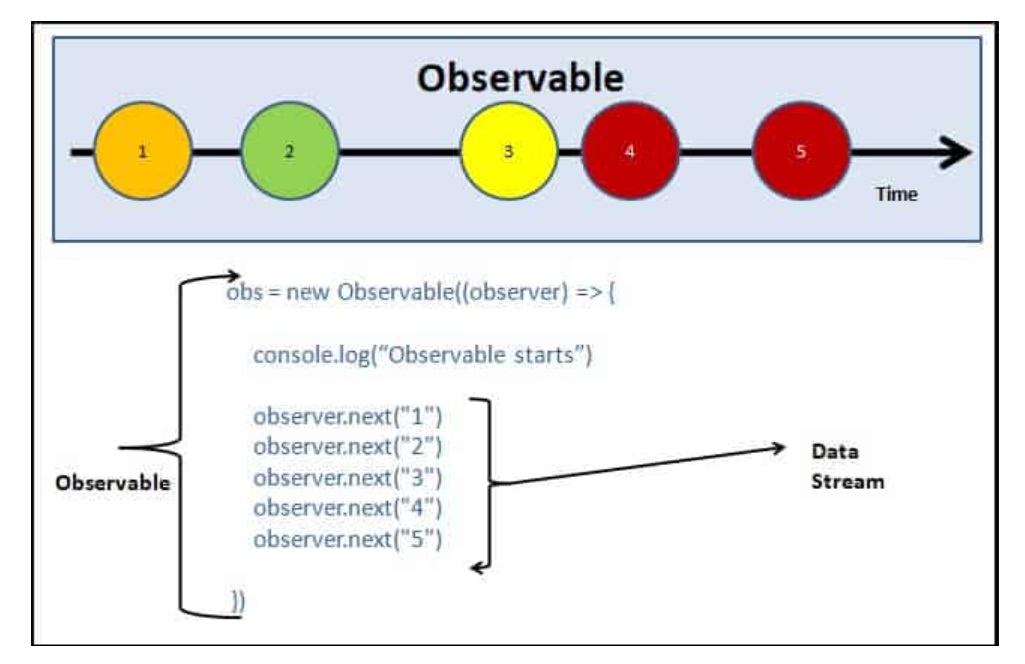
In the above example, we used the Observable Constructor to create the Observable. Many operators are available with the RxJS library, which makes creating the observable easy. These operators help us to create observables from an array, string, promise, any iterable, etc. Here is list of some of the commonly used operators
We subscribe to the observable by invoking the subscribe method on it.
We either pass an observer object or the next() callback as an argument. The arguments are optional. (The subscribe method signature was changed in RxJs 6.4. Scroll down for older syntax.)
An observer object is an object that optionally contains the next, error and complete methods. The signature of the observer object is shown below.
export interface Observer<T> {
  next: (value: T) => void;
  error: (err: any) => void;
  complete: () => void;
}
The code below shows subscribing to an observable using the observer object. The next method is invoked whenever the observable emits data. It invokes the error method when an error occurs and the complete method when the observable completes.
  ngOnInit() {
    this.obs.subscribe(
      {
        next: (val) => {
          console.log(val);
        }, //next callback
        error: (error) => {
          console.log('error');
        }, //error callback
        complete:() => {
          console.log('Completed');
         } //complete callback
      }
    );
  }
The complete app.component.ts code is shown below.
import { Component, OnInit } from '@angular/core';
import { Observable } from 'rxjs';

@Component({
  selector: 'my-app',
  template: `

  <h1>Angular Observable Tutorial</h1>

<br><br><br>
Refer
<a href="https://www.tektutorialshub.com/angular/angular-observable-tutorial-using-rxjs/">Angular Observable
  Tutorial</a>
  `
})
export class AppComponent implements OnInit {


  obs = new Observable(observer => {
    console.log('Observable starts');
    observer.next('1');
    observer.next('2');
    observer.next('3');
    observer.next('4');
    observer.next('5');
  });

  ngOnInit() {
    this.obs.subscribe( {
      next: (val) => {
        console.log(val);
      }, //next callback
      error: (error) => {
        console.log('error');
      }, //error callback
      complete:() => {
        console.log('Completed');
      } //complete callback
    }
    );
  }
}
The subscribe method signature was changed in RxJs 6.4
In the older version, we needed to pass three callback functions i.e.next(),
error() &
complete(). The code is shown below
ngOnInit() {

    this.obs.subscribe(
      val => { console.log(val) }, //next callback
      error => { console.log("error") }, //error callback
      () => { console.log("Completed") } //complete callback
    )
}
import { Component, OnInit } from '@angular/core';
import { Observable } from 'rxjs';

@Component({
  selector: 'app-root',
  templateUrl: './app.component.html',
  styleUrls: ['./app.component.css']
})
export class AppComponent implements OnInit {
  title = 'Angular Observable using RxJs - Getting Started';

  obs = new Observable((observer) => {
    console.log("Observable starts")
      observer.next("1")
      observer.next("2")
      observer.next("3")
      observer.next("4")
      observer.next("5")
  })

  data=[];

  ngOnInit() {

    this.obs.subscribe(
      val=> { console.log(val) },
      error => { console.log("error")},
      () => {console.log("Completed")}
    )
  }
}
Now, run the code and watch the output in debug window.
We can add a timeout to insert a delay in each next() callback
  obs = new Observable((observer) => {
    console.log("Observable starts")

    setTimeout(() => { observer.next("1") }, 1000);
    setTimeout(() => { observer.next("2") }, 2000);
    setTimeout(() => { observer.next("3") }, 3000);
    setTimeout(() => { observer.next("4") }, 4000);
    setTimeout(() => { observer.next("5") }, 5000);

  })
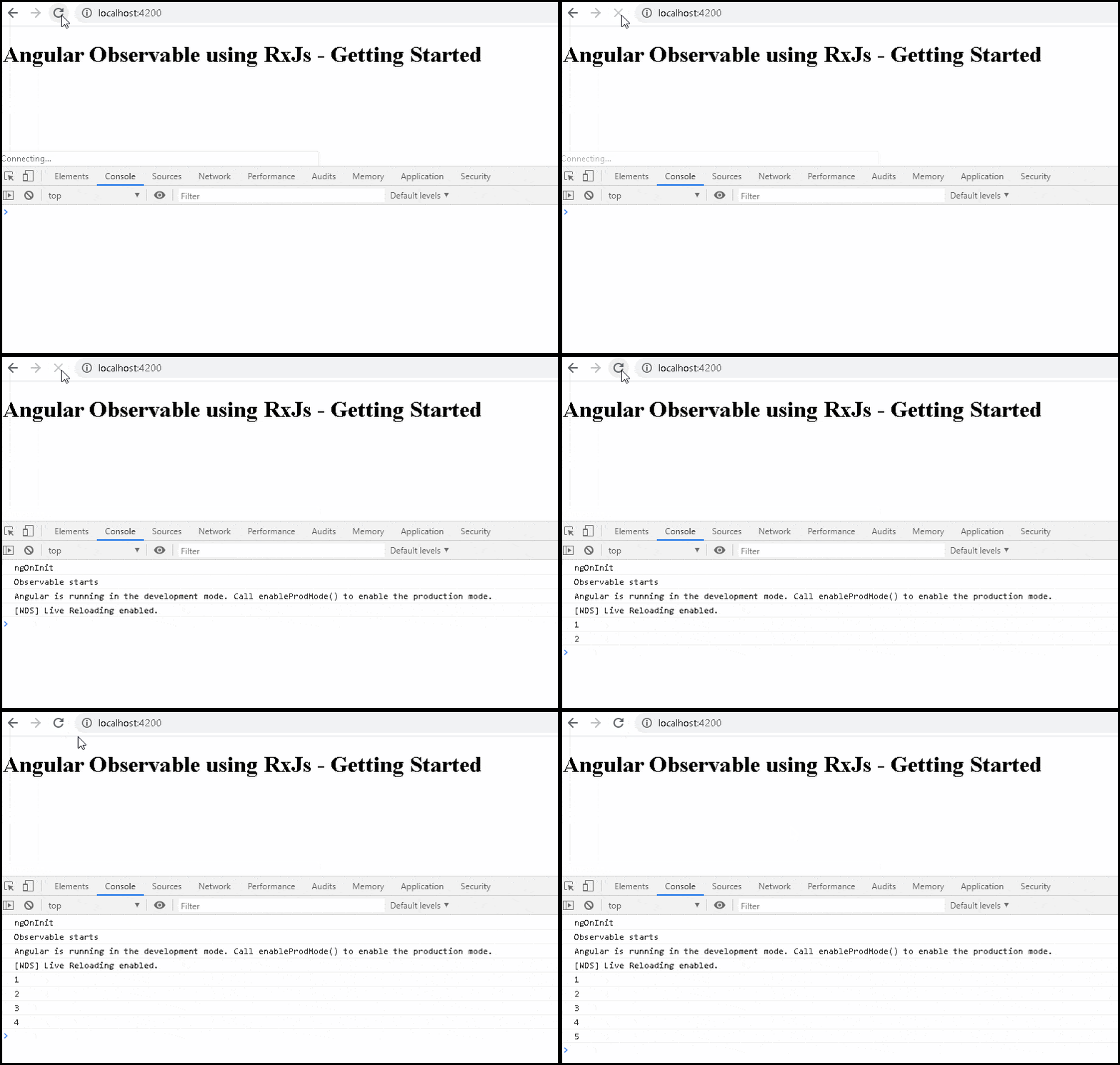
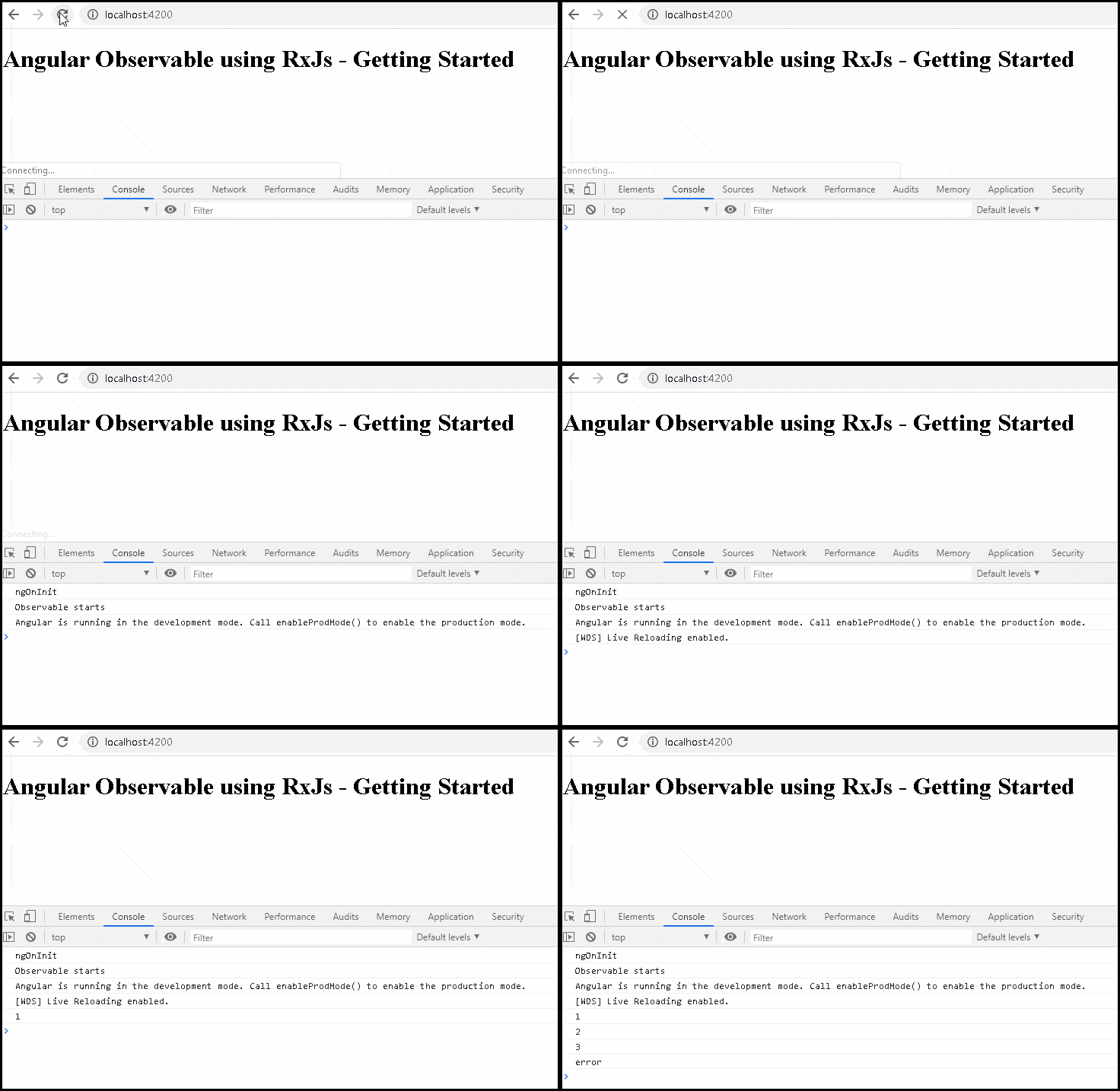
As mentioned earlier, the observable can also emit an error. This is done by invoking the error() callback and passing the error object. The observables stop after emitting the error signal. Hence in the following example, values 4 & 5 are never emitted.
 obs = new Observable((observer) => {
    console.log("Observable starts")

    setTimeout(() => { observer.next("1") }, 1000);
    setTimeout(() => { observer.next("2") }, 2000);
    setTimeout(() => { observer.next("3") }, 3000);
    setTimeout(() => { observer.error("error emitted") }, 3500);    //sending error event. observable stops here
    setTimeout(() => { observer.next("4") }, 4000);          //this code is never called
    setTimeout(() => { observer.next("5") }, 5000);

  })
You can send the error object as the argument to the error method
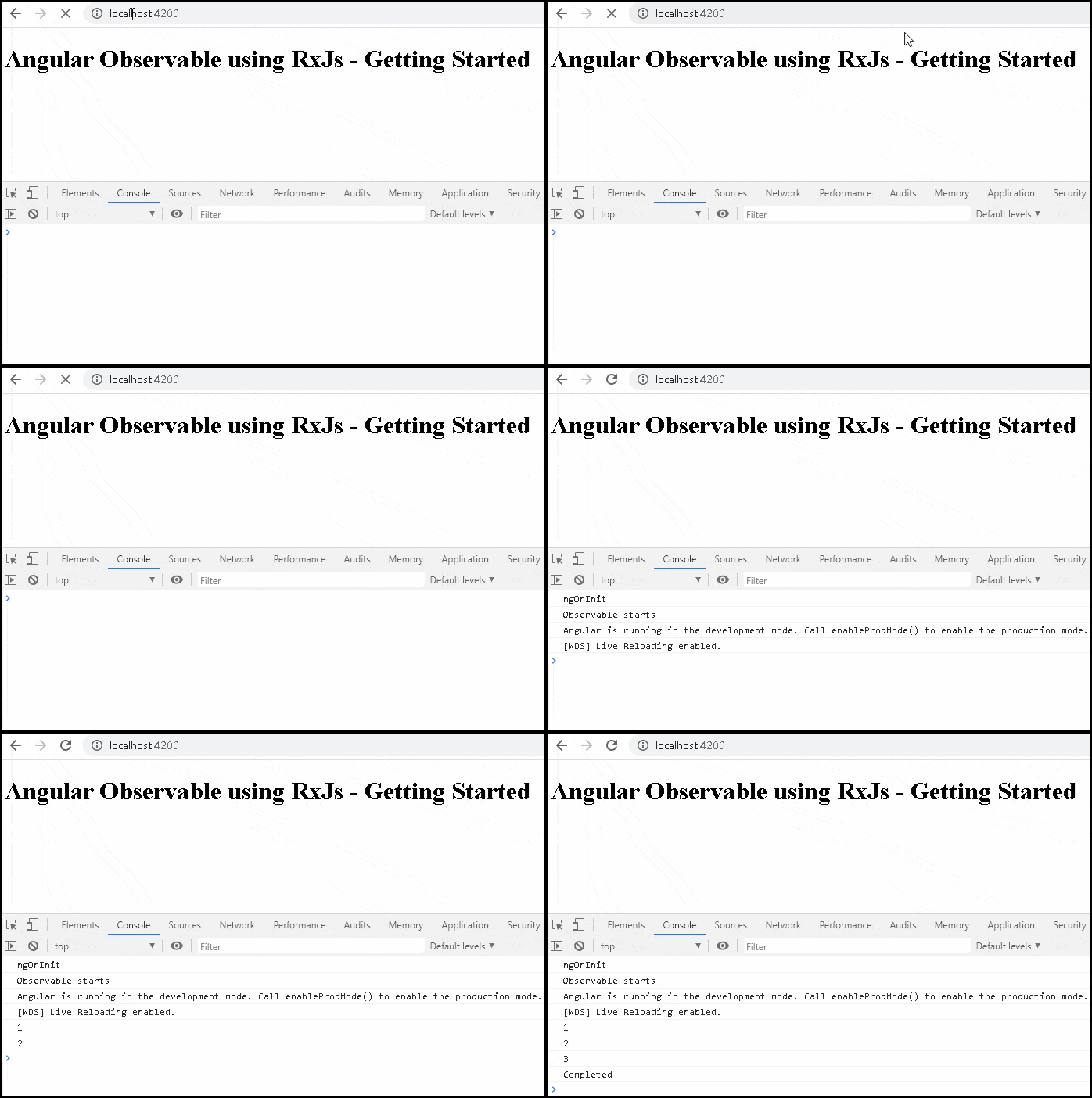
Similarly, the complete event. The observables stop after emitting the complete signal. Hence in the following example, values 4 & 5 are never emitted.
    obs = new Observable((observer) => {
    console.log("Observable starts")

    setTimeout(() => { observer.next("1") }, 1000);
    setTimeout(() => { observer.next("2") }, 2000);
    setTimeout(() => { observer.next("3") }, 3000);
    setTimeout(() => { observer.complete() }, 3500);   //sending complete event. observable stops here
    setTimeout(() => { observer.next("4") }, 4000);    //this code is never called
    setTimeout(() => { observer.next("5") }, 5000);

  })
The Operators are functions that operate on an Observable and return a new Observable.
The power of observable comes from the operators. You can use them to manipulate the incoming observable, filter it, merge it with another observable, alter the values or subscribe to another observable.
You can also chain each operator one after the other using the pipe. Each operator in the chain gets the observable from the previous operator. It modifies it and creates a new observable, which becomes the input for the next observable.
The following example shows the filer & map operators chained inside a pipe.The filter operator removes all data which is less than or equal to 2 and the map operator multiplies the value by 2.
The input stream is [1,2,3,4,5] , while the output is [6, 8, 10].
obs.pipe(
 obs = new Observable((observer) => {
    observer.next(1)
    observer.next(2)
    observer.next(3)
    observer.next(4)
    observer.next(5)
    observer.complete()
  }).pipe(
    filter(data => data > 2),   //filter Operator
    map((val) => {return val as number * 2}), //map operator
  )
The following table lists some of the commonly used operators
| AREA | OPERATORS |
|---|---|
| Combination | combineLatest, concat, merge, startWith , withLatestFrom, zip |
| Filtering | debounceTime, distinctUntilChanged, filter, take, takeUntil ,takeWhile, takeLast, first, last, single, skip, skipUntil, skipWhile, skipLast, |
| Transformation | bufferTime,concatMap, map, mergeMap , scan, switchMap, ExhaustMap, reduce |
| Utility | tap, delay, delaywhen |
| Error Handling | throwerror, catcherror, retry, retrywhen |
| Multicasting | share |
We must unsubscribe to close the observable when we no longer require it. If not, it may lead to memory leak & Performance degradation.
To Unsubscribe from an observable, we need to call the Unsubscribe() method on the subscription. It will clean up all listeners and frees up the memory.
To do that, first, create a variable to store the subscription
obs: Subscription;
Assign the subscription to the obs variable
this.obs = this.src.subscribe(value => {
  console.log("Received " + this.id);
});
Call the unsubscribe() method in the ngOnDestroy method.
ngOnDestroy() {
  this.obs.unsubscribe();
}
When we destroy the component, the observable is unsubscribed and cleaned up.
But you do not have to unsubscribe from every subscription. For Example, the observables, which emit the complete signal, close the observable.
To learn more about it, refer to the tutorial Unsubscribing from an Observable in Angular.
Reactive programming is about programming the stream. The RxJS library brings Reactive Programming into Angular. Using RxJs, we can create an observable, emitting the next value, error, and complete signals to the subscriber of the observable.
In the next few tutorials, we will learn more about the RxJs Observable
