
In this Angular Http Post Example, we will show you how to make an HTTP Post Request to a back end server. We use the HttpClient module in Angular. The Angular introduced the HttpClient Module in Angular 4.3. It is part of the package @angular/common/http. We will create a Fake backend server using JSON-server for our example. We also show you how to add HTTP headers, parameters or query strings, catch errors, etc.
Create a new Angular App.
ng new httpPost
Import the HttpClientModule & FormsModule in app.module.ts. Also, add it to the imports array.
import { BrowserModule } from '@angular/platform-browser';
import { NgModule } from '@angular/core';

import { HttpClientModule } from '@angular/common/http';
import { FormsModule } from '@angular/forms'

import { AppRoutingModule } from './app-routing.module';
import { AppComponent } from './app.component';

@NgModule({
  declarations: [
    AppComponent
  ],
  imports: [
    BrowserModule,
    AppRoutingModule,
    HttpClientModule,
    FormsModule,
  ],
  providers: [],
  bootstrap: [AppComponent]
})
export class AppModule { }
In the HTTP Get example, we made use of the publicly available GitHub API. For this example, we need a backend server, which will accept the post request.
There are few ways to create a fake backend. You can make use of an in-memory web API or the JSON server. For this tutorial, we will make use of the JSON Server.
Install the JSON-server globally using the following npm command
npm install -g json-server
create a db.json file with some data. The following example contains data of people with id & name fields.
{
  "people": [
    {
      "id": 1,
      "name": "Don Bradman"
    },
    {
      "id": 2,
      "name": "Sachin Tendulkar"
    }
  ]
}
Start the server
json-server --watch db.json
The json-server starts and listens for requests on port 3000.
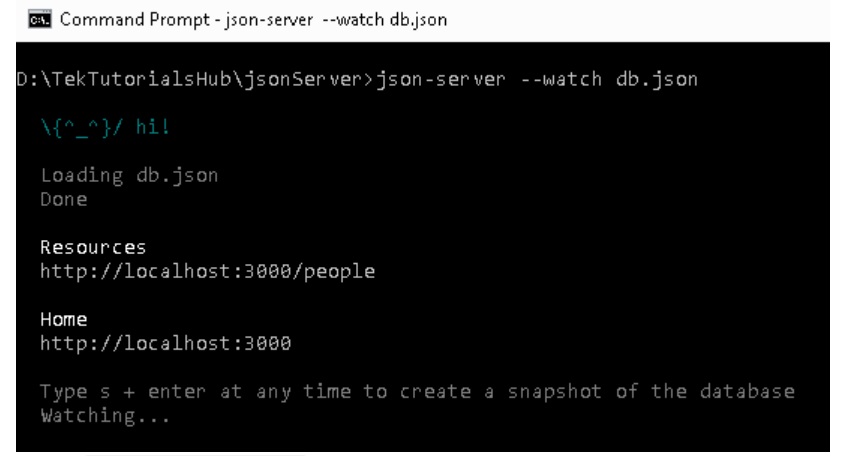
Browse the URL http://localhost:3000/ and you should be able to see the home page
The URL http://localhost:3000/people lists the people from the db.json. You can now make GET POST PUT PATCH DELETE OPTIONS against this URL
Now, back to our app and create a Person model class under person.ts
export class Person {
  id:number
  name:string
}
Now, let us create a Service, which is responsible to send HTTP Requests. Create a new file api.service.ts and copy the following code
import { HttpClient, HttpHeaders } from '@angular/common/http';
import { Person } from './person';
import { Injectable } from '@angular/core';
import { Observable } from 'rxjs';

@Injectable({providedIn:'root'})
export class ApiService {

  baseURL: string = "http://localhost:3000/";

  constructor(private http: HttpClient) {
  }

  getPeople(): Observable<Person[]> {
    console.log('getPeople '+this.baseURL + 'people')
    return this.http.get<Person[]>(this.baseURL + 'people')
  }

  addPerson(person:Person): Observable<any> {
    const headers = { 'content-type': 'application/json'}
    const body=JSON.stringify(person);
    console.log(body)
    return this.http.post(this.baseURL + 'people', body,{'headers':headers})
  }

}
The URL endpoint of our json-server is hardcoded in our example, But you can make use of a config file to store the value and read it using the APP_INITIALIZER token
baseURL: string = "http://localhost:3000/";
We inject the HttpClient using the Dependency Injection
constructor(private http: HttpClient) {
}
The getPeople() method sends an HTTP GET request to get the list of persons. Refer to the tutorial Angular HTTP GET Example to learn more.
getPeople(): Observable<Person[]> {
console.log('getPeople '+this.baseURL + 'people')
return this.http.get<Person[]>(this.baseURL + 'people')
}
In the addPerson method, we send an HTTP POST request to insert a new person in the backend.
Since we are sending data as JSON, we need to set the'content-type': 'application/json' in the HTTP header. The JSON.stringify(person) converts the person object into a JSON string.
Finally, we use the http.post() method using URL, body & headers as shown below.
  addPerson(person:Person): Observable<any> {
    const headers = { 'content-type': 'application/json'}
    const body=JSON.stringify(person);
    console.log(body)
    return this.http.post(this.baseURL + 'people', body,{'headers':headers})
  }
The post() method returns an observable. Hence we need to subscribe to it.
The template is very simple.
We ask for the name of the person, which we want to add to our backend server. The two-way data binding ([(ngModel)]="person.name") keeps the person object in sync with the view.
<h1>{{title}}</h1>

<div>
  <div>
    <label>Name: </label>
    <input [(ngModel)]="person.name" />
  </div>
  <div>
    <button (click)="addPerson()">Add</button>
  </div>
</div>

<table class='table'>
  <thead>
    <tr>
      <th>ID</th>
      <th>Name</th>
    </tr>
  </thead>
  <tbody>
    <tr *ngFor="let person of people;">
      <td>{{person.id}}</td>
      <td>{{person.name}}</td>
    </tr>
  </tbody>
</table>
In the refreshPeople() method, we subscribe to the getPeople() method of our ApiService to make an HTTP get() request to get the list of people.
Under the addPerson() method, we subscribe to the apiService.addPerson(). Once the post request finishes, we call refreshPeople() method to get the updated list of people.
import { Component, OnInit } from '@angular/core';
import { ApiService } from './api.service';
import { Person } from './person';

@Component({
  selector: 'app-root',
  templateUrl: './app.component.html',
  styleUrls: ['./app.component.css']
})
export class AppComponent implements OnInit {

  title = 'httpGet Example';
  people:Person[];
  person = new Person();

  constructor(private apiService:ApiService) {}

  ngOnInit() {
    this.refreshPeople()
  }

  refreshPeople() {
    this.apiService.getPeople()
      .subscribe(data => {
        console.log(data)
        this.people=data;
      })

  }

  addPerson() {
    this.apiService.addPerson(this.person)
      .subscribe(data => {
        console.log(data)
        this.refreshPeople();
      })
  }

}
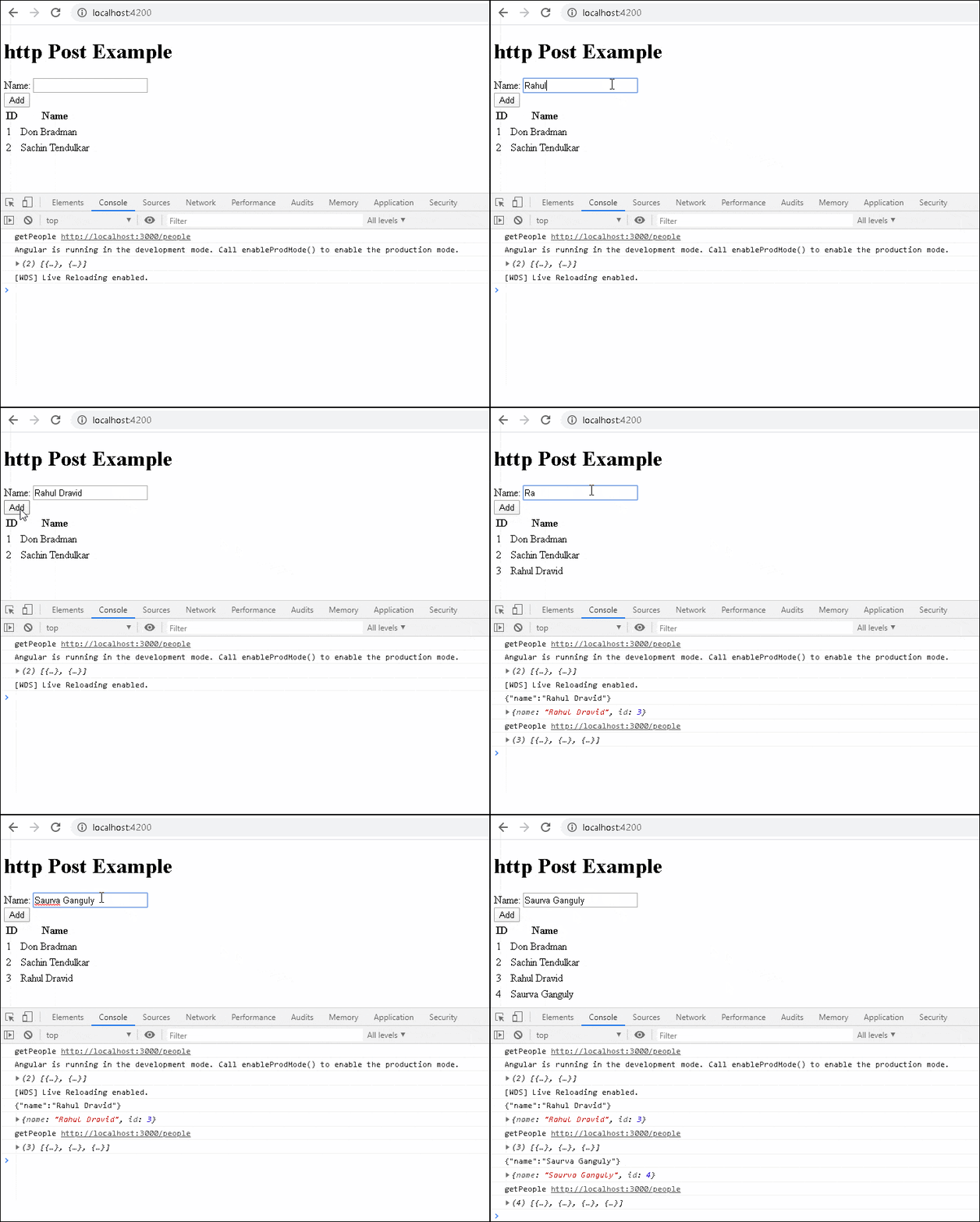
The above code is a very simple example of the HTTP post() method. The complete syntax of the post() method is as shown below. The first two arguments are URL and body. It has the third argument options, where we can pass the HTTP headers, parameters, and other options to control how the post() method behaves.
post(url: string,
     body: any,
     options: {
        headers?: HttpHeaders | { [header: string]: string | string[]; };
        observe?: "body|events|response|";
        params?: HttpParams | { [param: string]: string | string[]; };
        reportProgress?: boolean;
        responseType: "arraybuffer|json|blob|text";
        withCredentials?: boolean;
     }
): Observable
headers : use this to send the HTTP Headers along with the requestparams : set query strings / URL parametersobserve : This option determines the return type.responseType : The value of responseType determines how the response is parsed.
reportProgress : Whether this request should be made in a way that exposes progress events.withCredentials : Whether this request should be sent with outgoing credentials
(cookies).
The POST method returns one of the following
By default, it returns the body.
The following code will return the complete response and not just the body
addPerson(person:Person): Observable<any> {
    const headers = { 'content-type': 'application/json'}
    const body=JSON.stringify(person);

    return this.http.post(this.baseURL + 'people', body,{'headers':headers , observe: 'response'})
}
You can also listen to progress events by using the { observe: 'events', reportProgress: true }. You can read about observe the response
return this.http.post(this.baseURL + 'people', body,{'headers':headers, observe: 'response',reportProgress: true})
The responseType determines how the response is parsed. it can be one of the arraybuffer , json blob or text. The default behavior is to parse the response as JSON.
Instead of any, we can also use a type as shown below
addPerson(person:Person): Observable<Person> {
const headers = { 'content-type': 'application/json'}
    const body=JSON.stringify(person);
    console.log(body)
    return this.http.post<Person>(this.baseURL + 'people', body,{'headers':headers})
}
The API may return a simple text rather than a JSON. Use responsetype: 'text' to ensure that the response is parsed as a string.
  addPerson(person:Person): Observable<Person> {
    const headers = { 'content-type': 'application/json'}
    const body=JSON.stringify(person);

    return this.http.post<Person>(this.baseURL + 'people', body,{'headers':headers, responsetype: 'text'})
  }
The API might fail with an error. You can catch those errors using catchError. You either handle the error or throw it back to the component using thethrow err
  addPerson(person:Person): Observable<Person> {
    const headers = { 'content-type': 'application/json'}
    const body=JSON.stringify(person);

    return this.http.post<Person>(this.baseURL + 'people', body,{'headers':headers})
       .pipe(
         catchError((err) => {
           console.error(err);
           throw err;
         }
       )
  }
Read more about error handling from Angular HTTP interceptor error handling
You can make use of the map , filter RxJs Operators to manipulate or transform the response before sending it to the component.
  addPerson(person:Person): Observable<Person> {
    const headers = { 'content-type': 'application/json'}
    const body=JSON.stringify(person);

    return this.http.post<Person>(this.baseURL + 'people', body,{'headers':headers})
       .pipe(
          map((data) => {
            //You can perform some transformation here
           return data;
         }),
         catchError((err) => {
           console.error(err);
           throw err;
         }
       )
  }
The URL Parameters or Query strings can be added to the request easily using the HttpParams option. All you need to do is to create a new HttpParams class and add the parameters as shown below.
  addPerson(person:Person): Observable<Person> {
    const headers = { 'content-type': 'application/json'}

   const params = new HttpParams()
      .set('para1', "value1")
      .set('para2',"value2");
    const body=JSON.stringify(person);

    return this.http.post<Person>(this.baseURL + 'people', body,{'headers':headers, 'params': params})

  }
The above code sends the GET request to the URL
http://localhost:3000/people?para1=value1¶2=value2
The following code also works.
addPerson(person:Person): Observable<Person> {
const headers = { 'content-type': 'application/json'}


    const body=JSON.stringify(person);

    return this.http.post<Person>(this.baseURL + 'people?para1=value1¶2=value2', body,{'headers':headers))

}
You can also add HTTP Headers using the HttpHeaders option as shown below. You can make use of the Http Interceptor to set the common headers. Our example code already includes an HTTP header
This guide explains how to make use of HTTP post in Angular using an example app
