
ng new is the Angular CLI command that creates a new workspace and initial application project. The new application will become the default application in that workspace.
The syntax of ng new is as follows.
ng new <name> [options]

or

ng n <name> [options]
name: The name of the new workspace and initial project.
options: The options are optional parameters. The list of options is specified at the end of this article.
The following examples show how to use ng new in Angular.
To create a new workspace and new project, run the following command.
ng new HelloWorld
The above code will create a new folder HelloWorld in the current working folder. It will also create the hello-world application inside the src folder.
Note that Angular uses the dash-case (or kebab-case) for project names, file names, component selectors, etc. Hence HelloWorld will change to hello-world.
You can run the application using the command ng serve.
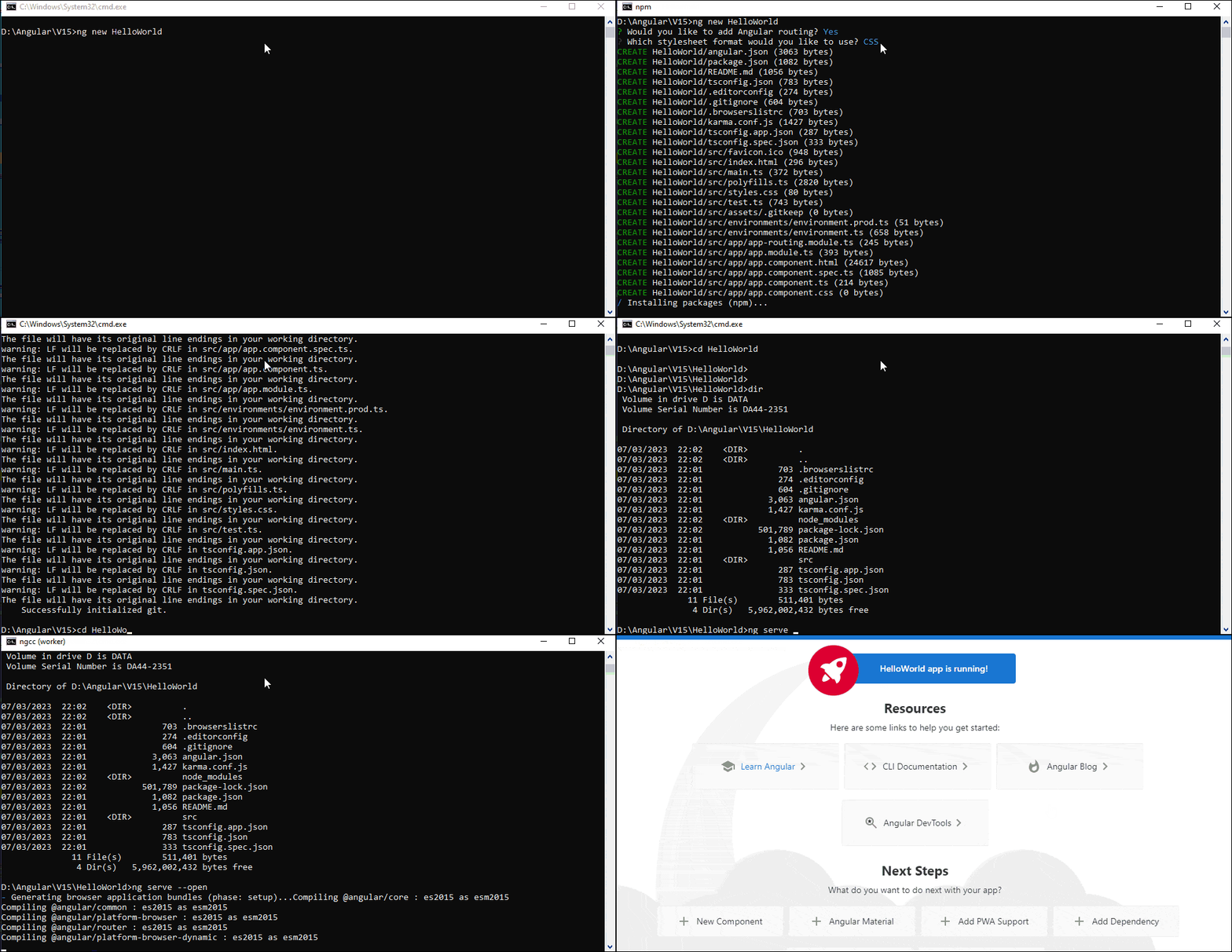
To create only a workspace without creating the angular application, use the --create-application=false option
ng new WorkspaceOnly --create-application=false
The above command creates a folder WorkspaceOnly under the current folder. It will create the node_modules folder and installs all the dependencies. But it will not create any application or create a src folder.
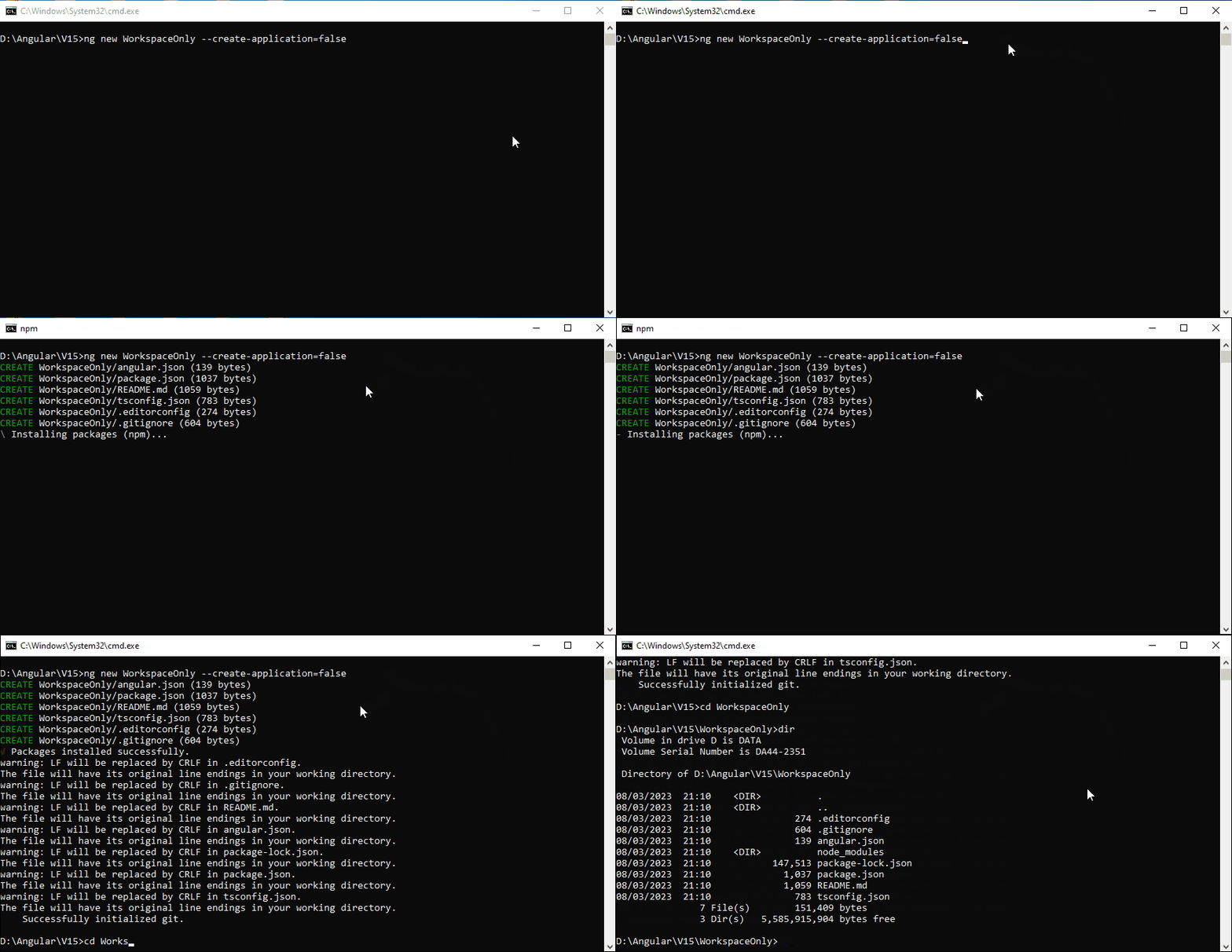
You can add the project later by using the command ng generate application
ng generate application HelloWorld
The above command creates a new application with the name hello-world inside the folder projects/hello-world. Since it is the first project, it will be marked as the default project. You can also create more than one project inside the same workspace, and all of them will share the same dependencies. Refer to the tutorial create Multiple Projects in a workspace for more information.
ng new uses the same name for the workspace folder and application name. We can use the projects option to choose a different folder name for the workspace.
The code below creates the folder angular-projects under the current directory and the application hello-world inside the src folder.
ng new --directory=angular-projects hello-world
The code below creates the workspace angular-projects under the
current
folder. But it will not create any application. Note that if we do not specify the
hello-world
in the command, the command will ask for the name, but it will be ignored.
ng new hello-world --directory=angular-projects --create-application=false
The ng new command generates the separate template (app.component.html) and CSS file (app.component.css). You can use the --inline-style=true --inline-template=true option to inline both template and style in the app.component.ts.
ng new hello-world --inline-style=true --inline-template=true
It will generate the following app.component.ts
import { Component } from '@angular/core';

@Component({
  selector: 'app-root',
  template: `
    <!--The content below is only a placeholder and can be replaced.-->
    <div style="text-align:center" class="content">
      <h1>
        Welcome to {{title}}!
      </h1>
      <span style="display: block">{{ title }} app is running!</span>
      <img width="300" alt="Angular Logo" src="data:image/svg+xml;base64,PHN2ZyB4bWxucz0iaHR0cDovL3d3dy53My5vcmcvMjAwMC9zdmciIHZpZXdCb3g9IjAgMCAyNTAgMjUwIj4KICAgIDxwYXRoIGZpbGw9IiNERDAwMzEiIGQ9Ik0xMjUgMzBMMzEuOSA2My4ybDE0LjIgMTIzLjFMMTI1IDIzMGw3OC45LTQzLjcgMTQuMi0xMjMuMXoiIC8+CiAgICA8cGF0aCBmaWxsPSIjQzMwMDJGIiBkPSJNMTI1IDMwdjIyLjItLjFWMjMwbDc4LjktNDMuNyAxNC4yLTEyMy4xTDEyNSAzMHoiIC8+CiAgICA8cGF0aCAgZmlsbD0iI0ZGRkZGRiIgZD0iTTEyNSA1Mi4xTDY2LjggMTgyLjZoMjEuN2wxMS43LTI5LjJoNDkuNGwxMS43IDI5LjJIMTgzTDEyNSA1Mi4xem0xNyA4My4zaC0zNGwxNy00MC45IDE3IDQwLjl6IiAvPgogIDwvc3ZnPg==">
    </div>
    <h2>Here are some links to help you start: </h2>
    <ul>
      <li>
        <h2><a target="_blank" rel="noopener" href="https://angular.io/tutorial">Tour of Heroes</a></h2>
      </li>
      <li>
        <h2><a target="_blank" rel="noopener" href="https://angular.io/cli">CLI Documentation</a></h2>
      </li>
      <li>
        <h2><a target="_blank" rel="noopener" href="https://blog.angular.io/">Angular blog</a></h2>
      </li>
    </ul>
    <router-outlet></router-outlet>
  `,
  styles: []
})
export class AppComponent {
  title = 'hello-world';
}
The list of all available options of ng new project
| Options | Alias | DESCRIPTION | Value Type | Default Value |
|---|---|---|---|---|
| --collection | -c | A collection of schematics to use in generating the initial application. | String | |
| --commit | Initial git repository commit information. | boolean | true | |
| --create-application | Create a new initial application project in the 'src' folder of the new workspace. When false, creates an empty workspace with no initial application. You can then use the generate application command so that all applications are created in the projects folder | boolean | true | |
| --defaults | Disable interactive input prompts for options with a default. | boolean | false | |
| --directory | The directory name to create the workspace in | string | ||
| --dry-run | -d | Run through and reports activity without making any changes. | boolean | false |
| --force | -f | Forces overwriting of any existing files in the project folder | boolean | false |
| --help | Shows a help message for this command in the console | boolean | ||
| --inline-style | -s | Use inline style rather than the external StyleSheet file. does not create external Stylesheets | boolean | false |
| --inline-template | -t | Does not create an external template file for the component. Specifies if the template will be in the ts file. | boolean | false |
| --interactive | Enable interactive input prompts | boolean | false | |
| --minimal | Installs a minimal set of features. does not create test files. | boolean | false | |
| --new-project-root | The path where new projects will be created, relative to the new workspace root. | string | projects | |
| --package-manager | The package manager used to install dependencies. | npm | yarn | pnpm | cnpm | ||
| --prefix | -p | The prefix to apply to generated selectors for the initial project. | ||
| --routing | Generates a routing module. If the option is not specified, it will ask for the confirmation | |||
| --skip-git | -g | Do not initialize a git repository. | boolean | false |
| --skip-install | Do not install dependency packages. | boolean | false | |
| --skip-tests | -S | Do not generate "spec.ts" test files for the new project. | ||
| --strict | Creates a workspace with stricter type checking and stricter bundle budgets settings. This setting helps improve maintainability and catch bugs ahead of time | boolean | true | |
| --style | The file extension or preprocessor to use for style files. | css | scss | sass | less | ||
| --view-encapsulation | Specifies the view encapsulation strategy. | Emulated | None | ShadowDom | Emulated |
ng new is Angular CLI command
We use it to create a new Angular workspace along with an initial project.
You can use the option --create-application=false to create only the workspace without using the initial project.
