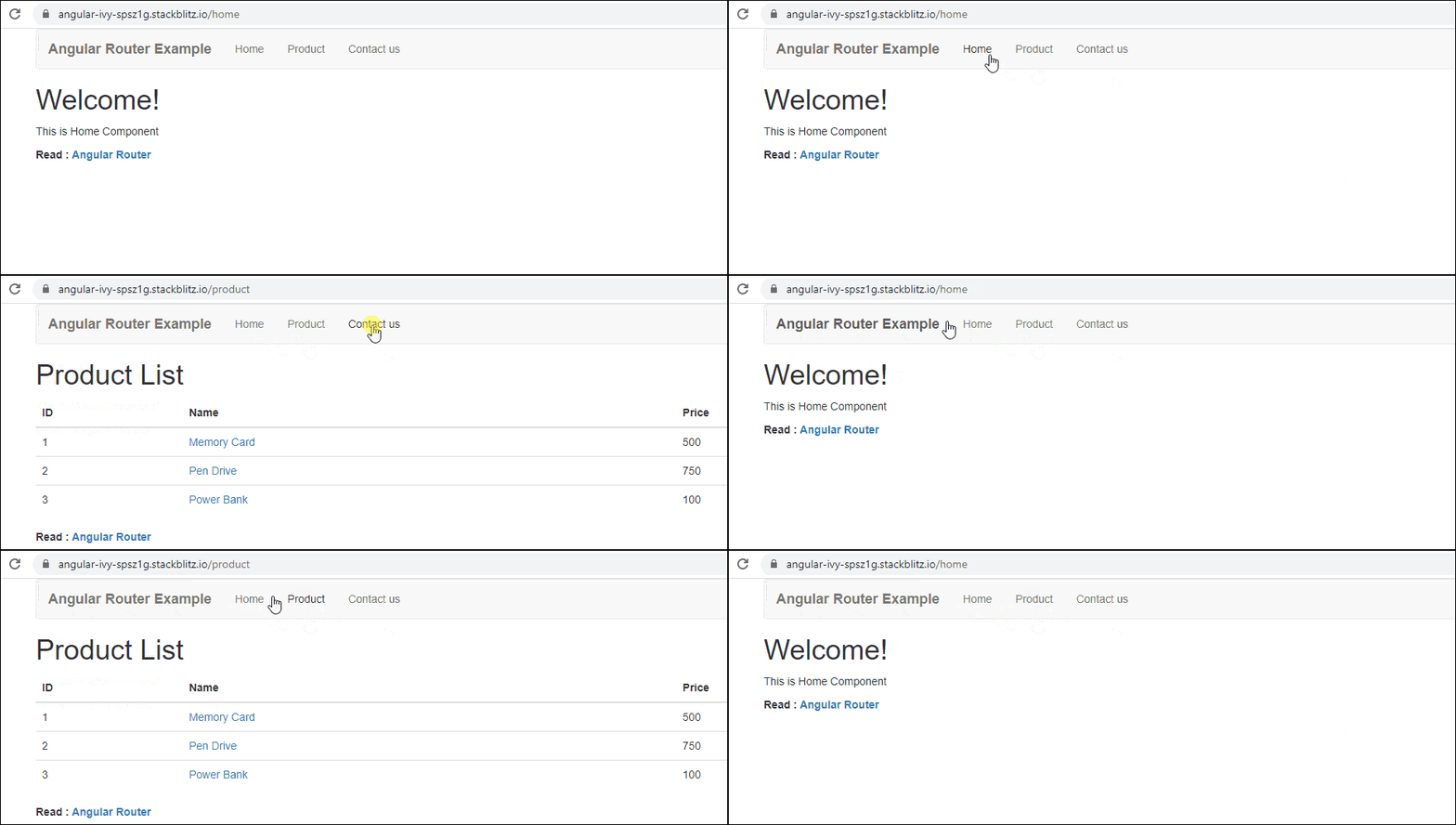
In this Angular Routing Tutorial, we learn how to use Angular Router to navigate from one view to another view in Angular. We will learn what Angular Routing is and how it works. We will also look at various components that make up the Angular Router Module. Then we will learn how to set up and configure the routes. Finally, we will create an Angular Routing Example application with four Angular Components and create a menu navigation system using the Angular Router.
You can download the source code from Stackblitz
Routing allows you to move from one part of the application to another part or one View to another View.
In Angular, Routing is handled by the Angular Router Module.
The Router is a separate module in Angular. It is in its own library package, @angular/router. The Angular Router provides the necessary service providers and directives for navigating through application views.
Using Angular Router you can
An Angular Router is a service (Angular Router API) that enables navigation from one component to the next component as users perform application tasks like clicking on menus links, and buttons, or clicking on the back/forward button on the browser. We can access the router object and use its methods like navigate() or navigateByUrl(), to navigate to a route
Route tells the Angular Router which view to display when a user clicks a link or pastes a URL into the browser address bar. Every Route consists of a path and a component it is mapped to . The Router object parses and builds the final URL using the Route
Routes is an array of Route objects our application supports
The outerOutlet is a directive (<router-outlet>) that serves as a placeholder, where the Router should display the view
The RouterLink is a directive that binds the HTML element to a Route. Clicking on the HTML element, which is bound to a RouterLink, will result in navigation to the Route. The RouterLink may contain parameters to be passed to the route’s component.
RouterLinkActive is a directive for adding or removing classes from an HTML element that is bound to a RouterLink. Using this directive, we can toggle CSS classes for active RouterLinks based on the current RouterState
The ActivatedRoute is an object that represents the currently activated route associated with the loaded Component.
The Parameters or arguments to the Route. It is an array that you can bind to RouterLink directive or pass it as an argument to the Router.navigate method.
To Configure the Router in Angular, you need to follow these steps
The HTML <base> element specifies the base URL to use for all relative URLs contained within a document.
The Angular Router uses the HTML5 style of Routing (or PathLocationStrategy) as the default option. The router makes use of the browser’s history API for navigation and URL interaction.
<base href="/">
To make HTML5 routing work, we need to set up the “base href” in the DOM. This is done in the index.html file immediately after the head tag.
You can read more about the PathLocationStrategy & HashLocationStrategy
Next, create an array of route objects. Each route maps the path (URL Segment) to the component
const appRoutes={ path: 'product', component: ProductComponent }
Where
path: The URL path segment of the route. We will use this value to refer to this route elsewhere in the app
component: The component to be loaded.
This route tells angular to render ProductComponent when the user navigates to the URL “/product”
This route tells angular to render ProductComponent when the user navigates to the URL “/product”
Import the Angular Router from @angular/router library in the root module of the application
import { RouterModule } from '@angular/router';
Then, install the routes using the RouterModule.forRoot method, passing the routes as the argument in the imports array
imports: [RouterModule.forRoot(appRoutes)],
Next, we need to bind the click event of the link, image, or button to a route. This is done using the routerlink directive
<li><a [routerLink]="['product']">Product</a></li>
The routerLink directive accepts an array of route names along with parameters. This array is called a Link Parameters array.
When the application requests navigation to the route “product”, the router looks in the routes array and activates the instance of the component associated with the route “ product”, which is ProductComponent. The browser address location & history is also updated to /product
Finally, we need to tell the angular where to display the view. This is done using the RouterOutlet directive as shown. We will add the following directive to the root component.
<router-outlet></router-outlet>
Let’s build a sample application with four components and build a navigation system to route each one of them
HomeComponent: This component will display the Welcome message. This is also our default component.
home.component.ts
import {Component} from '@angular/core';

@Component({
    template: `<h1>Welcome!</h1>
              <p>This is Home Component </p>
             `
})

export class HomeComponent {
}
ContactComponent: Displays the contact message.
contact.component.ts
import {Component} from '@angular/core';

@Component({
     template: `<h1>Contact Us</h1>
                <p>TekTutorialsHub </p>
                `
})
export class ContactComponent {
}
ProductComponent: Displays the list of products. The Products are retrieved from the Angular 2 Service using Dependency injection.
product.component.ts
import { Component, OnInit } from '@angular/core';

import { ProductService } from './product.service';
import { Product } from './product';

@Component({
  templateUrl: './product.component.html',
})

export class ProductComponent
{

   products:Product[];

   constructor(private productService:ProductService){
   }

   ngOnInit() {
     this.products=this.productService.getProducts();
   }

}
<h1>Product List</h1>
<div class='table-responsive'>
    <table class='table'>
        <thead>
            <tr>
                <th>ID</th>
                <th>Name</th>
                <th>Price</th>
            </tr>
        </thead>
        <tbody>
            <tr *ngFor="let product of products;">
                <td>{{product.productID}}</td>
                <td><a [routerLink]="['detail',product.productID]">{{product.name}} </a> </td>
                <td>{{product.price}}</td>
            </tr>
        </tbody>
    </table>
</div>

<router-outlet></router-outlet>
ErrorComponent: TheErrorComponent is displayed, when the user navigates to a nonexistent path. This is basically a 404 error page.
error.component.ts
import {Component} from '@angular/core';

@Component({
    template: `<h1>Page not found</h1>
               <p>This is a Error Page</p>
              `
})

export class ErrorComponent {
}
import { Observable } from 'rxjs/Observable';
import {Product} from './Product'


export class ProductService{

    public getProducts() {

        let products:Product[];

        products=[
            new Product(1,'Memory Card',500),
            new Product(2,'Pen Drive',750),
            new Product(3,'Power Bank',100)
        ]

        return products;
    }


    public getProduct(id) {
        let products:Product[]=this.getProducts();
        return products.find(p => p.productID==id);
    }


}
export class Product {

    constructor(productID:number,    name: string ,   price:number) {
        this.productID=productID;
        this.name=name;
        this.price=price;
    }

    productID:number ;
    name: string ;
    price:number;

}
<!doctype html>
<html>
<head>
  <base href="/">
  <meta charset="utf-8">
  <title>Angular 2 Routing</title>


  <meta name="viewport" content="width=device-width, initial-scale=1">
  <link rel="icon" type="image/x-icon" href="favicon.ico">
  <link href="https://maxcdn.bootstrapcdn.com/bootstrap/3.3.7/css/bootstrap.min.css" rel="stylesheet">
    ...
</head>
<body>
  <app-root>Loading...</app-root>
</body>
</html>
Note the <base href=”/”> right after the head tag. This makes the browser know where is the root of our application is and helps it to construct the URL’s
Now, we have our components ready. The next step is to create our routes.
It is good practice to create all our route configurations in a separate file. So create app.routes.ts under the app folder.
app.routes.ts
import { Routes } from '@angular/router';

import { HomeComponent} from './home.component'
import { ContactComponent} from './contact.component'
import { ProductComponent} from './product.component'
import { ErrorComponent} from './error.component'

export const appRoutes: Routes = [
  { path: 'home', component: HomeComponent },
  { path: 'contact', component: ContactComponent },
  { path: 'product', component: ProductComponent },
  { path: '', redirectTo: 'home', pathMatch: 'full' },
  { path: '**', component: ErrorComponent }
];
First, we import Routes from the router module
Next, we need to import all the components, that require routing We have imported Home, Contact, Product, and Error Components
Finally, we have defined a constant (appRoutes) that contains the Routes that we wish to create. The Routes is an array of route configuration objects (or route objects).
Each route has several configurable properties.
Our First route is
{ path: 'home', component: HomeComponent },
The first parameter is the path, which represents the URL path segment. The second parameter is the component to display. The above route configuration means, when you navigate to /home (URL path segment), then the HomeComponent gets displayed.
Note that the path does not contain the leading slash
The next two routes are similar to the home route
{ path: 'contact', component: ContactComponent },
{ path: 'product', component: ProductComponent },
The fourth route is
{ path: '', redirectTo: 'home', pathMatch: 'full' },
The path is empty, indicating the default route. The default route is redirected to the home path using the RedirectTo argument. This route means that, when you navigate to the root of your application /, you are redirected to the home path (/home), which in turn displays the HomeComponent.
Note, that we have pathMatch argument set to ‘full’. The pathMatch tells the Router how to match the URL.
When it is set to full, the path is matched to the entire URL
Every route ends in an empty space for ex: /contact/’’. If pathMatch is not set to full then the router will apply the redirect, which results in the error.
The next route is the wildcard route
{ path: '**', component: ErrorComponent }
The “**” matches every URL. The Router will display the ErrorComponent.
Note that the order of the route is important. The Routes are matched in the order they are defined. The Router always returns the first matching route (first-match-wins strategy)
Since the wildcard route (**) matches every URL and should be placed last.
Now, we have set up our routes. Now we will add these routes to our application.
Routes are registered in the root module of the application. I.e. app.module.ts
app.module.ts
  <!--code box  -->
                        <div class="example break">
                            <div class="codebox">
                                <div class="codebox-title">
                                    <h4>Example</h4><a
                                        href="../codelab.php?topic=javascript&file=sort-an-array-alphabetically"
                                        target="_blank" class="try-btn" title="Try this code using online Editor">Try
                                        this
                                        code
                                        <span>»</span></a>
                                </div>
                                <pre class="syntax-highlighter line-numbers language-javascript" style="tab-size:1;">
                            <code class="language-javascript">

import { BrowserModule } from '@angular/platform-browser';
import { NgModule } from '@angular/core';
import { FormsModule } from '@angular/forms';
import { HttpModule } from '@angular/http';

import { RouterModule } from '@angular/router';

import { AppComponent } from './app.component';
import { HomeComponent} from './home.component'
import { ContactComponent} from './contact.component'
import { ProductComponent} from './product.component'
import { ErrorComponent} from './error.component'

import { ProductService } from './product.service';

import { appRoutes } from './app.routes';

@NgModule({
  declarations: [
    AppComponent,HomeComponent,ContactComponent,ProductComponent,ErrorComponent
  ],
  imports: [
    BrowserModule,
    FormsModule,
    HttpModule,
    RouterModule.forRoot(appRoutes)                           /*path location strategy */
    /*RouterModule.forRoot(appRoutes, { useHash: true }) */   /*Hashlocationstrategy */
  ],
  providers: [ProductService],
  bootstrap: [AppComponent]
})
export class AppModule { }

                            </code>
                        </pre>
                            </div>
                        </div>
                        <!--End of codebox-->
First, we import the RouterModule
import { RouterModule } from '@angular/router';
Next, import all the components
import { AppComponent } from './app.component';
import { HomeComponent} from './home.component'
import { ContactComponent} from './contact.component'
import { ProductComponent} from './product.component'
import { ErrorComponent} from './error.component'
Next import the routes, which we configured from app.routes
import { routes } from './app.routes';
Finally, we add the RouterModule to the import array, passing the routes we have configured via the forRoot method
imports: [
    BrowserModule,
    FormsModule,
    HttpModule,
    RouterModule.forRoot(routes)
],
Note that we are using the forRoot method.
the forRoot method is used, when you want to provide the service and also want to configure the service at the same time
The routermodule.forroot method returns the Router Service configured with the routes passed in the argument and also registers the Router service. It also registers the other providers that the routing module requires.
When the application is bootstrapped, the Router service looks at the current browser URL and performs the initial navigation.
When the user changes the URL either by clicking on a link in the page or by entering a URL in the address bar, the router looks for a corresponding Route from the Routes array and renders the associated component.
The next step is to define the navigation
Open the app.component.html. The AppComponent is only handling navigation. It will display the menu option, which the user can click to navigate to a view
app.component.ts
<div class="container">

<nav class="navbar navbar-default">
  <div class="container-fluid">
    <div class="navbar-header">
      <a class="navbar-brand" [routerLink]="['/']"><strong> {{title}} </strong></a>
    </div>
    <ul class="nav navbar-nav">
        <li><a [routerLink]="['home']">Home</a></li>
        <li><a [routerLink]="['product']">Product</a></li>
        <li><a [routerLink]="['contact']">Contact us</a></li>
    </ul>
  </div>
</nav>

 <router-outlet></router-outlet>

</div>
We are using bootstrap to style our component
<li><a [routerLink]="['home']">Home</a></li>
<li><a [routerLink]="['product']">Product</a></li>
<li><a [routerLink]="['contact']">Contact us</a></li>
We use the routerLink directive to bind anchor tag elements to the route
RouterLink is an attribute directive. We enclose it in a square bracket. The routerLink is then bound to the template expression, which returns a link parameters array.
The Link Parameters array is the Parameters or arguments to the Route. The Angular Router module constructs the URL using the link parameters array
When the user clicks on the link, the Router service uses the path to locate the route associated with the path and activates the component
Finally, we need to tell Angular where to display the Component. This is done using the Router-outlet directive
The RouterOutlet is a directive that tells Angular where on our page we want to display the view.
We do not have to import the RouterOutlet and RouterLink directives. These directives are imported when we imported RouterModule in our app.module
<router-outlet></router-outlet>
That’s it
Type the in the address bar http://localhost:4200, you should see the HomeComponent is rendered, which is the default root
Type the invalid URL and you should see the ErrorComponent rendered.
Click on the menu options or Type the Back & forward button in the browser. Everything should work as intended.