
In this tutorial, we will learn how to set value in template-driven forms in Angular. We will learn how to set the default or initial value to form controls, dynamically set values, reset the value of the form, etc. Learn how to set the value of individual FormControl or a FormGroup and nested FormGroup.
We have covered how to create template-driven forms in the angular tutorial.We will continue from there and in this tutorial, we will show you
The following is the app.component.html from the angular template-driven forms tutorial.
<form #contactForm="ngForm" (ngSubmit)="onSubmit(contactForm)">

  <p>
    <label for="firstname">First Name </label>
    <input type="text" id="firstname" name="firstname" ngModel>
  </p>

  <p>
    <label for="lastname">Last Name </label>
    <input type="text" id="lastname" name="lastname" ngModel>
  </p>

  <p>
    <label for="email">Email </label>
    <input type="text" id="email" name="email"  ngModel>
  </p>

  <p>
    <label for="gender">Geneder </label>
    <input type="radio" value="male" id="gender" name="gender" ngModel> Male
    <input type="radio" value="female" id="gender" name="gender" ngModel> Female
  </p>

  <p>
    <label for="isMarried">Married </label>
    <input type="checkbox" id="isMarried" name="isMarried" ngModel>
  </p>

  <p>
    <label for="country">country </label>
    <select id="country" name="country" ngModel>
      <option [ngValue]="c.id" *ngFor="let c of countryList">
        {{c.name}}
      </option>
    </select>
  </p>

  <div ngModelGroup="address">

    <p>
      <label for="city">City</label>
      <input type="text" id="city" name="city" ngModel>
    </p>

    <p>
      <label for="street">Street</label>
      <input type="text" id="street" name="street" ngModel>
    </p>
    <p>
      <label for="pincode">Pin Code</label>
      <input type="text" id="pincode" name="pincode" ngModel>
    </p>

  </div>

  <p>
    <button type="submit">Submit</button>
  </p>

</form>
Before we set the default value, it is better to create a model class for the above form. Open the app.component.ts and add the following class
export class contact {
  firstname:string;
  lastname:string;
  email:string;
  gender:string;
  isMarried:boolean;
  country:string;
  address: {
    city:string;
    street:string;
    pincode:string;
  }
}
There are two ways you can set the value of the form elements
The two-way data binding.is the recommended way to set the value in the template-driven forms.
The following code uses the [(ngModel)]="contact.firstname" to bind the firstname HTML element to the contact.firstname field in the component class. The advantageous here is that any changes made in the form are automatically propagated to the component class and changes made in component class are immediately shown in the form.
<label for="firstname">First Name </label>
<input type="text" id="firstname" name="firstname" [(ngModel)]="contact.firstname">
To set the initial or default value all you need to populate the contact model in the ngOnInit method as shown below
ngOnInit() {

    this.contact = {
      firstname: "Sachin",
      lastname: "Tendulkar",
      email: "sachin@gmail.com",
      gender: "male",
      isMarried: true,
      country: "2",
      address: { city: "Mumbai", street: "Perry Cross Rd", pincode: "400050" }
    };

  }
changeCountry() {
  this.contact.country = "1";
}
<button type="button" (click)="reset(contactForm)">Reset</button>
reset(contactForm :NgForm) {
  contactForm.resetForm();
}
[tabby title=”app.component.ts”]
import { Component, ViewChild, ElementRef, OnInit } from '@angular/core';
import { NgForm } from '@angular/forms';

@Component({
  selector: 'app-root',
  templateUrl: './app.component.html',
  styleUrls: ['./app.component.css']
})
export class AppComponent implements OnInit {
  title = 'Template driven forms';


  countryList: country[] = [
    new country("1", "India"),
    new country('2', 'USA'),
    new country('3', 'England')
  ];

  contact: contact;

  ngOnInit() {

    this.contact = {
      firstname: "Sachin",
      lastname: "Tendulkar",
      email: "sachin@gmail.com",
      gender: "male",
      isMarried: true,
      country: "2",
      address: { city: "Mumbai", street: "Perry Cross Rd", pincode: "400050" }
    };

  }

  onSubmit() {
    console.log(this.contact);
  }

  setDefaults() {
    this.contact = {
      firstname: "Sachin",
      lastname: "Tendulkar",
      email: "sachin@gmail.com",
      gender: "male",
      isMarried: true,
      country: "2",
      address: { city: "Mumbai", street: "Perry Cross Rd", pincode: "400050" }
    };
  }

  changeCountry() {
    this.contact.country = "1";
  }

  reset(contactForm :NgForm) {
    contactForm.resetForm();
  }

}

export class contact {
  firstname: string;
  lastname: string;
  email: string;
  gender: string;
  isMarried: boolean;
  country: string;
  address: {
    city: string;
    street: string;
    pincode: string;
  }
}


export class country {
  id: string;
  name: string;

  constructor(id: string, name: string) {
    this.id = id;
    this.name = name;
  }
}
[tabby title=”app.component.html”]
<form #contactForm="ngForm" (ngSubmit)="onSubmit(contactForm)">

  <p>
    <label for="firstname">First Name </label>
    <input type="text" id="firstname" name="firstname" [(ngModel)]="contact.firstname">
  </p>

  <p>
    <label for="lastname">Last Name </label>
    <input type="text" id="lastname" name="lastname" [(ngModel)]="contact.lastname">
  </p>

  <p>
    <label for="email">Email </label>
    <input type="text" id="email" name="email"  [(ngModel)]="contact.email">
  </p>

  <p>
    <label for="gender">Geneder </label>
    <input type="radio" value="male" id="gender" name="gender" [(ngModel)]="contact.gender"> Male
    <input type="radio" value="female" id="gender" name="gender" [(ngModel)]="contact.gender"> Female

  </p>

  <p>
    <label for="isMarried">Married </label>
    <input type="checkbox" id="isMarried" name="isMarried" [(ngModel)]="contact.isMarried">
  </p>

  <p>
    <label for="country">country </label>
    <select id="country" name="country" [(ngModel)]="contact.country">
      <option [ngValue]="c.id" *ngFor="let c of countryList">
        {{c.name}}
      </option>
    </select>
  </p>

  <div ngModelGroup="address">

    <p>
      <label for="city">City</label>
      <input type="text" id="city" name="city" [(ngModel)]="contact.address.city">
    </p>

    <p>
      <label for="street">Street</label>
      <input type="text" id="street" name="street" [(ngModel)]="contact.address.street">
    </p>

    <p>
      <label for="pincode">Pin Code</label>
      <input type="text" id="pincode" name="pincode"  [(ngModel)]="contact.address.pincode">
    </p>

  </div>

  <p>
    <button type="submit">Submit</button>
  </p>

  <p>
    <button type="button" (click)="changeCountry()">Change Country</button>
    <button type="button" (click)="setDefaults()">Set Defaults</button>
    <button type="button" (click)="reset(contactForm)">Reset</button>
  </p>

  <b>valid</b> {{contactForm.valid}}
  <b>touched</b> {{contactForm.touched}}
  <b>pristine</b> {{contactForm.pristine}}
  <b>dirty</b> {{contactForm.dirty}}

</form>
[tabbyending]
We have a #contactForm reference variable, which is an instance of ngForm.
<form #contactForm="ngForm" (ngSubmit)="onSubmit(contactForm)">
We can get the reference to the #contactForm in the app.component.ts, using the viewchild
@ViewChild('contactForm',null) contactForm: NgForm;
Once we have the reference, we can use the setValue method of the ngForm to set the initial value
ngOnInit() {

   this.contact = {
      firstname: "Sachin",
      lastname: "Tendulkar",
      email: "sachin@gmail.com",
      gender: "male",
      isMarried: true,
      country: "2",
      address: {
        city: "Mumbai",
        street: "Perry Cross Rd",
        pincode: "400050"
      }
    };

    setTimeout(() => {
      this.contactForm.setValue(this.contact);
    });

  }
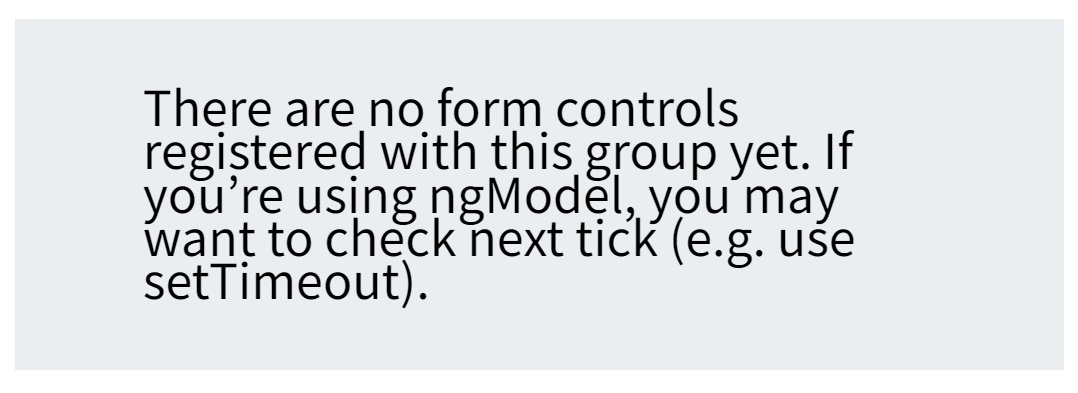
Note that we are using the setTimeout That is because the form controls are yet initialized when the OnInit is fired. We will get the following error message
You can also set the value individually using the setValue method of the individual FormControl.
You will get the reference to the individual FormControl from the controls collection of the ngForm. Once you get the reference use the setValue on the FormControl instance to change the value.
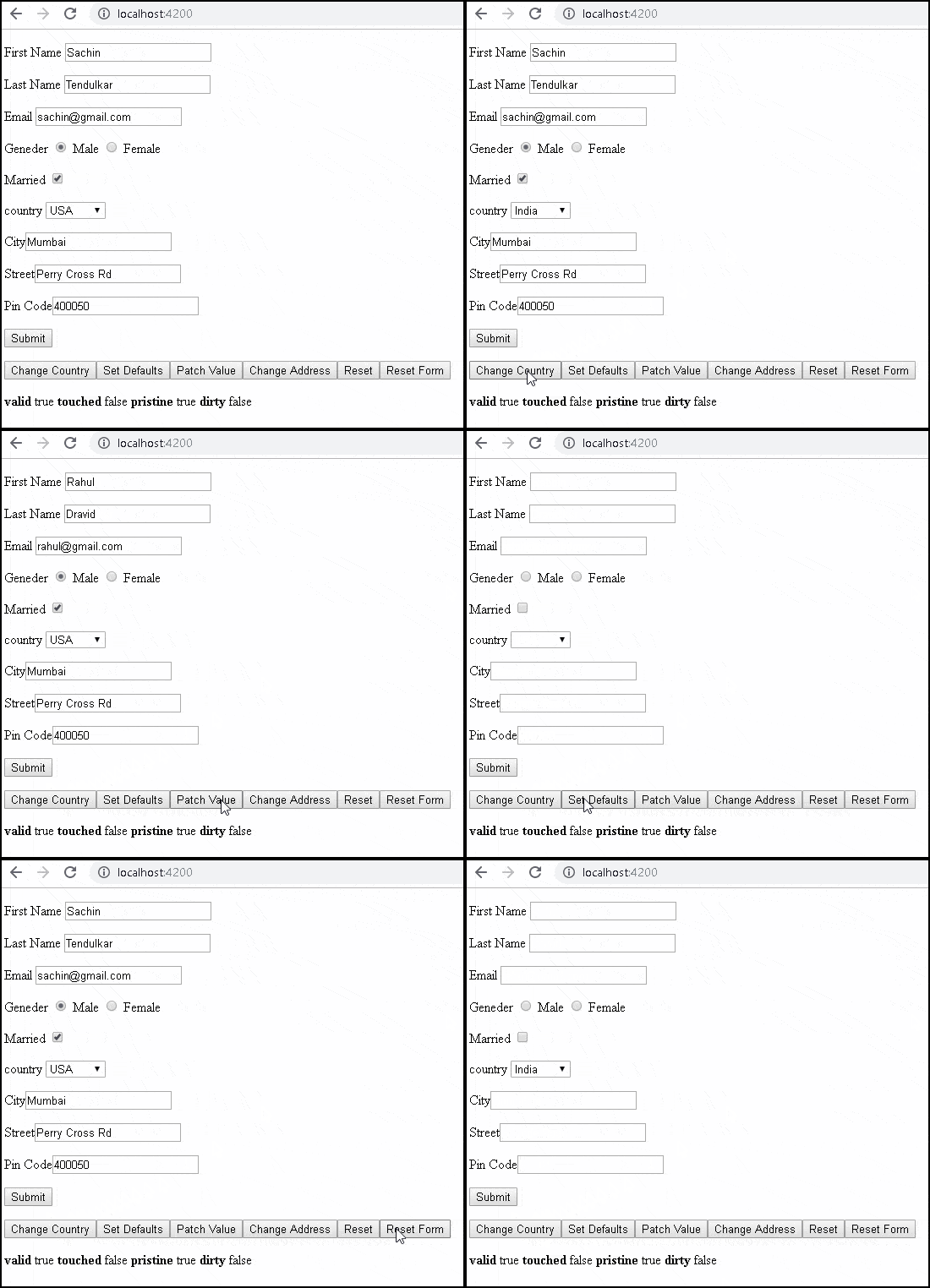
For Example, this code will change the country to India
changeCountry() {
   this.contactForm.controls["country"].setValue("1");
}
Call the changeCountry method from the Template.
<button type="button" (click)="changeCountry()">Change Country</button>
You can reset the form to empty value using the reset or resetForm method of the ngForm. These also resets the form status like dirty,valid,pristine & touched, etc
reset() {
  this.contactForm.reset();
}
resetForm() {
   this.contactForm.resetForm();
}
You can invoke the setValue anytime to set the form back to the default value. This will set the entire form to the value held by the contact form.
 setDefaults() {
    this.contactForm.setValue(this.contact);
  }
You can make use of the patchValue to change the only few fields anytime. The control property of the ngForm returns the reference to the top level FormGroup. Then, you can make use of the patchValue method to change only firstname,lastname & email fields
  patchValue() {
    let obj = {
      firstname: "Rahul",
      lastname: "Dravid",
      email: "rahul@gmail.com",
    };

    this.contactForm.control.patchValue(obj);

  }
You can update nested FormGroup by getting a reference to the nested FormGroup from the controls collection of ngForm.
  changeAddress() {
    let obj = {
      city: "Bangalore",
      street: "Brigade Road",
      pincode: "600100"
    };
    let address= this.contactForm.controls["address"] as FormGroup
    address.patchValue(obj);

  }
[tabby title=”app.component.ts”]
import { Component, ViewChild, ElementRef, OnInit } from '@angular/core';
import { NgForm, FormGroup } from '@angular/forms';

@Component({
  selector: 'app-root',
  templateUrl: './app.component.html',
  styleUrls: ['./app.component.css']
})
export class AppComponent implements OnInit {
  title = 'Template driven forms';

  @ViewChild('contactForm', null) contactForm: NgForm;

  countryList: country[] = [
    new country("1", "India"),
    new country('2', 'USA'),
    new country('3', 'England')
  ];

  contact: contact;

  ngOnInit() {

    this.contact = {
      firstname: "Sachin",
      lastname: "Tendulkar",
      email: "sachin@gmail.com",
      gender: "male",
      isMarried: true,
      country: "2",
      address: {
        city: "Mumbai",
        street: "Perry Cross Rd",
        pincode: "400050"
      }
    };

    setTimeout(() => {
      this.contactForm.setValue(this.contact);
    });

  }

  onSubmit() {
    console.log(this.contactForm.value);
  }

  setDefaults() {
    this.contactForm.setValue(this.contact);
  }

  changeCountry() {
    this.contactForm.controls["country"].setValue("1");
  }

  patchValue() {
    let obj = {
      firstname: "Rahul",
      lastname: "Dravid",
      email: "rahul@gmail.com",
    };

    this.contactForm.control.patchValue(obj);

  }

  changeAddress() {
    let obj = {
      city: "Bangalore",
      street: "Brigade Road",
      pincode: "600100"
    };
    let address= this.contactForm.controls["address"] as FormGroup
    address.patchValue(obj);

  }

  reset() {
    this.contactForm.reset();
  }

  resetForm() {
    this.contactForm.resetForm();
  }
}


export class contact {
  firstname: string;
  lastname: string;
  email: string;
  gender: string;
  isMarried: boolean;
  country: string;
  address: {
    city: string;
    street: string;
    pincode: string;
  }
}


export class country {
  id: string;
  name: string;

  constructor(id: string, name: string) {
    this.id = id;
    this.name = name;
  }
}
[tabby title=”app.component.html”]
<form #contactForm="ngForm" (ngSubmit)="onSubmit(contactForm)">

  <p>
    <label for="firstname">First Name </label>
    <input type="text" id="firstname" name="firstname" ngModel>
  </p>

  <p>
    <label for="lastname">Last Name </label>
    <input type="text" id="lastname" name="lastname" ngModel>
  </p>

  <p>
    <label for="email">Email </label>
    <input type="text" id="email" name="email"  ngModel>
  </p>

  <p>
    <label for="gender">Geneder </label>
    <input type="radio" value="male" id="gender" name="gender" ngModel> Male
    <input type="radio" value="female" id="gender" name="gender" ngModel> Female
  </p>

  <p>
    <label for="isMarried">Married </label>
    <input type="checkbox" id="isMarried" name="isMarried" ngModel>
  </p>

  <p>
    <label for="country">country </label>

    <select id="country" name="country" ngModel>
      <option [ngValue]="c.id" *ngFor="let c of countryList">
        {{c.name}}
      </option>
    </select>

  </p>

  <div ngModelGroup="address">

    <p>
      <label for="city">City</label>
      <input type="text" id="city" name="city" ngModel>
    </p>

    <p>
      <label for="street">Street</label>
      <input type="text" id="street" name="street" ngModel>
    </p>
    <p>
      <label for="pincode">Pin Code</label>
      <input type="text" id="pincode" name="pincode"  ngModel>
    </p>

  </div>

  <p>
    <button type="submit">Submit</button>
  </p>

  <p>
    <button type="button" (click)="changeCountry()">Change Country</button>
    <button type="button" (click)="setDefaults()">Set Defaults</button>
    <button type="button" (click)="patchValue()">Patch Value</button>
    <button type="button" (click)="changeAddress()">Change Address</button>
    <button type="button" (click)="reset()">Reset</button>
    <button type="button" (click)="resetForm()">Reset Form</button>
  </p>

  <b>valid</b> {{contactForm.valid}}
  <b>touched</b> {{contactForm.touched}}
  <b>pristine</b> {{contactForm.pristine}}
  <b>dirty</b> {{contactForm.dirty}}

</form>
[tabbyending]
In this tutorial, we learned how to set the form values in the template-driven forms. We can either use the setValue of the ngForm directive or use the two-way data binding.
The list of Article on Angular Forms
