
Angular Template-driven Forms is one of the two ways of building forms in Angular. In this tutorial, we will learn how to build a simple Template-driven forms example app. First, we build a simple HTML form using a few form elements. The ngForm directive will convert it to the Template-driven form and create the top-level FormGroup control. Next, we use the ngModel directive to create the FormControl instance for each of the HTML form elements. Later, we will learn how to submit the form data to the component class. We will also learn how to initialize or reset the form data and use the data binding to access the data in the component class.
If you have not gone through our Angular Forms Tutorial, we strongly recommend you to do so. In that article. we have covered fundamental concepts of the Angular Forms Module.
In Template Driven Forms we specify behaviors/validations using directives and attributes in our template and let it work behind the scenes. All things happen in Templates hence very little code is required in the component class. This is different from the reactive forms, where we define the logic and controls in the component class.
The Template-driven forms
Template-driven forms are
While they are
Use ng new to create a new application
ng new tdf --routing=true --style=css
Run ng serve and verify if everything is installed correctly.
To work with Template-driven forms, we must import the FormsModule. We usually import it in root module or in a shared module. The FormsModule contains all the form directives and constructs for working with forms
Open the app.module.ts and add the import { FormsModule } from'@angular/forms'; to it.
And also add the FormsModule to the imports metadata property array
import { BrowserModule } from '@angular/platform-browser';
import { NgModule } from '@angular/core';
import { FormsModule } from '@angular/forms';        //import FormsModule

import { AppRoutingModule } from './app-routing.module';
import { AppComponent } from './app.component';

@NgModule({
  declarations: [
    AppComponent
  ],
  imports: [
    BrowserModule,
    AppRoutingModule,
    FormsModule                    //Add in Imports Array
  ],
  providers: [],
  bootstrap: [AppComponent]
})
export class AppModule { }
The first task is to build the template. The following is a regular HTML form. We enclose it in a <form> tag. We have included two text input (FirstName & LastName), a email (email), a radio button (gender), a checkbox (isMarried), and a select list (country). These are form elements.
<form>

  <p>
    <label for="firstname">First Name</label>
    <input type="text" id="firstname" name="firstname">
  </p>

  <p>
    <label for="lastname">Last Name</label>
    <input type="text" id="lastname" name="lastname">
  </p>

  <p>
    <label for="email">Email </label>
    <input type="text" id="email" name="email">
  </p>

  <p>
    <label for="gender">Geneder</label>
    <input type="radio" value="male" id="gender" name="gender"> Male
    <input type="radio" value="female" id="gender" name="gender"> Female
  </p>

  <p>
    <label for="isMarried">Married</label>
    <input type="checkbox" id="isMarried" name="isMarried">
  </p>

  <p>
  <label for="country">country </label>
  <select name="country" id="country">
    <option selected="" value=""></option>
    <option [ngValue]="c.id" *ngFor="let c of countryList">
      {{c.name}}
    </option>
  </select>
  </p>

  <p>
    <button type="submit">Submit</button>
  </p>

</form>
import { Component } from '@angular/core';

@Component({
  selector: 'app-root',
  templateUrl: './app.component.html',
  styleUrls: ['./app.component.css']
})
export class AppComponent {
  title = 'Template driven forms';

  countryList:country[] = [
    new country("1", "India"),
    new country('2', 'USA'),
    new country('3', 'England')
  ];
}

export class country {
  id:string;
  name:string;

  constructor(id:string, name:string) {
    this.id=id;
    this.name=name;
  }
}
Once, we have a form with few form elements, the angular automatically converts it into a Template-driven form. This is done by the ngForm directive.
The ngForm directive is what makes the Angular template-driven forms work. But we do not need to add it explicitly. Angular adds it automatically
When we include FormsModule, the Angular is going to look out for any <form> tag in our HTML template. Angular does this via ngForm directive. ngForm directive automatically detects the <form> tag and automatically binds to it. You do not have to do anything on your part to invoke and bind the ngForm directive.
The ngForm does the following
We can export the ngForm instance into a local template variable using ngForm as the key (ex: #contactForm="ngForm"). This allows us to access the many properties and methods of ngForm using the template variable contactForm
Hence, update the form element as shown below.
<form #contactForm="ngForm">
The FormControl is the basic building block of the Angular Forms. It represents a single input field in an Angular form. The Angular Forms Module binds the input element to a FormControl. We use the FormControl instance to track the value, user interaction and validation status of an individual form element. Each individual Form element is a FormControl
We have six form elements in our HTML template. They are firstName, lastname, email, gender, isMarried & country. We need to bind them to FormControl instance. We do this by using the ngModel directive. Add the ngModel directive to each control as shown below.
<input type="text" name="firstname" ngModel>
ngModel will use the name attribute to create the FormControl instance for each of the Form field it is attached.
Now have the template ready, except for the final piece i.e submitting data to the component.
We use the ngSubmit event, to submit the form data to the component class. We use the event binding (parentheses) to bind ngSubmit to OnSubmit method in the component class. When the user clicks on the submit button, the ngSubmit event will fire
<form #contactForm="ngForm" (ngSubmit)="onSubmit(contactForm)">
We are passing the local template variable contactForm in onSubmit method. contactForm holds the reference to the ngForm directive. We can use this in our component class to extract the data from the form fields.
Our final template is as shown below.
<form #contactForm="ngForm" (ngSubmit)="onSubmit(contactForm)">

  <p>
    <label for="firstname">First Name</label>
    <input type="text" name="firstname" ngModel>
  </p>

  <p>
    <label for="lastname">Last Name</label>
    <input type="text" name="lastname" ngModel>
  </p>

  <p>
    <label for="email">Email </label>
    <input type="text" id="email" name="email" ngModel>
  </p>

  <p>
    <label for="gender">Geneder</label>
    <input type="radio" value="male" name="gender" ngModel> Male
    <input type="radio" value="female" name="gender" ngModel> Female
  </p>

  <p>
    <label for="isMarried">Married</label>
    <input type="checkbox" name="isMarried" ngModel>
  </p>

  <select name="country" ngModel>
    <option [ngValue]="c.id" *ngFor="let c of countryList">
      {{c.name}}
    </option>
  </select>

  <p>
    <button type="submit">Submit</button>
  </p>

</form>
We need to receive the data in component class from our form. To do this we need to create the onSubmit method in our component class. The submit method receives the reference to the ngForm directive, which we named is as contactForm. The contactForm exposes the value method which returns the form fields as a Json object.
  onSubmit(contactForm) {
    console.log(contactForm.value);
  }
You can print the value to the console using the console.log(contactForm.value)
Run the code now and enter some data into the form. Open the Developer Console in your browser and check the output, when you submit the data.
country: "1"
firstname: "Sachin"
email:"sachin@gmail.com"
gender: "male"
isMarried: true
lastname: "Tendulkar"
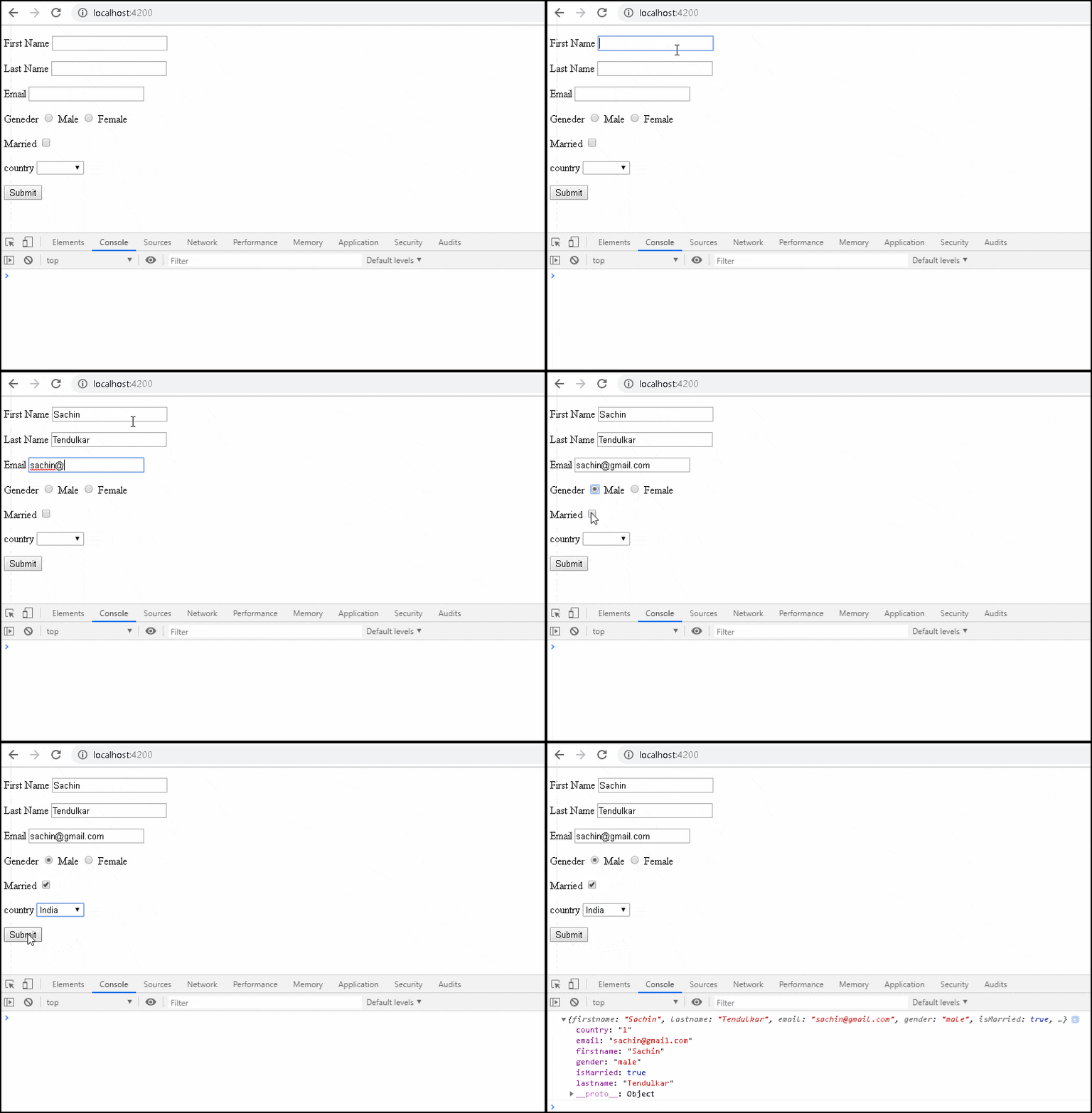
We can assign the ngForm,FormControl or FormGroup instance to a template local variable. This allows us to check the status of the form like whether the form is valid, submitted, and value of the form elements, etc
We have access to the ngForm instance via the local template variable #contactForm.
<form #contactForm="ngForm" (ngSubmit)="onSubmit(contactForm)">
Now, we can make use of some of the properties & methods to know the status of form. For Example
<p>
  <button type="submit">Submit</button>
</p>

<pre>Value : {{contactForm.value | json }} </pre>
<pre>Valid : {{contactForm.valid}} </pre>
<pre>Touched : {{contactForm.touched  }} </pre>
<pre>Submitted : {{contactForm.submitted  }} </pre>
value:
The value property returns the object containing the value of every FormControl
valid:
Returns true if the form is Valid else returns false.
touched:
True if the user has entered
submitted:
Returns true if the form is submitted. else false.
The FormGroup is a collection of FormControl. It can also contain other FormGroup's.
The ngForm directive creates the top Level FormGroup behind the scene, when we use the <Form> directive.
<form #contactForm="ngForm" (ngSubmit)="onSubmit(contactForm)">
We can add new FormGroup using the ngModelGroup directive. Let us add street, city & Pincode form controls and group them under the address FormGroup
All you need to do is to enclose the fields inside a div element with ngModelGroup directive applied on it as shown below
<div ngModelGroup="address">

    <p>
      <label for="city">City</label>
      <input type="text" name="city" ngModel>
    </p>

    <p>
      <label for="street">Street</label>
      <input type="text" name="street" ngModel>
    </p>
    <p>
      <label for="pincode">Pin Code</label>
      <input type="text" name="pincode" ngModel>
    </p>

</div>
Run the App and submit. The resultant object is as shown below.
Value : {
  "firstname": "Sachin",
  "lastname": "Tendulkar",
  "email":"sachin@gmail.com"
  "gender": "male",
  "isMarried": true,
  "country": "1",
  "address": {
    "city": "Mumbai",
    "street": "Fashin Street",
    "pincode": "400600"
  }
}
The form is usually pre-filled with some default data. In the case of editing, we have to show the user the current data. You can refer to the next tutorial on How to set value in the template-driven form.
Validating the form is another important task. We have covered it in Validation in template-driven form tutorial.
Angular Template-driven Forms is simpler compared to the reactive forms. The FormsModule is imported first. Then we create the HTML form. The Angular detects the <form> tag and converts the form to the Angular Form.ngModel directive added to each form element, which converts them to FormControl. Finally, submit event is subscribed via event binding.
Validating and displaying error messages are equally important. We have covered it in a separate tutorial. The following is the list of tutorials on Angular forms
