In this tutorial, we will look at how Angular dependency injection works. The Angular creates a hierarchical dependency injection system. It creates a hierarchical tree of Injectors. Each Injector gets their own copy of Angular Providers. Together these two form the core of the Angular dependency injection framework. We will learn how Angular creates the injector tree.How injector resolves the dependency.
The Angular creates an Injector instance for every Component , Directive, etc it loads. It also creates an injector instance for theRoot Module and for every lazy loaded module. But eagerly loaded modules do not get their own injector but share the injector of the Root Module.
Angular Creates not one but two injector trees. Module Injector tree & Element Injector tree.
Module Injector tree is for Modules (@NgModule). For Root Module & for every Lazy Loaded Module.
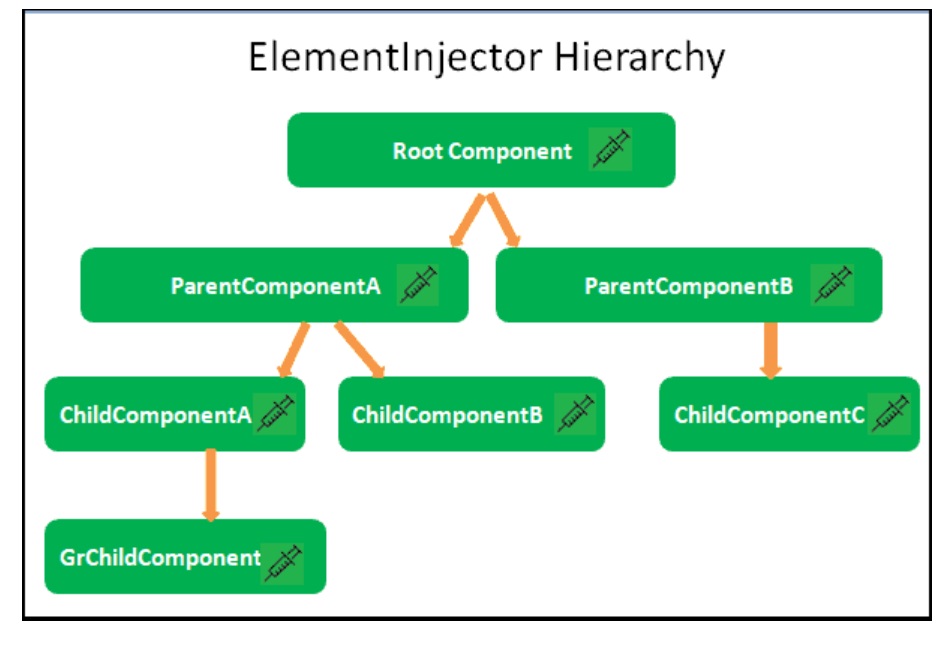
Element Injector tree is for DOM Elements like Components & Directives.
Angular creates the ModuleInjector for the services to be provided at Module Levels.
We register the Module level services in two ways
Angular Creates the Module Injector tree when the Application starts.
At the top of the Module Injector tree , Angular creates an instance of Null Injector. The Null Injector always throws an error unless we decorate the dependency with the Optional decorator.
Under Null Injector Angular creates an instance of PlatformInjector. Platform Injector usually includes built-in providers like DomSanitize etc.
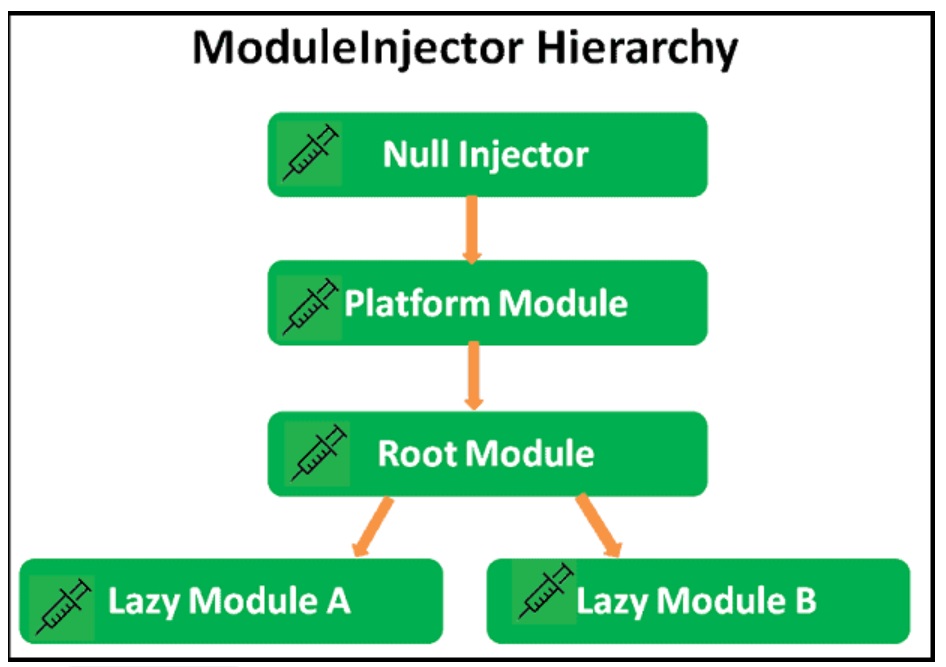
Under the Platform Injector, Angular creates the Injector for the Root Module. It is configured with the providers from the following locations.
Under Root Module Injector, Angular creates an Injector instance for every Lazy loaded Module. Angular creates them only when it loads them. They are configured with the providers from the following locations.
Angular creates the Element Injector tree for the services to be provided at the element level like Components & Directives.
Angular creates the Element Injector tree when the application starts.
The Injector instance of the Root Component becomes the root Injector for the Element Injector tree. It gets the Providers from the provider’s property of the Root Component.
The Root Component acts as a parent to every element ( i.e. Component or Directives) we create. Each of those elements can contain child elements creating a tree of elements. The Angular creates an Injector for each of these elements creating a tree of Injectors.
Each Injector gets the list of Providers from the @Directive() or @Component(). If the Providers array is empty, then Angular creates an empty Injector.
The Angular will destroy the Injector when Angular destroys the element.
Angular resolves the dependency in two phases
The components ask for the dependencies in the constructor using the token.
The search starts at the Injector associated with the component in the Element Injector tree. It uses the token to search for dependency in its Providers array. If it finds the provider, Injector checks to see if the instance of the service already exists. If exists then it injects it into the component else it creates a new instance of it. Then it injects it into the component.
Injector passes the request to the parent Injector in the Element Injector Hierarchy if it fails to find the provider. If the provider is found, the request returns the instance of the Provider. If not found then the request continues until the request reaches the topmost injector in the Element Injector tree.
The topmost Injector in the Element Injector tree belongs to the root component. If the dependency is not found, it does not throw the error but returns back.
Now, the search shifts to Module Injector Tree
Search starts from the Injector associated with the module to which the element belongs. For the Root Modules & Eagerly loaded Module the search starts from the Root Module Injector. For components from the lazy loaded modules, the resolutions start from the Module Injector associated with Lazy Loaded Module.
The request continues until the request reaches the topmost injector in the Module Injector tree i.e. Null Injector. The Null Injector does not contain any providers. Its job is to throw No provider for Service error. But if we decorate the dependency with @Optional decorator, then it will return null instead of throwing an error.
The following image shows how Angular Resolves the Dependency for Component in a Root Module.
The component (GrChildComponentA) asking for dependency is in the RootModule. The search starts in the Element Injector hierarchy starting with the Injector associated with the GrChildComponentA. The search moves up the Injector tree to reach the Root Injector, which belongs to the RootComponent. If the service not found, the search shifts to Module Injector Hierarchy starting from Root Module (because GrChildComponentA belongs to Root Module).
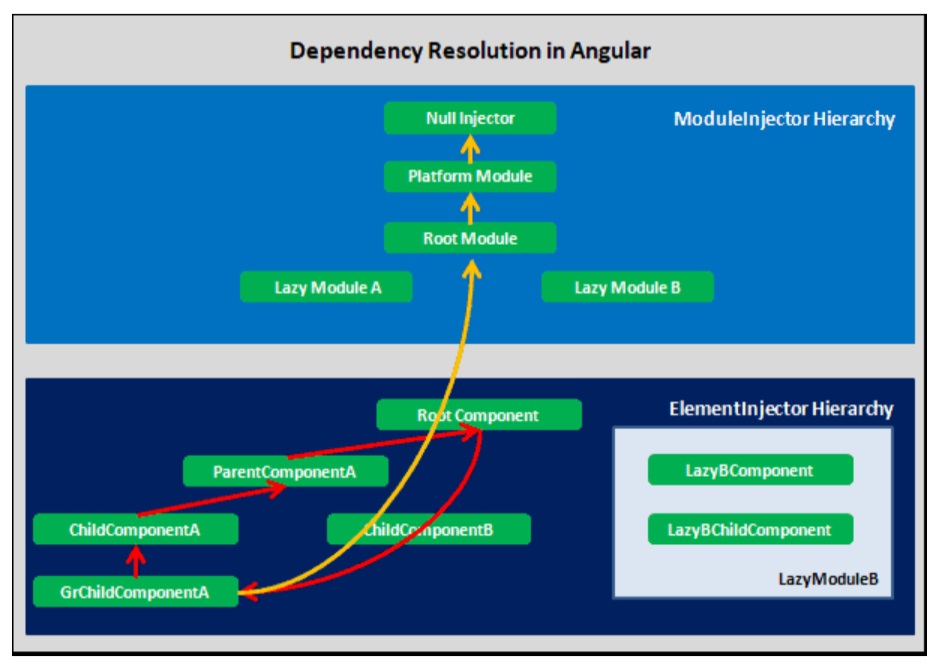
The following image shows how Angular Resolves the Dependency for Component in a Lazy Loaded Module
The component (LazyBChildComponent) asking for dependency is in the LazyModuleB. As you can see, once the Injectors from the Element Injector tree fail to provide the service, the request shifts to Module Injector Hierarchy. The starting point for the search is the Module to which LazyBChildComponent belongs i.e. LazyModuleB.
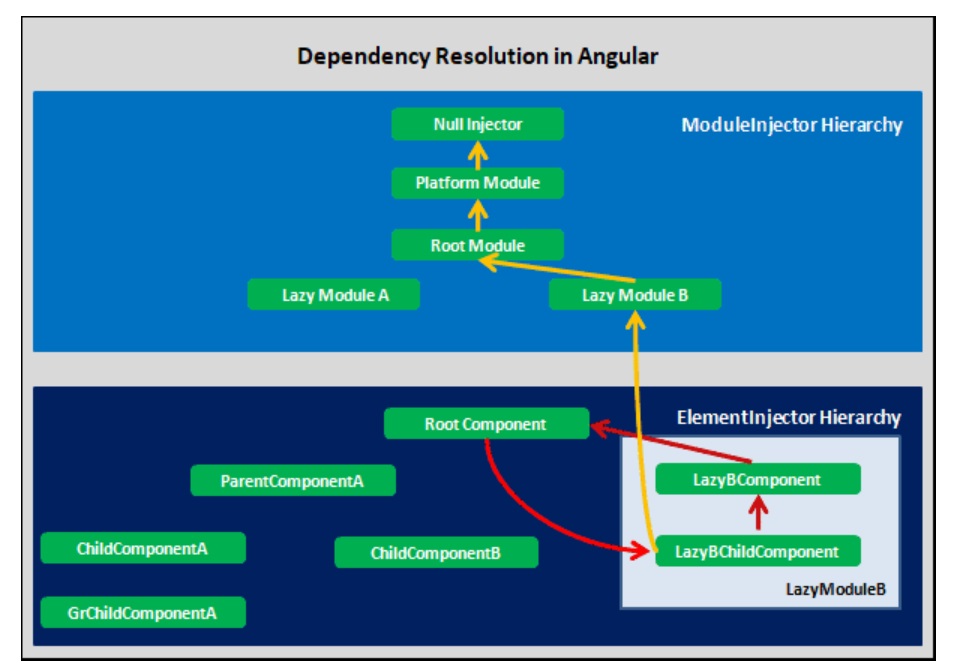

Module Injector Tree is not a parent of Element Injector Tree. Each Element can have the same parent Element Injector Tree, but a different parent in Module Injector Tree
No Injectors from Eager Modules. They share it with the Root Module.
Separate Injector for Lazy Loaded Modules in Module Ejector Tree
If two Eager Modules, provide the service for the same token, the module, which appears last in the imports array wins. For Example in the following imports, providers of Eager2Module overwrites the providers of the Eager1Module for the same token
imports: [BrowserModule, FormsModule, Eager1Module, Eager2Module],
If Eager Module & Root Module provide the service for the same token, then the Root module wins
Any service with providedIn value of root in the lazy loaded module, become part of the Root Module Injector.
To restrict service to the lazy loaded module, remove it from the providedIn and add it in the provider’s array of the Module.
The Services are singletons within the scope of an injector. When the injector gets a request for a particular service for the first time, it creates a new instance of the service. For all the subsequent requests, it will return the already created instance.
The Injectors are destroyed when Angular removes the associated Module or element.
Where you configure your services, will decide the service scope, service lifetime & bundle size.
You can use Resolution Modifiers to modify the behavior of injectors. Refer to the @Self, @SkipSelf & @Optional Decorators & @Host Decorator in Angular
You can download the sample application from Stackblitz
The App has a RootModule,EagerModule & LazyModule.
All the modules have one service each. Each generates a random number. We affix the number with the name of the service so that you will know the service has generated it.
The code from the AppService. Other services are almost identical
app.service.ts
import { Injectable } from '@angular/core';

@Injectable,()
export class AppService {
  sharedValue: string;

  constructor() {
    console.log('Shared Service initialised');
    this.sharedValue = 'App:' + Math.round(Math.random() * 100);
    console.log(this.sharedValue);
  }

  public getSharedValue() {
    return this.sharedValue;
  }
}
All Components inject all services and display the result. We use the @Optional,() decorator. This will ensure that the Injector returns null instead of an error if the dependency not found.
import { Component, Optional } from '@angular/core';
import { AppService } from './app.service';
import { EagerService } from './eager/eager.service';
import { LazyService } from './lazy/lazy.service';

@Component({
  selector: 'parent1-component',
  template: `
    <div class="box">
      <strong>Parent1</strong>
      {{ appValue }}
      {{ eagerValue }}
      {{ lazyValue }}

      <child1-component></child1-component>
      <child2-component></child2-component>

    </div>
  `,
  providers: []
})
export class Parent1Component {
  appValue;
  eagerValue;
  lazyValue;

  constructor(
    @Optional,() private appService: AppService,
    @Optional,() private eagerService: EagerService,
    @Optional,() private lazyService: LazyService
  ) {

    this.appValue = appService?.getSharedValue();
    this.eagerValue = eagerService?.getSharedValue();
    this.lazyValue = lazyService?.getSharedValue();
  }
}
Now, let us play around and see the effect of providing the services at various places.
Use the Providers array to add the AppService, EagerService & LazyService in their respective NgModules(Stackblitz).
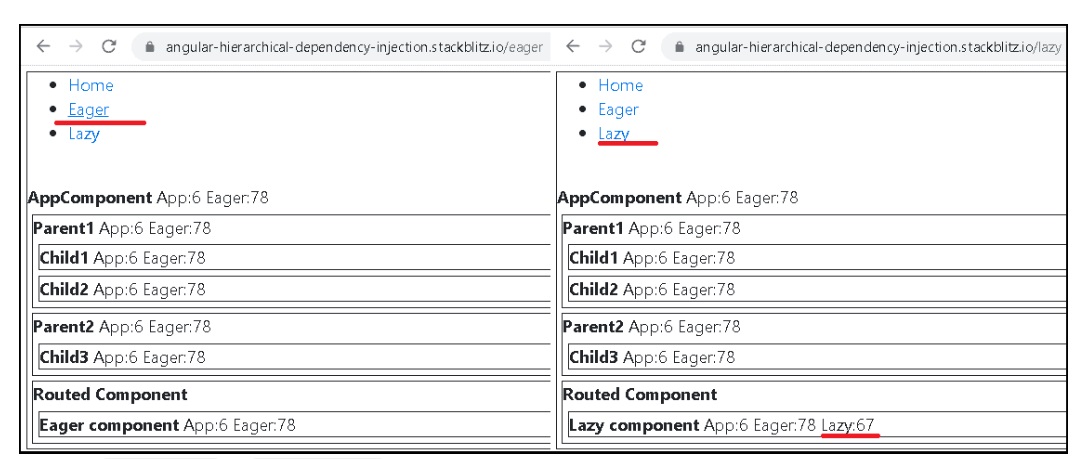
You can try out the following
Both will result in a similar result
ProvidedIn in LazyService
@Injectable({ providedIn: 'root' })
export class LazyService {
Since the LazyService is now available Root Module Injector, it will be available across the application as a singleton (Code).
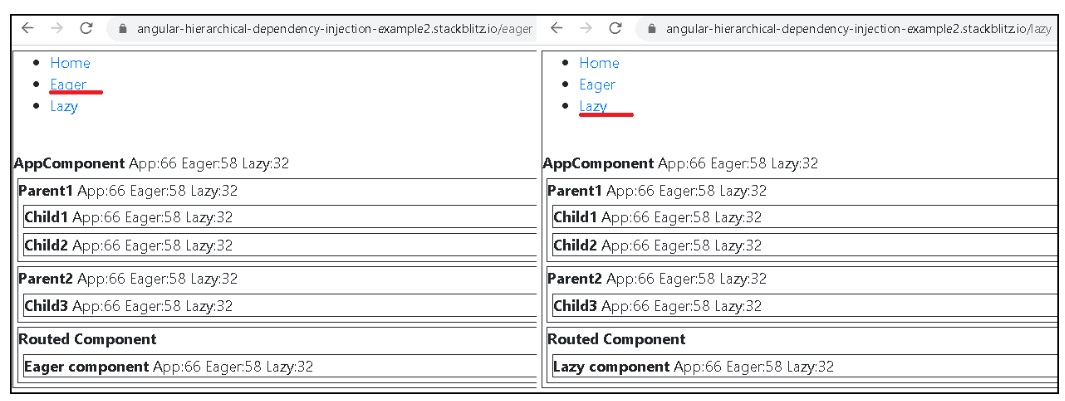
You can try out the following
LazyService.LazyModule.Now LazyService available at two Injectors. In RootModule Injector & in LazyModule Injector. The LazyComponent will use the service from the LazyModule Injector, while the rest of the App uses it from the RootModule Injector. Hence you get two different values
Now LazyService available at three Injectors (code). RootModule Injector, LazyModule Injector & AppComponent Injector. The AppComponent Injector is the root of the Element Injector Tree. All Components are children of the AppComponent. Hence all of them get the same value.
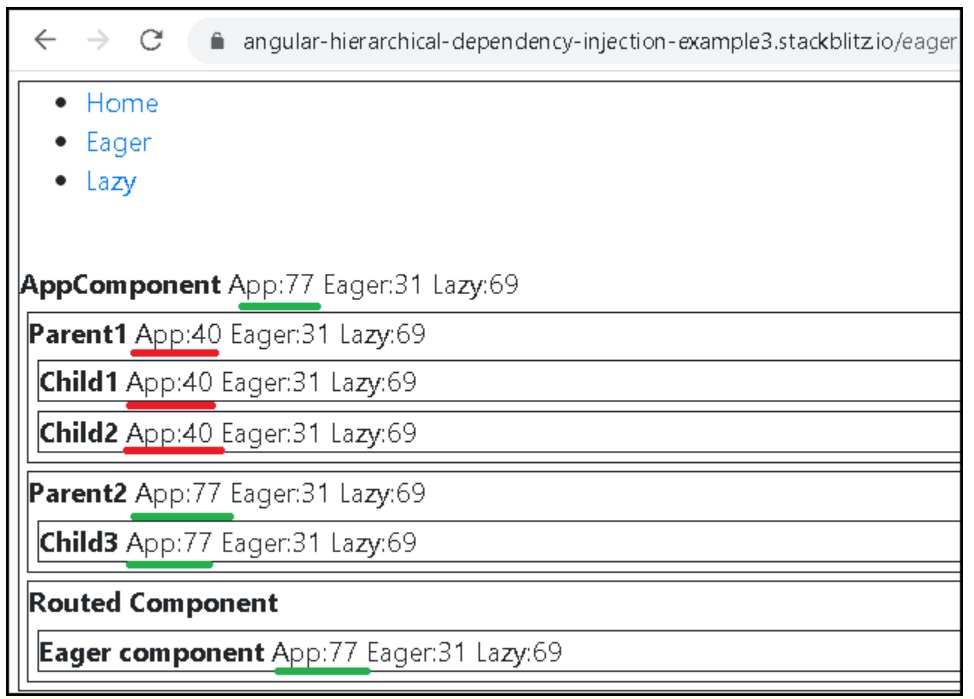
Register the AppService in the Providers array of Parent1Component.
As you can see from the image below, the Parent1Component & all its child components gets their copy of AppService from the Parent1Component while rest of the App gets it from AppModule